A Guide to Low Code Workflow Automation
So, what exactly is low-code workflow automation?
Think of it as building with a high-tech LEGO set. Instead of needing to mold each individual plastic piece from scratch, you get a box full of pre-made, perfectly shaped bricks that you can snap together to create something amazing. This approach lets just about anyone design and automate business processes using visual, drag-and-drop tools, all with very little actual coding involved. It breaks down the old walls that kept automation exclusively in the hands of specialized developers.
The Power of Low Code Workflow Automation Explained

Every business runs on countless small, repetitive tasks that eat up time and energy. We've all been there—manually entering customer info into a CRM, chasing down approvals, or sending the same follow-up emails over and over. These jobs are necessary, but they're a massive drain on efficiency.
In the past, the only way to automate these processes was to kick off a complex, expensive software development project. That meant long timelines and a big investment in a team of programmers.
Low-code workflow automation completely flips that script. It offers a visual canvas where you can map out a process by simply connecting the apps you already use. Instead of writing lines of code to get your email platform to talk to your project management tool, you just drag their icons onto the screen and draw a line to connect them.
Putting Development Tools in Everyone’s Hands
The whole point is to hide all the complicated stuff happening in the background. You don’t need to know what an API is or understand a specific programming language to build a useful workflow. All you need is a solid grasp of the business process you want to improve.
This accessibility has created a new role in the workplace: the "citizen developer." This is someone without a formal tech background—a marketer, a sales manager, an HR coordinator—who can now build custom solutions to solve their team's specific problems.
This shift changes everything:
Incredible Speed: Building what you need can be up to 90% faster than with traditional coding. A project that might have taken months can now be up and running in a few days, sometimes even hours.
Real Agility: Your business can react to changes almost instantly. Workflows can be tweaked and updated on the fly without having to get in line for IT resources.
Team Empowerment: The people on the front lines—the ones who know the problems best—are given the tools to innovate and build solutions that make their own jobs easier and more productive.
The real magic of low-code workflow automation is that it puts the power to build directly into the hands of the people who best understand the problem. It closes the gap between business needs and technical execution.
From Simple Triggers to Complex Orchestration
And this isn't just for automating simple "if this, then that" tasks. Low-code platforms can manage sophisticated, multi-step processes that weave through different departments and software systems.
For instance, imagine a new lead fills out a form on your website. That one action can automatically set off a perfectly coordinated chain of events: the contact is instantly added to your CRM, assigned to the right salesperson, sent a personalized welcome email, and a task is created for a follow-up call in two days.
By getting rid of the friction from manual hand-offs and mind-numbing data entry, low-code automation ensures your processes run smoothly and consistently every single time. It’s not just about saving a few hours here and there; it’s about building a fundamentally more efficient, resilient, and responsive organization.
Understanding What Makes It All Tick

To really get why low-code workflow automation is such a game-changer, you have to look under the hood. It’s not magic; it’s just a clever combination of intuitive design and powerful tech that lets you translate business logic into a real-world process, minus the headaches of traditional coding.
The whole experience is built around a visual drag-and-drop interface. Think of it as your digital whiteboard. Instead of writing lines of code, you’re dragging and dropping pre-made blocks that represent different apps or tasks. You arrange them in a sequence, building what looks more like a flowchart than a complex program.
This visual-first approach is the heart and soul of low-code. It lets you see your entire process laid out, making it incredibly simple to tweak and adjust as things change.
The Building Blocks: Triggers and Actions
Every automated workflow, no matter how complex, boils down to two simple things: triggers and actions. It helps to think of it like a set of digital dominoes. The trigger is the first push, and the actions are all the dominoes that fall in a chain reaction afterward.
A Trigger is the specific event that starts your workflow. It's the "If this happens..." part of the equation.
An Action is the job the system does automatically once that trigger fires. It's the "...then do that" response.
Let's say a new lead fills out the "Contact Us" form on your website—that’s your trigger. A series of actions could immediately follow: the lead’s info gets added to Salesforce, a notification pops up in a specific Slack channel, and a task is created in your project management tool for a sales rep to follow up.
The real beauty of low-code workflow automation is stringing together multiple actions from a single trigger. You're not just automating one task; you're orchestrating an entire business process across different software platforms, all in one go.
This simple "trigger-action" model is the basic language of automation, and low-code platforms make it incredibly easy for anyone to become fluent.
Pre-Built Connectors: Your Digital Translators
The next piece of the puzzle is the library of pre-built connectors, or integrations. Picture trying to manage a project with a team of people who all speak different languages. It would be total chaos, right? Unless, of course, you had a team of expert translators.
That's exactly what connectors are for your software. They are pre-built links that let all your different apps—like Google Drive, Slack, Salesforce, or QuickBooks—talk to each other without you having to write a single line of custom code. When you drag the Slack icon into your workflow, the connector handles all the messy API calls in the background. All you have to do is tell it which channel to post in.
The Rise of The Citizen Developer
This blend of visual tools, simple logic, and plug-and-play connectors has given rise to a new and powerful role in business: the citizen developer. This isn't a coder by trade. It’s the marketing manager, the HR specialist, or the operations coordinator who knows their department's processes inside and out and can now build their own solutions.
The demand for new business applications is exploding, and most IT departments simply can't keep up. That's why by 2026, it's estimated that 75% of new applications will be built using low-code technologies. These tools can speed up development by as much as 90% and cut costs by around 70%. If you want to dig deeper, you can explore more low-code trends and see the full impact for yourself. This isn't just about convenience; it's becoming a strategic necessity.
What Automation Actually Does for Your Business

It's one thing to understand the nuts and bolts of low-code automation, but it’s another to see what it can actually do for you. The real value isn't in the tech itself—it's in how it changes the way you work. For any manager or business leader, this is about getting real, measurable improvements in how things get done.
The promise is straightforward: get more done with less manual grind. By taking over the predictable, rule-based tasks that eat up your team's day, you build a smarter, more resilient operation. These aren't just pie-in-the-sky ideas; they're practical gains you can see in every corner of the business.
A Huge Boost in Operational Efficiency
Think about a marketing team kicking off a new campaign. The old way means bouncing between spreadsheets, manually entering lead info into a CRM, and then sending out follow-up emails one by one. It’s a messy, disconnected process where it's all too easy for things to fall through the cracks.
Now, imagine that same launch with a low-code workflow in place. A new lead fills out a form, and instantly, they're added to the CRM, dropped into a welcome email sequence, and a task pops up for a sales rep. The whole thing is done in seconds, with zero human intervention.
That's what true efficiency looks like. At its core, workflow automation is about automating repetitive tasks so your team can stop doing busywork and start focusing on the creative, strategic stuff that actually grows the business.
Slash Costs and All but Eliminate Errors
Manual work isn't just slow—it's expensive and a magnet for mistakes. Every hour your team spends on manual data entry or chasing down approvals is a direct hit to your payroll. Worse, a single typo can snowball into a major headache, like an incorrect invoice or a botched customer order.
Low-code workflow automation is your built-in quality control. When you take human hands off the repetitive parts of a process, you practically eliminate the chance for error. The workflow runs the same way, perfectly, every single time.
This kind of precision has a direct effect on your bottom line. In fact, some businesses have cut down their development and setup time by as much as 90%. That’s a massive saving, freeing up cash and people to pour back into growing the company.
Make Your Team Happier and More Focused
Nothing kills morale faster than being stuck doing boring, repetitive work. Your team is full of smart people you hired for their problem-solving skills, not their ability to copy and paste. Forcing them to do tasks a machine could handle is a recipe for burnout.
Putting low-code automation in place shows your team you value their brains, not just their hands. Take an HR department, for example, that automates its new-hire onboarding.
Before Automation: They're stuck manually sending offer letters, chasing down paperwork, and trying to coordinate with IT to get laptops ready.
After Automation: A signed offer letter kicks off a workflow. It automatically sends out the welcome packet, assigns training modules, and logs tickets for IT and facilities.
This simple change frees the HR team to focus on what matters: making new hires feel welcome and building a great company culture. When you take the grunt work off people's plates, you don't just get more done—you get a workplace where people can do their best, most meaningful work.
If you want to dig deeper into these ideas, our complete guide to business process automation has a lot more on how these strategies can reshape your operations.
Real-World Examples of Low Code Workflow Automation in Action
It's one thing to talk about low-code automation in theory, but seeing it work in the real world is where the lightbulb really goes on. This isn't just a tool for the IT department; it's something every team across the company can use to fix nagging problems and get more done.
Let's dive into a few concrete examples of how different departments are using these tools to make a real difference.
The process for getting started is often simpler than people think. It usually boils down to three core stages: figuring out what you need, designing the solution, and then launching it.
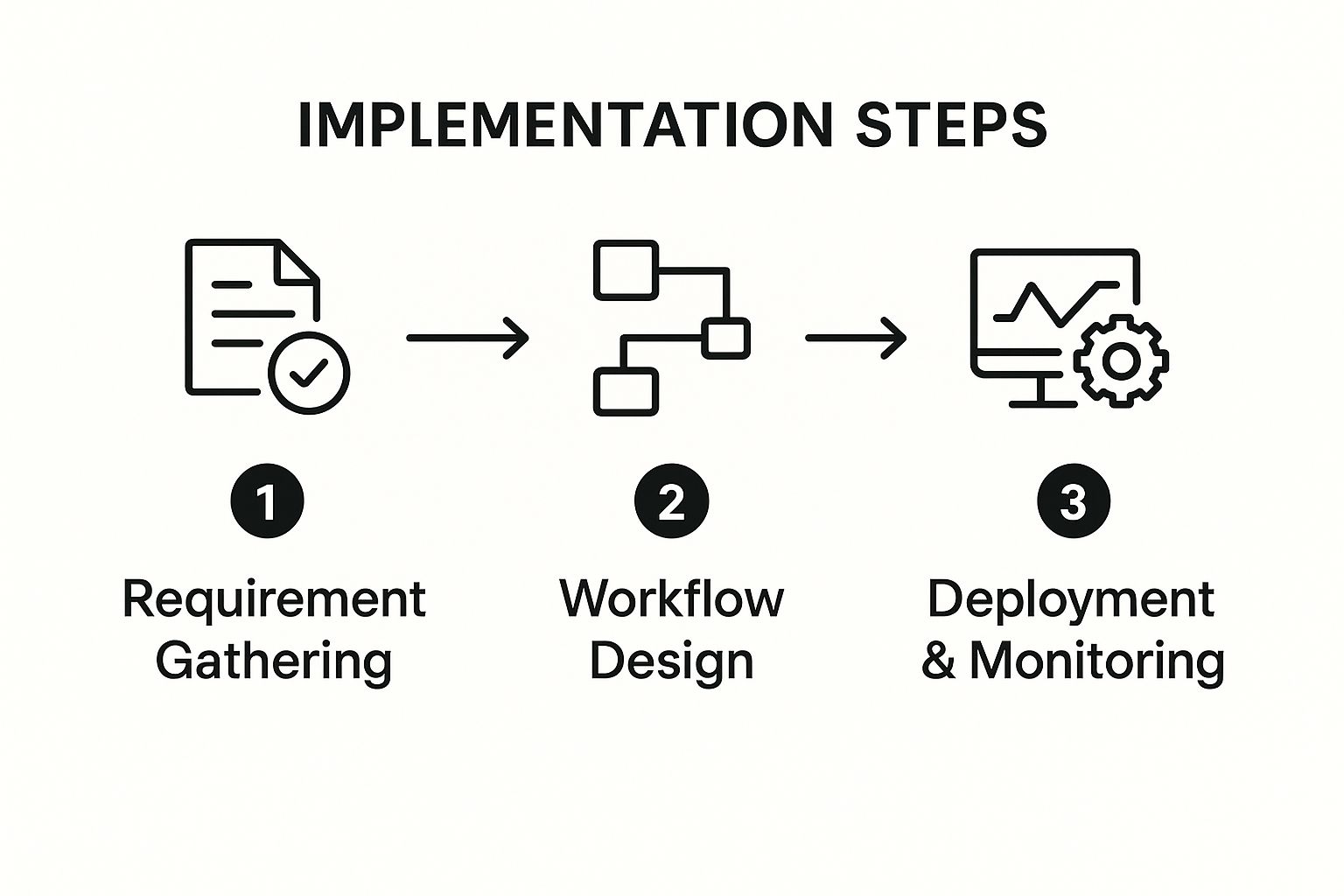
As you can see, a successful rollout starts with clear goals, moves to an intuitive build phase, and finishes with deployment and monitoring. This straightforward approach is what makes it so accessible, even for people who don't write code.
Human Resources: Onboarding and Offboarding
The employee lifecycle is packed with repetitive tasks, making it a goldmine for automation. Just think about everything that goes into welcoming a new team member.
A mid-sized tech company, for example, found its HR team drowning in manual onboarding tasks. They were juggling offer letters, tax forms, IT equipment requests, and training schedules—all tracked with messy checklists and endless email threads.
Here's how they fixed it:
The Automated Solution: They built a workflow that kicks off the second a candidate accepts their offer. The system automatically sends a digital welcome packet, adds the new hire to the HR system, generates tickets for IT and Facilities, and enrolls them in their first week of training.
The Outcome: The results were immediate. They cut the administrative time spent on each new hire by over 75%. Even better, it created a smooth, professional welcome for new employees and freed up the HR team to focus on culture and talent development.
Finance: Invoice Processing and Approvals
Finance departments are often buried under a mountain of paperwork. From invoices to expense reports, every document requires manual data entry, verification, and a multi-step approval process that can bring things to a grinding halt.
An automated workflow can completely transform this.
When you automate rule-based financial tasks, you can dramatically shorten payment cycles, slash the risk of costly data entry errors, and get a much better handle on cash flow. The system becomes a reliable gatekeeper, ensuring every dollar is accounted for.
Take a construction company that was struggling with a painfully slow invoice approval system. Invoices would arrive by email, get printed, and then sit on a manager's desk for days waiting for a signature.
The Automated Solution: They set up a workflow that pulls invoices directly from a dedicated email inbox. It automatically extracts key data—vendor name, invoice number, amount—and routes it to the right project manager for approval with a simple mobile notification.
The Outcome: The average invoice approval time plummeted from eight days to just 24 hours. This eliminated late payment fees and even allowed the company to grab early payment discounts, directly boosting its bottom line. For more ideas, you can check out these powerful workflow automation examples that boost efficiency across other business areas.
Sales and Marketing: Lead Management
For sales and marketing teams, speed is the name of the game. A lead that sits untouched for even an hour can quickly go cold, turning a potential customer into a missed opportunity.
The Problem: A B2B software company was bleeding leads during the manual handoff from marketing to sales. A prospect would fill out a website form, but it could take hours for someone to manually enter that info into the CRM. By then, the lead's interest had often faded.
The Automated Solution: They built a low-code workflow that instantly captures form submissions. The moment a lead comes in, the workflow enriches it with company data, scores it based on their ideal customer profile, and assigns it to the right sales rep in the CRM—all in a matter of seconds.
The Outcome: Lead response time went from hours to under five minutes. That simple change led to a 20% increase in sales-qualified leads and gave their sales team a massive head start on the competition.
These examples are just the tip of the iceberg. To see how this applies across the board, let's look at a few more side-by-side comparisons.
Low Code Automation Across Business Departments
The table below shows common manual processes within different departments and how a simple automated workflow can change the game.
Department | Manual Process Example | Automated Workflow Solution |
|---|---|---|
Operations | Manually creating and assigning work orders based on email requests. | A system where service requests automatically create, assign, and track work orders in a project management tool. |
Customer Support | Agents manually categorizing support tickets and routing them to the right team. | An automated workflow that uses keywords to categorize tickets and assign them to the correct specialist instantly. |
Legal | Drafting standard contracts from templates and emailing them back and forth for review. | A workflow that auto-generates contracts with client data, then routes them through a pre-defined approval chain. |
As you can see, the core idea is the same everywhere: take a predictable, repetitive task and let a system handle it. This frees up smart people to do the work that actually requires their expertise and creativity.
How To Choose The Right Low-Code Automation Platform
With so many low-code automation platforms popping up, picking the right one can feel overwhelming. The market is absolutely booming, which is great because it means there are tons of options, but it also makes the decision that much harder.
Just look at the numbers. The global workflow automation market is expected to rocket from USD 29.9 billion in 2025 to a massive USD 87.7 billion by 2032. You can read more about the workflow automation market's rapid expansion on coherentmarketinsights.com. This explosion has created everything from simple cloud-based tools that cost a few bucks a month to heavyweight enterprise systems.
So, how do you cut through the noise? It’s about looking past the shiny features and focusing on what your business actually needs to get work done better.
Start By Looking Inward: Assess Your Core Requirements
Before you even start window shopping for platforms, you need to do a little homework. The first step is to get crystal clear on what you want to automate. Sit down with your team and map out the specific processes you're targeting.
To get a clear picture, ask yourself some tough questions:
Who is this for? Is this a tool for the IT department, or do you need something simple enough for "citizen developers" in sales, marketing, or HR to use? The answer here will tell you how important a simple drag-and-drop interface really is.
What does it need to connect to? Make a concrete list of the software your business can't live without—your CRM, project management tools, accounting software, you name it. A platform is worthless if it can’t communicate with your existing tech stack.
How complicated are your workflows? Are you looking to build simple, A-to-B automations? Or do you need to create complex, branching workflows with if/then logic and multiple steps? Be honest about what you need today and what you might need a year from now.
A common mistake is choosing a platform based on its potential rather than your reality. Start with a clear understanding of the problems you need to solve today, and then look for a tool that can grow with you tomorrow.
Key Criteria For Evaluating Platforms
Once you've got your requirements checklist, you can start sizing up the contenders. Using a consistent set of criteria helps you make a true apples-to-apples comparison and avoid getting swayed by a slick sales demo.
1. Ease of Use and User Interface (UI)The whole point of low-code is to make automation accessible. The platform's interface should feel natural and intuitive, letting people build and manage workflows without needing weeks of training. If the UI is clunky, you’ve already lost half the battle.
2. The Integration LibraryThe real power of a low-code workflow automation platform is its ability to act as the glue between all your other tools. Dig into its library of pre-built connectors. Make sure it has solid, well-supported integrations for the apps you rely on every day.
3. Scalability and PerformanceAs your business grows, your automation needs will too. Your platform has to keep up. Can it handle a higher volume of workflows and more data without slowing to a crawl? Make sure its architecture can support both simple tasks and enterprise-scale processes down the road.
4. Security and ComplianceWorkflows often touch sensitive customer or company data, so security is absolutely non-negotiable. Look for must-have features like role-based access control (RBAC), detailed audit logs, and compliance with standards like GDPR or HIPAA if they're relevant to your industry.
5. Pricing ModelsThis is where things can get tricky. Some platforms charge per user, others by the number of workflows you run or even by the individual task. Try to model your expected usage to figure out the total cost of ownership. A tool that looks cheap at first glance might get very expensive as you scale. For a deeper look at the strategy behind this, check out our guide to digital process automation.
Finally, don't make the decision in a vacuum. Get your end-users involved. The best way to know if a platform is right for you is to take it for a test drive. Run a pilot project with your top one or two choices on a small, high-impact workflow. There’s no substitute for seeing how it performs in the real world with your actual team.
Here is the rewritten section, designed to sound human-written and natural.
Getting It Right: Best Practices for Low-Code Automation
Picking a great low-code tool is only half the battle. How you roll it out is what truly separates a successful automation initiative from one that fizzles out. A smart strategy is everything—it’s what turns a cool piece of tech into something that delivers real, measurable value.
The secret? Start small. Don't try to boil the ocean by automating an entire department's operations on day one. Instead, look for the quick wins: those high-impact, low-complexity tasks that everyone hates. Think of things like routing expense approvals or copying data between systems.
Nailing these simple projects first does something incredibly important: it builds momentum. When people see a frustrating part of their day disappear in a week, they become your biggest champions. That kind of buy-in makes every future project ten times easier.
Set Up Some Guardrails with Clear Governance
Once you empower your team to start building their own solutions, you need a plan to keep things from going off the rails. Without a clear set of rules, you can accidentally create a new version of "shadow IT"—a tangled web of unmanaged workflows that create security risks and data headaches.
That's where governance policies come in. These aren't meant to stifle creativity, but to guide it. You need to define what citizen developers can build, what data they can touch, and what the approval process looks like before an app goes live.
Think of a good governance model as a safe sandbox. It gives people the freedom to experiment and solve real problems, all while ensuring everything they build is secure and aligned with the company’s goals.
Make It a Team Sport and Offer Real Support
The best automation happens when business experts and IT work together. Your business teams know the processes inside and out—the pain points, the exceptions, the workarounds. Your IT team provides the technical oversight to make sure the solutions are secure, scalable, and don't break anything.
When these two groups collaborate, you get solutions that are both practical and technically sound. But this partnership only works if you give people the support they need to succeed. Don't just hand them a login and wish them luck. You have to invest in them with resources like:
Hands-on workshops to get them comfortable with the platform's basics.
A self-service knowledge base with simple how-to guides and video tutorials.
An internal community forum or chat where users can ask questions and share what they've built.
This kind of environment is more important than ever. With so many powerful tools now in the cloud, it's no surprise that 75% of businesses view workflow automation as a major competitive advantage. You can explore the strategic impact of workflow automation on mordorintelligence.com to dig deeper into the data. Equipping your team properly is how you turn that potential into a reality.
Finally, figure out what success actually looks like. Before you even start, define the metrics you'll use to track the ROI of your low code workflow automation projects. Are you trying to reduce manual errors? Save a certain number of hours per week? Speed up project delivery? Tracking these outcomes proves the value of your work and helps you decide what to automate next.
Frequently Asked Questions
Even after seeing the benefits, it's natural to have a few practical questions before jumping into low-code workflow automation. Let's tackle some of the most common ones so you can move forward with confidence.
Is Low-Code Automation Secure?
This is a big one, and rightly so. Workflows often touch sensitive company and customer data. The good news is that reputable low-code platforms are built from the ground up with security as a top priority—they aren't some insecure shortcut.
Of course, security is a partnership. The platform provider handles the heavy lifting of securing the core infrastructure, but you still need to follow smart practices on your end. This means:
Role-Based Access Control (RBAC): Giving people permissions only for the data and workflows they absolutely need to do their jobs. Nothing more.
Audit Logs: Keeping an eye on who is building, changing, and running workflows using the platform’s built-in tracking features.
Secure Integrations: Making sure any connections to other apps are properly authenticated and managed, not just left wide open.
Think of it this way: a well-managed low-code platform can actually be more secure than old-school manual processes. It replaces scattered spreadsheets and ad-hoc emails with a standardized, trackable system, cutting down on the risks that come with shadow IT.
What Is a Citizen Developer?
You'll hear this term a lot. A "citizen developer" is simply an employee who builds applications and automates processes using low-code tools, even though they aren't a professional programmer.
Imagine the marketing manager who sets up an automated follow-up sequence for new leads, or the finance analyst who builds a simple workflow for approving expense reports. They are the experts on their department's real-world problems. Low-code platforms give them the power to build the solutions themselves instead of waiting in a long queue for the IT department.
This trend is exploding. Some analysts predict that soon, as many as 80% of applications will be built by people outside of traditional IT roles.
Can Low-Code Automate Everything?
Nope, and that's by design. Low-code workflow automation shines when it's applied to structured, rule-based processes—the kind of repetitive and predictable work that eats up so much time. It's fantastic for tasks like data entry, multi-step approvals, sending notifications, and keeping information synced between different software tools.
But it’s not a silver bullet. Processes that demand complex human judgment, genuine creativity, or require building something with truly unique, specialized system logic are better suited for custom code or just leaving them in human hands.
The goal isn't to automate everything. It's to automate the right things so your team can focus on the work that truly matters.
Ready to stop wasting time on manual tasks and start building a more efficient business? The team at Flow Genius specializes in designing and implementing custom automation solutions that fit your exact needs. Visit us at https://www.flowgenius.ai to schedule your free consultation and discover your automation potential.

Comments