top of page

Insights

Short. Precise. Effective.

In today's fast-paced business world, making the right call can be the difference between stagnation and growth. While intuition has its place, relying on it alone is a gamble, especially when managing complex logistics, integrating software ecosystems, or optimizing resource management. The most successful leaders and organizations leverage structured systems to navigate complexity and uncertainty. This guide explores several powerful decision making frameworks designed to bring clarity, objectivity, and strategic foresight to your most critical choices.


These structured methods move you beyond simple pros and cons, offering a systematic way to deconstruct challenges and evaluate potential outcomes. For a broader exploration of different structured approaches, you can delve into this guide on 10 powerful decision making frameworks that offer additional perspectives for making better choices. By incorporating these models, you can minimize bias, manage risk, and ensure your entire team is aligned on a well-reasoned path forward.


From time-tested models like SWOT analysis for strategic planning to agile loops like Build-Measure-Learn for product development, these frameworks provide a versatile toolkit for dissecting problems, evaluating options, and committing to a course of action with confidence. Whether you are a project manager synchronizing logistics, a business owner automating workflows in Zapier or Make.com, or a director planning for market shifts, mastering these approaches is essential. This article will provide a comprehensive breakdown of each framework, including its core principles, ideal use cases, and actionable steps for implementation. By the end, you will have a clear understanding of how to transform ambiguity into a decisive path forward, ensuring your choices are not just quick, but also sound, strategic, and aligned with your long-term goals.


1. SWOT Analysis


SWOT Analysis is a foundational strategic planning and decision-making framework used to evaluate a project or business venture. It organizes key factors into four distinct quadrants: Strengths, Weaknesses, Opportunities, and Threats. Strengths and Weaknesses are internal factors that you can control, while Opportunities and Threats are external factors beyond your direct influence.


This matrix-based approach provides a comprehensive, at-a-glance overview of the internal and external landscape affecting your decision. By systematically mapping these elements, you gain clarity on strategic advantages to leverage and potential pitfalls to mitigate, making it one of the most versatile decision making frameworks available.



How It Works & When to Use It


The primary goal is to match your internal strengths with external opportunities while converting weaknesses or defending against threats. For instance, Netflix used a SWOT analysis to transition from DVDs to streaming. They identified their strong brand (Strength) and the rise of high-speed internet (Opportunity) to pivot, while recognizing their dependence on physical mail (Weakness) and emerging digital competitors (Threats).


Use SWOT when you need to:


  • Evaluate a new business idea or project: Assess the viability and potential risks of a new venture, such as a roofing contractor considering expansion into a new city.

  • Formulate strategic plans: Determine where to focus resources for maximum impact, like a technology company deciding which product feature to develop next.

  • Assess a changing environment: Understand the implications of market shifts, like a university adapting to the threat of declining enrollment by creating online learning opportunities.


Actionable Implementation Tips


To get the most out of your SWOT analysis, move beyond simple brainstorming.


  • Be Specific and Factual: Instead of listing "good marketing" as a strength, specify "a highly engaged email list of 50,000 subscribers with a 35% open rate."

  • Involve Diverse Stakeholders: Include team members from different departments (sales, operations, marketing) to gain a 360-degree perspective and avoid blind spots.

  • Prioritize with Weighting: Assign a score (e.g., 1-10) for both the importance and magnitude of each item. This helps you focus on what truly matters rather than treating every point as equal.

  • Develop Action Items: Your analysis is a starting point. Match Strengths to Opportunities to create "attack" strategies and match Weaknesses to Threats to formulate "defensive" strategies.


2. Cost-Benefit Analysis (CBA)


Cost-Benefit Analysis (CBA) is a systematic and quantitative approach to decision-making. It involves summing the total expected benefits of an action and subtracting the total expected costs. By expressing both sides of the equation in monetary terms, CBA provides a clear, data-driven basis for determining if a potential decision is financially sound.


This framework moves beyond intuition by assigning a tangible value to both the positive and negative consequences of a choice. The core principle is simple: if the total benefits outweigh the total costs, the project is worth pursuing. This makes CBA one of the most powerful decision making frameworks for evaluating investments and comparing multiple, competing alternatives on a like-for-like basis.


How It Works & When to Use It


The primary goal of a CBA is to produce a net benefit value, enabling objective comparisons. For example, a city government considering a new subway line would quantify costs like construction, land acquisition, and maintenance, and weigh them against benefits like reduced traffic congestion, lower pollution levels, and increased property values. To conduct a thorough Cost-Benefit Analysis, it is essential to understand key metrics like Return on Investment (ROI).


Use CBA when you need to:


  • Justify major capital expenditures: Decide if a corporate investment in a new IT system or manufacturing plant is financially viable.

  • Evaluate public policy or projects: Assess government infrastructure projects or environmental regulations where a clear social and economic rationale is required.

  • Choose between competing options: Select the most financially advantageous project when resources are limited, such as a company deciding which of three potential software tools to purchase.


Actionable Implementation Tips


A robust CBA requires meticulous attention to detail and a comprehensive view of all impacts.


  • Quantify Everything Possible: Go beyond direct costs. Include indirect and intangible factors by assigning them a monetary value. For instance, the "cost" of poor employee morale could be monetized as increased turnover and recruitment expenses.

  • Apply a Discount Rate: Future costs and benefits are worth less than present ones. Use a discount rate to calculate the present value of all future cash flows, ensuring a more accurate comparison.

  • Use Sensitivity Analysis: Your analysis is built on assumptions. Test these assumptions by running the numbers with different variables (e.g., higher costs, lower benefits) to see how sensitive your conclusion is to change.

  • Document Assumptions Clearly: Be transparent about how you arrived at your figures, which intangibles were included, and what discount rate was used. This builds credibility and allows for informed debate. Learn more about how to improve your business efficiency with these kinds of frameworks.


3. Decision Matrix Analysis (Weighted Scoring)


Decision Matrix Analysis is a quantitative framework for evaluating multiple options against a set of predefined criteria. It brings structure and objectivity to complex choices by assigning numerical scores to alternatives based on how well they meet the criteria, which are weighted according to their importance.


This method transforms a subjective decision into a more logical process. By calculating a total weighted score for each option, you can systematically identify the most suitable choice, making it an indispensable tool among decision making frameworks for choices with multiple competing variables.


How It Works & When to Use It


The core principle is to break down a decision into its key components, score each option against those components, and then tally the scores for a clear winner. For example, a company selecting new CRM software would list criteria like "Cost," "Ease of Use," and "Integration Capabilities." They would assign a weight to each (e.g., Integration is most important), score each vendor's software against the criteria, and calculate the total weighted score to find the best fit.


Use a Decision Matrix when you need to:


  • Select a vendor or supplier: Compare multiple proposals objectively for a major purchase, such as enterprise software or manufacturing equipment.

  • Prioritize projects or features: Decide which initiatives to fund or which product features to develop next based on criteria like potential ROI, resource cost, and strategic alignment.

  • Make hiring or promotion decisions: Evaluate candidates against a consistent set of job-related criteria like experience, technical skills, and cultural fit to reduce bias.


Actionable Implementation Tips


To ensure your Decision Matrix is effective, focus on the setup and execution.


  • Involve Stakeholders in Criteria & Weighting: Collaborate with key team members to define the evaluation criteria and agree on their respective weights. This builds consensus and ensures the model reflects collective priorities.

  • Use a Consistent Scoring Scale: Whether you use a 1-5 or 1-10 scale, apply it uniformly across all criteria to maintain mathematical integrity. Clearly define what each number on the scale represents (e.g., 1 = Poor, 5 = Excellent).

  • Conduct a Sensitivity Analysis: After calculating the initial results, test them by slightly adjusting the weights of the most important criteria. If the winning option remains the same, it confirms a robust decision. If it changes, further discussion is needed.

  • Combine with Qualitative Discussion: The final score is a guide, not a mandate. Use the results to facilitate a final discussion, considering any intangible factors the matrix couldn't capture.


4. Decision Trees


A Decision Tree is a visual, flowchart-like framework that maps out every potential outcome of a decision. It organizes choices, chance events, and their consequences into a tree-like model, with each branch representing a different path. This allows you to quantitatively compare different options by calculating the "expected value" of each path, making it an indispensable tool for navigating uncertainty.


This structured approach transforms complex problems into a clear visual map, making it one of the most powerful quantitative decision making frameworks for strategic planning. It forces you to consider various possibilities and their probabilities, providing a logical basis for your final choice. For more on creating effective visual aids, check out these data visualization best practices.



How It Works & When to Use It


The primary goal of a Decision Tree is to identify the strategy that maximizes the expected value or outcome. For example, a technology company can use a decision tree to decide whether to build a new feature in-house or acquire a smaller company that already has it. The tree would map out costs, probabilities of success, and potential revenue for each path, guiding them to the most profitable choice.


Use Decision Trees when you need to:


  • Make financial investment choices: Evaluate different investment strategies by mapping out potential returns, risks, and market condition probabilities.

  • Plan a product launch: Decide on the optimal timing for a product release by weighing development costs against potential market share gains and competitor actions.

  • Develop emergency response plans: Map out potential disaster scenarios and the most effective sequence of actions for logistics or energy sector operations teams.

  • Formulate complex medical or legal strategies: Systematically chart treatment protocols or litigation paths based on probable outcomes and consequences.


Actionable Implementation Tips


To ensure your Decision Tree is a reliable guide, focus on the quality of your inputs and structure.


  • Start with Major Decisions: Begin by mapping the most critical decision points and branches. You can add more granular detail and secondary choices progressively to avoid overcomplicating the initial structure.

  • Use Data for Probabilities: Instead of guessing, use historical data, market research, or industry benchmarks to assign realistic probabilities to chance events and outcomes.

  • Validate with Domain Experts: Share your tree with stakeholders or subject matter experts. They can help validate the logic, identify missing variables, and refine probability estimates.

  • Perform Sensitivity Analysis: Test how changes in key variables, like market demand or costs, impact the final outcome. This reveals how robust your chosen strategy is under different conditions.


5. Six Thinking Hats


The Six Thinking Hats, developed by Edward de Bono, is a parallel thinking framework designed to improve team decision-making by separating thinking into six distinct modes. Participants metaphorically "wear" different colored hats, each representing a specific perspective: White (facts and data), Red (emotions and intuition), Black (risks and caution), Yellow (optimism and benefits), Green (creativity and new ideas), and Blue (process and control).


This method prevents the common pitfalls of group discussions, such as adversarial debate or premature conclusions. By having everyone focus on the same type of thinking simultaneously, it ensures a comprehensive and collaborative exploration of an issue. This structured approach makes it one of the most effective decision making frameworks for fostering innovation and achieving consensus.


How It Works & When to Use It


The goal is to systematically analyze a problem from all angles without personal bias interfering. For instance, in a product development session at 3M, the team might use the Green Hat to brainstorm new features, switch to the Black Hat to identify potential flaws, and then use the Red Hat to gauge the emotional response to a proposed design. This prevents a "devil's advocate" from shutting down creative ideas prematurely.


Use Six Thinking Hats when you need to:


  • Solve complex problems collaboratively: Facilitate a structured discussion where all viewpoints are heard, such as a leadership team at IBM deciding on a major strategic shift.

  • Foster creative solutions: Encourage out-of-the-box thinking without immediate criticism, ideal for marketing teams brainstorming a new campaign.

  • Overcome analysis paralysis: Guide a team through a decision by systematically covering all necessary perspectives, like a healthcare organization handling a crisis.


Actionable Implementation Tips


To maximize the effectiveness of the Six Thinking Hats framework, move beyond simply assigning colors.


  • Appoint a Facilitator (Blue Hat): Designate one person to manage the process, keep time, and guide the group through the hat sequence. This person wears the Blue Hat throughout the meeting.

  • Use a Planned Sequence: Don't just jump between hats randomly. A common sequence is Blue (define), White (facts), Green (ideas), Yellow (benefits), Black (risks), Red (feelings), and Blue (summary/decision).

  • Enforce Parallel Thinking: When a hat is active, all participants must stick to that mode of thinking. Gently redirect anyone who strays, for instance, by saying, "That's a great point for the Black Hat, let's save it for then."

  • Document Everything: Keep a visible record of the key points generated under each hat. This creates a comprehensive map of the discussion that can be referenced when making the final decision.


6. OODA Loop


The OODA Loop is a high-speed decision-making cycle created by military strategist Colonel John Boyd to gain an advantage in fast-paced, competitive environments. It breaks down the decision process into four stages: Observe, Orient, Decide, and Act. The core principle is to continuously and rapidly cycle through this loop, adapting to new information faster than an opponent or a changing situation.


Unlike more static models, the OODA Loop is a dynamic framework designed for agility and continuous learning. By shortening your decision cycle, you can effectively disrupt your competitor's process, forcing them to react to a situation you have already moved past. This makes it one of the most powerful decision making frameworks for volatile and uncertain conditions where speed is a critical advantage.


How It Works & When to Use It


The goal of the OODA Loop is to "get inside" your opponent's decision cycle. By observing, orienting, deciding, and acting more quickly, you can seize the initiative. For example, in cybersecurity, an incident response team uses this loop: they Observe an anomaly (unusual network traffic), Orient by analyzing its source and potential threat, Decide on a containment strategy (e.g., isolating a server), and Act by executing the plan, immediately observing the results to start the next cycle.


Use the OODA Loop when you need to:


  • Respond to crises or emergencies: An emergency medical team arriving at an accident scene must quickly observe injuries, orient themselves to the situation, decide on treatment priorities, and act.

  • Navigate competitive markets: A startup can outmaneuver a larger, slower competitor by rapidly observing customer feedback, orienting to market needs, deciding on a product pivot, and acting to deploy it.

  • Manage high-stakes, real-time scenarios: Financial traders use this framework to react to market fluctuations, observing price movements and news, orienting their strategy, and deciding to buy or sell in seconds.


Actionable Implementation Tips


To effectively implement the OODA Loop, focus on accelerating each stage of the cycle.


  • Establish Clear Information Channels (Observe): Set up real-time data feeds, monitoring dashboards, and direct customer feedback channels so you get accurate information as quickly as possible.

  • Develop Shared Mental Models (Orient): Train your team to analyze situations using a common framework. This shared understanding of goals and context allows for faster and more coherent orientation.

  • Empower Decentralized Decisions (Decide): Grant autonomy to frontline team members to make decisions without waiting for layers of approval. This drastically shortens the Decide phase.

  • Create Tight Feedback Loops (Act): After acting, ensure a process is in place to immediately gather data on the outcome. This data feeds directly back into the Observe stage of the next loop, fueling continuous improvement.


7. Cynefin Framework


The Cynefin Framework, developed by Dave Snowden, is a sense-making tool that helps leaders categorize problems into one of five domains to guide their response. It moves beyond a one-size-fits-all approach, recognizing that different situations require fundamentally different decision-making strategies. The domains are Simple, Complicated, Complex, Chaotic, and Disorder (a state of confusion about which domain applies).


This framework is not about placing situations into rigid boxes but about understanding the nature of the cause-and-effect relationships at play. By correctly identifying the context, leaders can avoid applying simple solutions to complex problems or over-analyzing a crisis that demands immediate action. It’s one of the most sophisticated decision making frameworks for navigating uncertainty.


The infographic below illustrates the distinct action patterns required for the three most common operational domains: Simple, Complicated, and Complex.
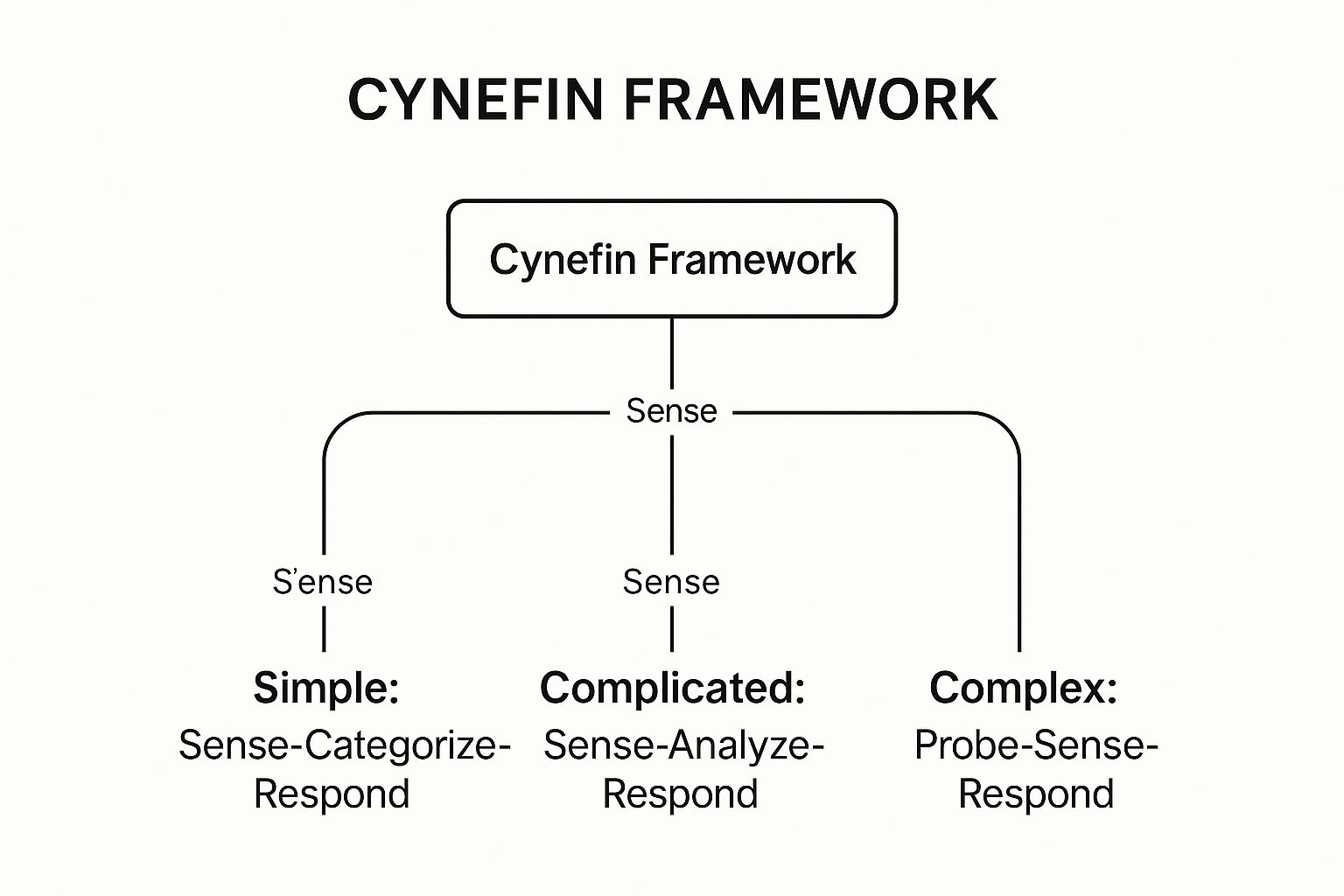


This visualization highlights how the appropriate response shifts from applying best practices in Simple domains to experimenting and adapting in Complex ones.


How It Works & When to Use It


The core idea is to first "sense" the environment to determine which domain you are in, and then act accordingly. For instance, a manufacturing plant optimizing a known production line operates in the Complicated domain: there are knowable unknowns, and experts can analyze the situation to find the right answer. In contrast, managing a public health response during a novel pandemic falls into the Complex domain, where cause and effect are only clear in hindsight, requiring leaders to probe, sense, and respond with emergent strategies.


Use the Cynefin Framework when you need to:


  • Lead in uncertain conditions: Differentiate between complicated but solvable problems and truly complex, unpredictable challenges.

  • Manage organizational change: Understand why imposing a "best practice" (Simple) solution on a cultural issue (Complex) is likely to fail.

  • Develop robust strategies: Create plans that are adaptable enough to handle shifts between domains, such as a crisis (Chaotic) stabilizing into a solvable problem (Complicated).


Actionable Implementation Tips


To apply the Cynefin Framework effectively, focus on situational awareness and adaptability.


  • Sense First, Act Second: Resist the urge to immediately jump to a solution. First, gather information and perspectives to accurately diagnose which domain your problem resides in.

  • Use Diverse Perspectives: When classifying a situation, involve people with different roles and expertise. A problem that seems Complicated to an engineer may appear Complex to a marketer.

  • Develop Domain-Appropriate Capabilities: Build teams skilled in analysis for Complicated issues, experimentation for Complex challenges, and decisive action for Chaotic events. This aligns with many process improvement methodologies.

  • Be Prepared to Shift: Contexts are dynamic. A Complex market innovation can become a Complicated industry standard over time. Regularly re-evaluate your position on the framework and be ready to change your approach.


8. Kepner-Tregoe Decision Analysis


Kepner-Tregoe Decision Analysis is a structured methodology for gathering, organizing, and evaluating information to make a logical choice. Developed by Charles Kepner and Benjamin Tregoe, this framework deconstructs complex decisions into rational components: defining objectives, weighing them by importance, generating alternatives, and assessing risks. Its strength lies in its systematic, step-by-step process that minimizes emotional bias and ensures all critical factors are considered.


This model forces a clear separation between the "what" (the desired outcomes) and the "how" (the potential solutions). By focusing first on objectives, teams create a clear, agreed-upon standard against which all alternatives are measured, making it one of the most rigorous decision making frameworks for high-stakes situations where a defendable, transparent choice is crucial.


How It Works & When to Use It


The core of the Kepner-Tregoe method involves classifying objectives into two categories: Musts (mandatory, non-negotiable criteria) and Wants (desirable but not essential criteria). Alternatives that fail to meet a "Must" are immediately eliminated. The remaining options are then scored against the "Wants" to identify the best overall fit, followed by a final risk assessment. For example, when selecting a new CRM platform, a "Must" might be "integrates with our existing accounting software," while a "Want" could be "has a mobile app."


Use Kepner-Tregoe when you need to:


  • Make major capital investment decisions: Systematically compare large equipment purchases or facility upgrades against a clear set of financial and operational objectives.

  • Select critical suppliers or partners: Choose a new logistics provider by evaluating them against non-negotiable delivery times ("Musts") and desirable cost structures ("Wants").

  • Choose a technology platform: Decide on a new software system where functionality, security, and integration requirements are complex and non-negotiable.


Actionable Implementation Tips


To apply this framework effectively, precision is key. A vague process will yield a vague outcome.


  • Clearly Distinguish 'Musts' and 'Wants': This is the most critical step. A "Must" must be measurable and absolute. Ask, "If an option doesn't have this, would we still consider it?" If the answer is yes, it's a "Want."

  • Use Factual Data for Scoring: When evaluating alternatives against "Wants," use concrete data and performance metrics, not just opinions. Instead of "good support," use "24/7 phone support with an average resolution time of under 4 hours."

  • Involve Cross-Functional Stakeholders: Engage representatives from every department affected by the decision (e.g., IT, finance, operations) to define objectives and ensure all critical needs are captured.

  • Conduct a Thorough Risk Assessment: For your top one or two choices, analyze potential negative consequences. What could go wrong with this option? How likely is it, and what would be the impact? This final check protects against unforeseen problems.


9. Scenario Planning


Scenario Planning is a strategic foresight method used to make robust decisions in the face of uncertainty. Instead of trying to predict a single future, this framework helps organizations explore several different plausible futures, or "scenarios." By doing so, decision-makers can develop strategies that are resilient and adaptable, regardless of how events unfold.


Popularized by strategists at Royal Dutch Shell, this approach acknowledges that the future is shaped by complex and unpredictable forces. By creating narratives around different potential outcomes, you can test your plans and identify blind spots. This makes it one of the most powerful decision making frameworks for long-range planning and navigating volatile environments.


How It Works & When to Use It


The core of Scenario Planning involves identifying key driving forces and critical uncertainties that could shape the future. For example, Shell famously used this method in the 1970s to prepare for a potential oil crisis. By envisioning a future where oil-producing nations restricted supply, they developed contingency plans that allowed them to thrive when the 1973 oil shock occurred, while competitors were caught off guard.


Use Scenario Planning when you need to:


  • Navigate high-stakes uncertainty: Prepare for major market shifts, geopolitical risks, or technological disruptions, like a financial firm planning for different economic recession outcomes.

  • Develop long-term corporate strategy: Create flexible 5-10 year plans that can adapt to changing industry landscapes, such as a utility company planning for various climate change and regulatory futures.

  • Test the resilience of a major decision: Evaluate how a significant investment, like building a new factory, would fare under different political, economic, or environmental conditions.


Actionable Implementation Tips


To make Scenario Planning effective, go beyond vague future-gazing and build structured, logical narratives.


  • Develop 3-4 Distinct Scenarios: Avoid simple best-case, worst-case, and base-case thinking. Instead, create stories that are fundamentally different from one another, each based on a plausible combination of driving forces. For example, "Green Revolution" vs. "Fossil Fuel Resurgence."

  • Focus on Key Uncertainties: Identify the two or three most critical, unpredictable factors that will have the biggest impact on your organization (e.g., consumer adoption of AI, future government regulations). These will form the axes of your scenario matrix.

  • Involve Diverse Stakeholders: Bring in experts from different fields, as well as internal team members from various departments, to challenge assumptions and build richer, more imaginative scenarios.

  • Stress-Test Your Strategies: For each scenario, ask: "If this future came to pass, would our current strategy succeed?" Identify which strategies are robust across all or most scenarios and which are brittle. Develop contingency plans for high-risk, high-impact scenarios.


10. Lean Startup Decision Framework (Build-Measure-Learn)


Popularized by Eric Ries, the Lean Startup Decision Framework is an iterative cycle designed for making decisions under conditions of extreme uncertainty. It reframes product development around rapid experimentation and validated learning, moving away from rigid, long-term planning. The core of this framework is a simple feedback loop: Build, Measure, and Learn.


Instead of investing heavily in a final product based on assumptions, you build a Minimum Viable Product (MVP) to test a core hypothesis. You then measure customer behavior and feedback, and finally, learn whether to persevere with the current strategy or pivot. This makes it one of the most agile decision making frameworks for innovation and market validation.



How It Works & When to Use It


The primary goal is to minimize wasted time and resources by learning what customers actually want as quickly as possible. For example, Dropbox famously used this approach by creating a simple video demonstrating their file-syncing concept (the MVP) before writing a single line of code. The overwhelming positive response validated their core idea and guided their decision to build the full product.


Use the Build-Measure-Learn framework when you need to:


  • Launch a new product or service: Test market demand for a novel idea, like how Zappos initially posted photos of shoes from local stores to see if people would buy them online.

  • Enter a new market: Validate if your existing offering resonates with a new customer segment before committing to a full-scale launch.

  • Develop innovative features: Quickly test user interest in a new feature without over-investing in development, similar to how Buffer used a simple landing page to gauge interest.


Actionable Implementation Tips


To effectively use the Build-Measure-Learn cycle, focus on the speed and quality of your learning.


  • Define a Falsifiable Hypothesis: Before you build, state a clear, testable assumption. For example, "We believe that 15% of visitors to our landing page will sign up for early access if we offer a 20% discount."

  • Focus on Actionable Metrics: Avoid vanity metrics like total sign-ups. Instead, track metrics that inform specific decisions, such as conversion rates, user engagement levels, or customer acquisition cost.

  • Be Prepared to Pivot: The goal is learning, not just confirming your initial idea. If the data shows your hypothesis is wrong, be ready to make a significant change (a pivot) to your strategy based on what you've learned.

  • Gather Qualitative Feedback: The "Learn" phase isn't just about numbers. Implementing effective customer feedback strategies is crucial for understanding the "why" behind user behavior.


Decision Making Frameworks Comparison


Decision Framework

Implementation Complexity 🔄

Resource Requirements ⚡

Expected Outcomes 📊

Ideal Use Cases 💡

Key Advantages ⭐

SWOT Analysis

Low - simple matrix setup

Low - minimal data gathering

Broad situational awareness, qualitative insights

Initial strategic planning, group brainstorming

Easy to use, fosters group consensus, cost-effective

Cost-Benefit Analysis (CBA)

Medium - requires quantitative data

Medium to High - data & forecasting

Objective financial evaluation, numeric comparison

Financial investments, policy evaluation

Quantifies costs and benefits, supports stakeholder justification

Decision Matrix Analysis

Medium to High - criteria & weights

Medium - requires scoring inputs

Prioritized alternatives via weighted scores

Vendor selection, project prioritization

Reduces bias, transparent, handles multiple criteria

Decision Trees

High - probability and outcome mapping

High - reliable probability data required

Quantitative risk-based decisions, expected values

Sequential decisions under uncertainty

Visualizes complex decisions, incorporates risk explicitly

Six Thinking Hats

Medium - requires training/facilitation

Low to Medium - group sessions

Comprehensive perspective, structured thinking

Creative brainstorming, conflict reduction

Encourages collaboration, increases creativity

OODA Loop

Medium - rapid iterative process

Medium - organizational discipline

Fast, adaptive decision cycles

Military, emergencies, startups

Promotes speed & adaptability, prevents paralysis

Cynefin Framework

High - requires deep understanding

Medium to High - domain analysis

Context-appropriate decision strategies

Complex environments, leadership decisions

Adaptive to context, handles complexity explicitly

Kepner-Tregoe Decision Analysis

High - multi-phase, structured process

High - training & data intensive

Thorough, risk-aware decisions

Complex investment or supplier selections

Systematic, reduces bias, integrates risk analysis

Scenario Planning

High - multiple future scenarios

High - scenario development effort

Robust strategies accommodating uncertainty

Long-term strategic planning, risk exploration

Prepares for multiple futures, improves adaptability

Lean Startup (Build-Measure-Learn)

Medium - iterative cycles

Medium - MVP development & testing

Rapid validated learning and market fit iteration

Startups, innovation projects

Reduces risk, maximizes learning, cost-effective


Putting Frameworks into Action with Smart Automation


Throughout this guide, we've explored ten powerful decision making frameworks, each offering a unique lens through which to view your most critical challenges. From the strategic foresight of a SWOT Analysis to the rapid, iterative cycles of the OODA Loop, these models provide the structured thinking needed to navigate uncertainty and make choices with confidence. We've seen how a Decision Matrix can bring mathematical clarity to complex options and how the Six Thinking Hats can unlock holistic, creative problem-solving by separating perspectives.


The common thread connecting all these methodologies is the transformation of ambiguity into actionable insight. Instead of relying on gut feelings or incomplete information, these frameworks compel you to gather data, weigh variables, consider consequences, and collaborate effectively. They are not rigid rules but flexible guides designed to elevate your strategic thinking, whether you're an infrastructure project manager coordinating logistics or a technology leader pioneering a new software ecosystem.


From Theory to Execution: The Automation Advantage


Choosing the right framework is a crucial first step, but the true value is realized in its consistent and efficient application. This is where many organizations falter. Manually gathering data for a Cost-Benefit Analysis, collecting diverse feedback for a Six Thinking Hats session, or tracking metrics for a Lean Startup loop can be slow, prone to error, and resource-intensive. These manual bottlenecks often lead to frameworks being used sporadically or abandoned altogether.


This is precisely where intelligent automation becomes a game-changer. Imagine your CRM automatically populating a Decision Matrix with client data and deal values, or a system that triggers a Kepner-Tregoe analysis when a critical operational threshold is breached. Automation bridges the gap between knowing what to do and actually doing it consistently and at scale.


By automating the routine, data-intensive components of these frameworks, you free up your team’s most valuable resource: their cognitive capacity. Instead of spending hours compiling spreadsheets, they can focus on high-level analysis, strategic debate, and creative problem-solving, which is the true purpose of these decision making frameworks.


Creating an Ecosystem for Smarter Decisions


Implementing automation isn't just about speeding up a single task; it's about creating a responsive, data-driven ecosystem that supports better decision-making across your entire organization. For logistics directors, this could mean automated workflows that provide the real-time tracking data needed for Scenario Planning. For business brokers or roofing contractors, it could involve automating outreach and follow-up, then using the resulting data to refine their approach via a Build-Measure-Learn cycle.


Consider the practical applications:


  • Automated Data Feeds for SWOT: Integrate your CRM, financial software, and project management tools to automatically pull real-time data on Strengths (e.g., high-performing sales channels), Weaknesses (e.g., project delays), Opportunities (e.g., emerging market segments), and Threats (e.g., customer churn rates).

  • Streamlined OODA Loops: Create automated dashboards that Observe key metrics, Orient you with contextual data, and trigger alerts for key personnel to Decide and Act, dramatically shortening the loop's cycle time.

  • Enhanced Decision Trees: Use automation to run simulations, feeding historical data into your decision tree models to calculate probabilities and expected outcomes with greater accuracy and speed.


By embedding these processes into your daily operations using tools like Zapier, Make.com, or custom integrations, you transform decision-making from a periodic, high-effort event into a continuous, low-friction habit. This disciplined, system-driven approach ensures that every choice, from the daily operational tweak to the major strategic pivot, is grounded in the best possible logic and information. The ultimate goal is to build an organization that not only makes good decisions but learns and improves with every choice it makes.


Ready to operationalize these frameworks and eliminate manual bottlenecks? Flow Genius specializes in creating custom automation and integration solutions that connect your tools and data, turning sophisticated decision-making models into practical, everyday workflows. Visit Flow Genius to discover how we can help you build a smarter, more responsive business.


In a competitive landscape, trimming expenses is a constant priority. However, true financial resilience isn't about arbitrary budget cuts; it's about strategic cost optimization that enhances efficiency without sacrificing quality or growth potential. Many businesses struggle with generic advice that fails to address the unique complexities of high-value sectors like technology, logistics, and energy. This guide moves beyond the obvious to provide a deep dive into nine powerful, actionable cost reduction strategies designed for immediate and lasting impact.


We will explore how leveraging automation, streamlining complex processes, and utilizing data analytics can create a robust framework for sustainable savings. This is not a theoretical exercise. You will find practical implementation steps for everything from lean manufacturing and strategic supplier management to inventory optimization and workforce planning. Each section is structured to provide clear, actionable insights that you can adapt to your specific operational needs, whether you are an infrastructure project manager, a logistics director, or a technology company leader. For businesses looking for specific actionable strategies, exploring proven ways to reduce software development costs can offer valuable insights into achieving sustainable savings in that critical area.


For organizations looking to transform their operations, consultancies like Flow Genius specialize in identifying efficiency gaps and implementing tailored automation blueprints that deliver immediate improvements in productivity and resource allocation. This guide will equip you with the practical insights needed to not just cut costs, but to build a more agile, profitable, and resilient enterprise for 2025 and beyond. By focusing on these sophisticated cost reduction strategies, you can build a leaner operation that is better prepared for market fluctuations and positioned for long-term growth.


1. Lean Manufacturing


Lean Manufacturing is a systematic approach to minimizing waste within a production system without sacrificing productivity. Originating from the Toyota Production System, this powerful cost reduction strategy focuses on maximizing customer value by eliminating non-value-added activities. The core principle is to produce exactly what is needed, when it is needed, with the minimum amount of materials, equipment, and labor.


This methodology identifies and targets the "Eight Wastes" of production: Defects, Overproduction, Waiting, Non-Utilized Talent, Transportation, Inventory, Motion, and Extra-Processing. By systematically addressing these areas, businesses can significantly streamline their operations, improve quality, and lower operational expenses.


Actionable Implementation Steps


  • Start Small: Begin with a pilot program in a single department or for a specific product line. This allows you to refine your approach and demonstrate success before a full-scale rollout.

  • Engage Frontline Workers: Your employees on the production floor are the experts in their daily tasks. Involve them in identifying sources of waste and brainstorming improvement opportunities.

  • Use Visual Management: Implement tools like Kanban boards or Andon lights to make workflow, progress, and problems visible to everyone. This transparency fosters accountability and enables rapid problem-solving.


Real-World Success Stories


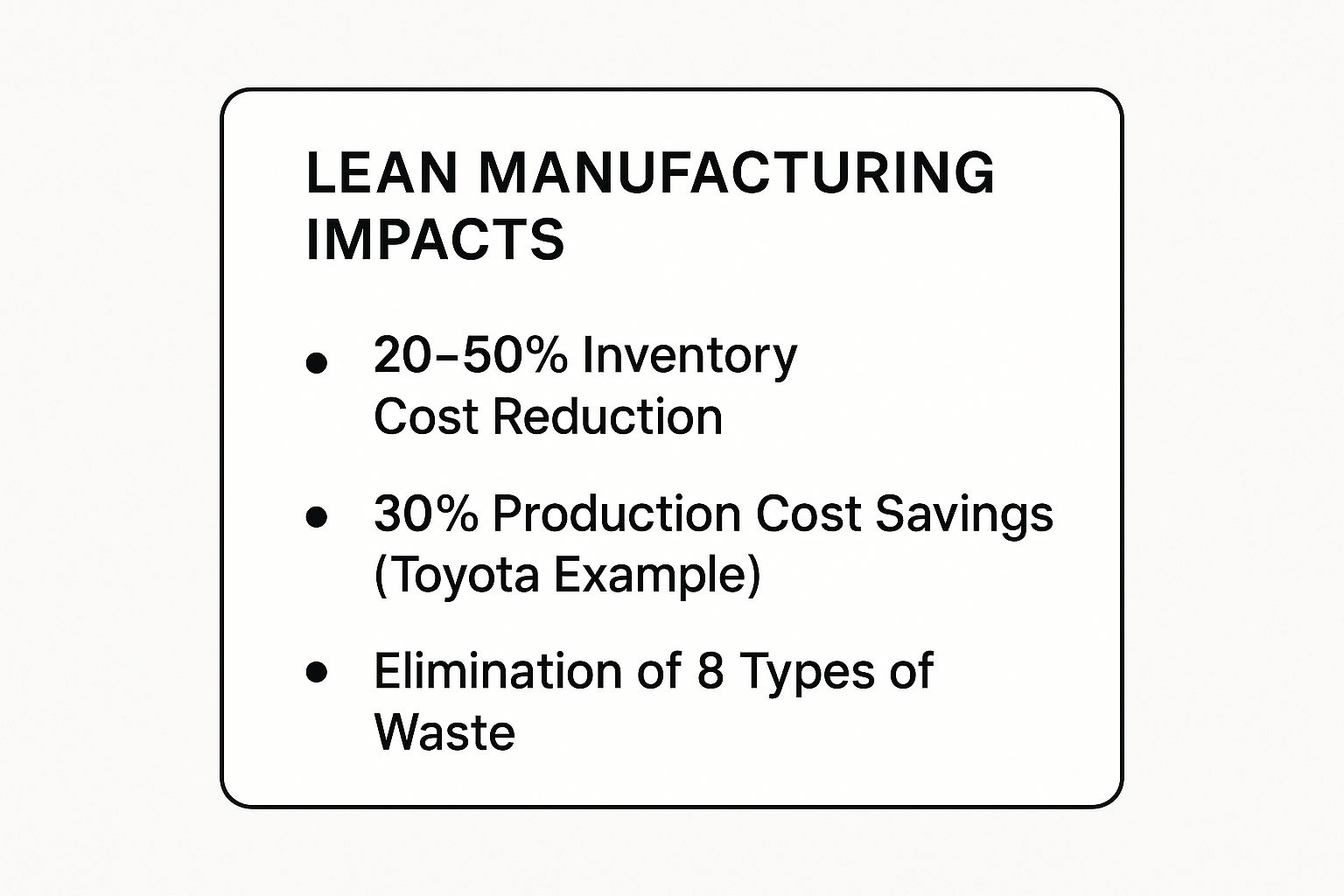
The impact of lean principles is well-documented across industries. Toyota, the pioneer of this system, famously reduced its production costs by 30% and slashed inventory by 75%. Aerospace giant Boeing applied lean manufacturing to cut the production time for its 787 Dreamliner by 50%. These examples highlight how focusing on waste elimination directly translates into substantial financial gains and competitive advantages.


To illustrate the potential impact of this strategy, the following infographic summarizes key results from successful lean implementations.


As the data shows, adopting lean principles can lead to dramatic reductions in both inventory and overall production costs by systematically targeting specific types of operational waste. This makes it one of the most effective cost reduction strategies for any organization involved in production or complex service delivery.


2. Outsourcing Non-Core Activities


Outsourcing Non-Core Activities is a strategic business practice that involves contracting out specific business functions or processes to external, third-party providers. This approach allows a company to focus its internal resources on its primary competencies, those activities that create the most value and competitive differentiation. By delegating tasks like IT support, human resources, accounting, or customer service, businesses can access specialized expertise and advanced technologies without the high cost of in-house development.


This powerful cost reduction strategy works by converting fixed overhead costs into variable costs, providing greater operational flexibility and access to economies of scale. Instead of bearing the full expense of salaries, benefits, and infrastructure for non-essential departments, a company pays a service provider, often at a lower rate due to the provider's specialization and efficiency. This not only reduces direct expenses but also frees up capital for investment in core business growth.


Actionable Implementation Steps


  • Conduct Thorough Due Diligence: Start by meticulously vetting potential vendors. Evaluate their industry reputation, financial stability, technological capabilities, and security protocols to ensure they are a reliable and competent partner.

  • Establish Clear Service Level Agreements (SLAs): Define your expectations in a detailed SLA. This document should clearly outline performance metrics, responsibilities, reporting frequency, and penalties for non-compliance, leaving no room for ambiguity. For non-core tasks that don't require in-house expertise, leveraging virtual assistants can be a highly cost-effective outsourcing strategy.

  • Start with Non-Critical Functions: Test the outsourcing relationship by beginning with a low-risk, non-critical process. This pilot approach allows you to assess the vendor's performance and refine communication and workflows before entrusting them with more vital functions.


Real-World Success Stories


The benefits of strategic outsourcing are demonstrated by some of the world's largest corporations. IBM, a pioneer in business process outsourcing, reportedly saved $4 billion annually by delegating significant portions of its IT infrastructure management. Similarly, Procter & Gamble achieved a 30% reduction in IT costs through a comprehensive outsourcing partnership. Even American Express saw a 25% cost reduction after outsourcing its HR functions. These cases prove that when executed correctly, outsourcing is a formidable tool for achieving substantial financial savings and operational efficiency.


3. Strategic Supplier Management


Strategic Supplier Management is a proactive approach that transforms procurement from a transactional function into a powerful engine for value creation. Instead of focusing solely on the lowest price, this strategy involves building long-term, collaborative partnerships with key suppliers to optimize costs, mitigate risks, and drive innovation. The core idea is that a company’s performance is directly linked to the performance of its supply chain, making supplier relationships a critical competitive asset.


This methodology goes beyond simple vendor negotiation by focusing on mutual growth, performance management, and joint cost-reduction initiatives. By aligning suppliers with your business objectives, you can unlock efficiencies in areas like inventory management, quality control, and product development. This collaborative model creates a resilient supply chain that adapts to market changes and delivers sustained financial benefits.


Actionable Implementation Steps


  • Implement Supplier Scorecards: Develop and use objective scorecards to track key performance indicators (KPIs) such as on-time delivery, quality, and cost competitiveness. This data provides a clear basis for performance discussions and improvement plans.

  • Establish Joint Cost Reduction Targets: Work collaboratively with strategic suppliers to identify waste and inefficiencies in the shared value chain. Set mutual goals for cost reduction and agree on a framework for sharing the resulting savings.

  • Invest in Supplier Development: Provide training, resources, and technical support to help your key suppliers improve their capabilities. A stronger supplier is a more reliable and cost-effective partner. For a deeper look into this area, explore these vendor management best practices.


Real-World Success Stories


The power of strategic supplier management is evident in the success of global industry leaders. Walmart’s renowned vendor partnership program is credited with reducing its procurement costs by billions, enabling its "Everyday Low Prices" strategy. Similarly, Honda’s supplier development initiatives have famously improved component quality by over 50% while simultaneously reducing costs.


Apple’s tight-knit relationships with its component suppliers allow it to optimize production costs while maintaining premium quality standards, a key factor in its high-profit-margin products. These examples demonstrate that treating suppliers as partners is one of the most effective cost reduction strategies for achieving long-term, sustainable savings and a distinct competitive advantage.


4. Automation and Process Digitization


Automation and Process Digitization involves implementing technology to handle manual, repetitive processes, thereby reducing human intervention and boosting operational efficiency. This powerful cost reduction strategy encompasses everything from robotic process automation (RPA) for administrative tasks to sophisticated artificial intelligence for complex data analysis. By digitizing workflows and automating tasks, businesses can eliminate human error, accelerate operations, and free up employees to focus on high-value activities that drive growth.


This approach targets inefficiencies directly at their source. Instead of paying for hours of manual data entry, document processing, or system updates, companies invest in software that performs these tasks instantly and accurately. For example, learning how to automate repetitive tasks to save time is a direct path to boosting productivity and cutting operational expenses, making this one of the most impactful cost reduction strategies available today.


Actionable Implementation Steps


  • Start with Simple, Rule-Based Processes: Begin by identifying high-volume, low-complexity tasks like data entry, invoice processing, or generating standard reports. These quick wins provide a clear ROI and build momentum for more complex projects.

  • Calculate ROI Carefully: When evaluating automation tools, consider the total cost of ownership, including initial setup, licensing, and ongoing maintenance. Compare this against the projected savings in labor costs, error reduction, and increased productivity.

  • Provide Comprehensive Training: Effective change management is crucial. Ensure employees understand how automation will augment their roles, not replace them. Provide thorough training to help them work alongside new digital systems and manage the automated processes.


Real-World Success Stories


The transformative power of automation is evident across major industries. JP Morgan Chase implemented its COIN system, which uses machine learning to analyze legal documents, saving an estimated 360,000 hours of manual work annually. Similarly, Amazon's extensive use of robotics in its fulfillment centers has cut operational costs by over 20% while speeding up delivery times. Shipping giant Maersk's digitization of its container booking and documentation process reduced processing times by an incredible 90%.


These examples demonstrate that strategic automation is not just about incremental improvements; it’s a fundamental shift that creates a leaner, more agile, and highly competitive organization. To explore this topic further, discover the key benefits of business automation in 2025. This makes automation a cornerstone of modern cost reduction strategies.


5. Energy Efficiency and Sustainability Programs


Energy Efficiency and Sustainability Programs are comprehensive initiatives designed to minimize a company's environmental footprint while unlocking substantial financial savings. This approach goes beyond simply turning off lights; it involves a strategic re-evaluation of how resources like energy, water, and raw materials are consumed and managed across all operations. The core principle is that reducing waste and improving resource efficiency directly correlates with lower operational costs and enhanced brand reputation.


These programs encompass a wide range of activities, from conducting detailed energy audits and upgrading to energy-efficient equipment to adopting renewable energy sources and implementing robust waste reduction protocols. By systematically targeting inefficiencies, businesses can achieve significant cost reduction, mitigate risks associated with fluctuating energy prices, and meet growing consumer demand for environmentally responsible practices.


Actionable Implementation Steps


  • Conduct Comprehensive Energy Audits: Start by performing a thorough audit of your facilities to identify the most significant areas of energy consumption and waste. This data provides a clear roadmap for prioritizing high-impact improvements.

  • Implement an Energy Management System (EMS): Use technology to gain real-time visibility into your energy usage. An EMS allows for continuous monitoring, helping you track progress against targets and quickly identify anomalies or new savings opportunities.

  • Leverage Financial Incentives: Research and apply for utility rebates, tax credits, and government grants designed to support energy efficiency upgrades and renewable energy adoption. These incentives can significantly lower the upfront investment costs.

  • Engage Employees: Foster a culture of conservation by launching awareness programs. Educate staff on the importance of sustainability and empower them to contribute ideas for reducing waste in their daily routines.


Real-World Success Stories


The financial benefits of robust sustainability programs are proven across major industries. Retail giant Walmart, for example, reportedly saved over $1 billion annually through its comprehensive energy efficiency initiatives, including upgrading to LED lighting and optimizing its trucking fleet. Similarly, Interface Inc., a pioneer in sustainable manufacturing, reduced its energy intensity per unit of production by 96%, demonstrating that profound environmental goals can align with strong business growth.


These examples showcase how investing in sustainability is not just an ethical choice but also a powerful and effective cost reduction strategy. By systematically reducing consumption and waste, companies can secure long-term financial resilience and build a competitive advantage in an increasingly eco-conscious market.


6. Shared Services Centers


Shared Services Centers (SSCs) are a powerful cost reduction strategy that involves consolidating and centralizing common business functions, such as HR, Finance, and IT, from multiple business units into a single, specialized hub. This approach eliminates redundant roles and systems, standardizes processes, and leverages economies of scale to drive significant operational efficiencies. By centralizing these back-office tasks, businesses can improve service quality, enforce best practices, and free up individual departments to focus on core, value-generating activities.


This model transforms transactional functions into a strategic asset. Instead of each location or division managing its own administrative overhead, the SSC acts as an internal service provider, delivering consistent and high-quality support across the entire organization. This centralization not only reduces direct costs associated with staffing and infrastructure but also enhances control, improves data accuracy, and supports faster decision-making through unified reporting and analytics.


Actionable Implementation Steps


  • Start with Mature Processes: Begin by centralizing functions that are highly transactional and well-defined, such as accounts payable or payroll. These areas offer clear opportunities for standardization and quick wins.

  • Establish Clear Governance: Develop formal Service Level Agreements (SLAs) that define performance metrics, service quality, and responsibilities. A clear governance structure is crucial for managing expectations and ensuring accountability.

  • Invest in Enabling Technology: Implement a robust technology platform, like an Enterprise Resource Planning (ERP) system or specialized service desk software, to automate workflows, manage requests, and enable efficient service delivery.


Real-World Success Stories


The impact of shared services is evident across global enterprises. General Electric famously reduced its finance costs by over $500 million by consolidating its financial operations. Similarly, Procter & Gamble's Global Business Services unit achieved savings of more than $900 million over five years by centralizing its administrative functions. Even in capital-intensive industries, the model proves effective; Shell reduced operational costs by 40% through its shared services network while simultaneously improving service quality.


These cases demonstrate that creating Shared Services Centers is more than a simple consolidation exercise. It is a strategic transformation that, when executed correctly, unlocks substantial financial benefits and operational excellence, making it a cornerstone among effective cost reduction strategies.


7. Inventory Optimization


Inventory Optimization is a data-driven approach to minimize inventory carrying costs while ensuring high service levels. This strategy involves using advanced analytics, demand forecasting, and sophisticated management techniques to strike the perfect balance between the cost of holding inventory and the risk of stockouts. The goal is to have the right amount of stock, in the right place, at the right time, avoiding both expensive overstock and damaging shortages.


By analyzing historical sales data, market trends, and supply chain lead times, businesses can make more accurate predictions about future demand. This allows for a significant reduction in safety stock and prevents capital from being tied up in slow-moving or obsolete products. Effective inventory optimization is a critical component of modern cost reduction strategies, turning a company's supply chain from a cost center into a competitive advantage.


Actionable Implementation Steps


  • Implement ABC Analysis: Categorize your inventory items based on their value. "A" items are high-value, "B" are medium-value, and "C" are low-value. This allows you to focus your management efforts on the items that have the biggest financial impact.

  • Leverage Technology: Utilize statistical forecasting methods and specialized software to improve demand planning accuracy. Modern tools can automate much of this process. Explore options for the best inventory management software for your small business on flowgenius.ai.

  • Establish VMI Programs: Collaborate with key suppliers to create Vendor-Managed Inventory (VMI) programs. In a VMI system, the supplier takes responsibility for maintaining agreed-upon inventory levels at your location, reducing your administrative burden and improving stock availability.


Real-World Success Stories


The power of inventory optimization is evident across various industries. Dell's revolutionary build-to-order model minimized finished goods inventory, allowing it to operate with exceptional capital efficiency. Similarly, Zara’s fast-fashion model relies on tight inventory control and rapid turnover, which helped reduce its inventory levels by 50% compared to industry averages. More recently, Amazon has used predictive analytics to position products in fulfillment centers before they are even ordered, reducing both shipping times and inventory costs by billions. These examples prove that optimizing inventory is a direct path to a leaner, more profitable operation.


8. Workforce Optimization


Workforce Optimization is a strategic approach to managing human capital that aims to align labor resources with business objectives, enhancing productivity while controlling costs. This goes beyond simple scheduling; it involves a holistic view of the entire employee lifecycle, from hiring and training to performance management and retention. The core principle is to have the right people with the right skills in the right roles at the right time.


This powerful cost reduction strategy focuses on maximizing the value of your workforce by improving efficiency, boosting engagement, and reducing labor-related expenses like overtime and turnover. By leveraging data analytics and advanced planning tools, businesses can anticipate staffing needs, identify skill gaps, and deploy employees more effectively. This ensures that every labor dollar spent contributes directly to operational goals and customer satisfaction.


Actionable Implementation Steps


  • Implement Workforce Analytics: Use HR data to identify patterns in productivity, absenteeism, and turnover. These insights will reveal key opportunities for improvement and help forecast future staffing requirements.

  • Develop Flexible Staffing Models: Move beyond traditional fixed schedules. Implement flexible work arrangements, cross-training programs, and on-demand staffing to match labor capacity precisely with fluctuating business demand.

  • Invest in Skills Development: A well-trained workforce is a productive one. Create targeted training and upskilling programs to close skill gaps, improve performance, and prepare employees for future roles, reducing the need for costly external hires.


Real-World Success Stories


The benefits of workforce optimization are evident across various industries. UPS famously saved an estimated $600 million annually by using route optimization technology, a key component of workforce management that maximizes driver efficiency. Similarly, Accenture improved its talent utilization by 25% after adopting a skills-based model, ensuring its consultants were deployed on projects that best matched their expertise. Even Starbucks enhanced its labor efficiency by 20% through a cross-training program that allowed for more flexible staff deployment during peak hours.


These examples demonstrate that strategic workforce management is not just about cutting headcount; it's about making your team more effective and engaged. By focusing on efficiency and skill alignment, organizations can achieve significant cost savings while simultaneously improving service quality and employee morale, making it a crucial component of any modern cost reduction strategy.


9. Value Engineering and Design-to-Cost


Value Engineering and Design-to-Cost is a systematic, function-oriented methodology for reducing expenses by analyzing the components and processes of a product or service. This powerful cost reduction strategy aims to eliminate unnecessary costs while maintaining or even enhancing functionality and quality. It scrutinizes every element of design and production to ensure it delivers maximum value at the lowest possible lifecycle cost.


This approach challenges the assumption that existing designs are optimal, forcing a re-evaluation of materials, processes, and features from a purely functional perspective. By integrating cost as a primary design parameter from the outset (Design-to-Cost), organizations can prevent over-engineering and embed efficiency directly into the product's DNA, moving beyond simple cost-cutting to intelligent value optimization.


Actionable Implementation Steps


  • Form Cross-Functional Teams: Assemble a dedicated team that includes members from design, engineering, manufacturing, procurement, and marketing. This diversity of expertise ensures that all aspects of a product's lifecycle are considered during the value analysis.

  • Challenge Every Component: For each part or process step, ask fundamental questions like, "What function does this perform?" and "Can this function be achieved more cost-effectively?" This breaks down complex products into manageable functional units for optimization.

  • Standardize and Simplify: Whenever possible, use standardized components and materials that are readily available and less expensive. Simplifying designs by reducing part counts not only lowers material costs but also streamlines assembly and reduces potential points of failure.


Real-World Success Stories


The impact of value engineering is evident across high-value sectors. Aerospace giant Boeing famously applied these principles to its 787 Dreamliner, successfully reducing manufacturing costs by an estimated 20%. Similarly, Ford's value engineering program was credited with saving the company over $1.25 billion in a single year by optimizing vehicle components.


In the consumer electronics space, Samsung utilized a Design-to-Cost approach to reduce smartphone component costs by as much as 30%, enhancing its competitive edge in a crowded market. These examples demonstrate that by systematically analyzing function and cost, businesses can achieve significant savings without compromising the quality or performance that customers demand, making it a cornerstone of effective cost reduction strategies.


Cost Reduction Strategies Comparison Matrix


Strategy

Implementation Complexity 🔄

Resource Requirements ⚡

Expected Outcomes 📊

Ideal Use Cases 💡

Key Advantages ⭐

Lean Manufacturing

High – cultural change and ongoing commitment

Moderate to High – training and time

Significant cost reduction, improved quality, lead time

Manufacturing and operations seeking waste elimination

Waste elimination, continuous improvement, employee engagement

Outsourcing Non-Core Activities

Moderate – vendor selection and contract management

Variable – depends on scope and partners

Operational cost savings, access to specialized skills

Non-core functions to reduce costs and increase focus

Cost reduction, scalability, access to expertise

Strategic Supplier Management

Moderate to High – relationship and performance mgmt

Moderate – time and collaboration effort

Cost savings, improved quality, supply chain risk reduction

Companies aiming for long-term supplier collaboration

Supplier innovation, cost control, risk management

Automation and Process Digitization

High – technology integration and change management

High – investment in technology and training

Labor cost reduction, accuracy, speed, 24/7 operation

Processes with repetitive/manual tasks requiring efficiency

Cost savings, accuracy, scalability, data-driven insights

Energy Efficiency and Sustainability Programs

Moderate – requires capital investment and expertise

High – upfront costs for upgrades

Utility cost reduction, brand enhancement, long-term savings

Organizations targeting sustainability and cost control

Cost savings, environmental benefits, incentives

Shared Services Centers

High – centralization and change management

Moderate to High – technology and governance

Operational cost reduction, process standardization

Multi-unit businesses consolidating support functions

Cost reduction, standardization, career development

Inventory Optimization

Moderate – advanced analytics and demand planning

Moderate – technology and skilled personnel

Lower inventory costs, improved cash flow and service

Retail, manufacturing, and distribution with inventory challenges

Cost savings, demand visibility, reduced waste

Workforce Optimization

High – planning, training, and performance systems

Moderate – HR technology and training

Labor cost reduction, improved productivity and retention

Organizations managing diverse or flexible workforce

Productivity, flexibility, employee engagement

Value Engineering and Design-to-Cost

High – requires cross-functional collaboration

Moderate – design team time and expertise

Product cost reduction while maintaining quality

Product development focusing on cost and functionality

Cost savings, improved functionality, competitive edge


Turning Strategy into Sustainable Savings


The journey through these nine distinct yet interconnected cost reduction strategies reveals a powerful, unifying theme: sustainable financial health is not achieved through drastic, one-time cuts, but through a systematic and intelligent redesign of how a business operates. From the shop floor efficiencies of Lean Manufacturing to the strategic foresight of Value Engineering, each approach offers a pathway to not only reduce expenses but also to build a more resilient, competitive, and agile organization. We have moved beyond the outdated notion of cost-cutting as a reactive measure and repositioned it as a proactive strategy for long-term value creation. The core principle is clear: efficiency is the new currency, and optimization is the engine of modern business growth.


The strategies detailed in this article, such as Strategic Supplier Management and Workforce Optimization, are not isolated initiatives. Instead, they are components of a larger, integrated system. True transformation occurs when these elements work in concert. Imagine a logistics company that combines Inventory Optimization with advanced Automation and Process Digitization. It doesn't just reduce warehousing costs; it creates a predictive, self-correcting supply chain that anticipates demand, minimizes waste, and enhances customer satisfaction. Similarly, an energy firm implementing robust Energy Efficiency Programs alongside a Shared Services model for its administrative functions can reallocate significant capital towards core innovation and exploration.


The Central Role of Technology and Data


A critical thread weaving through nearly every strategy is the indispensable role of technology, particularly automation and data analytics. In today's digital-first landscape, manual processes are not just inefficient; they are a liability. They introduce human error, create bottlenecks, and obscure valuable operational insights.


  • Automation: Platforms like Zapier, Make.com, and n8n are no longer just tools for tech companies. A roofing contractor can automate lead follow-ups and scheduling, freeing up time for project management. A real estate broker can create sophisticated CRM workflows that nurture client relationships without constant manual input. This is the essence of modern cost reduction: investing in systems that work for you, amplifying your team's capacity and reducing the cost associated with repetitive, low-value tasks.

  • Data-Driven Decisions: The shift from intuition-based to data-driven decision-making is perhaps the most significant competitive advantage a company can secure. Effective cost reduction is impossible without clear, accurate metrics. By analyzing operational data, businesses can pinpoint the precise sources of inefficiency, validate the impact of new initiatives, and forecast future trends with greater accuracy. This is where a data advisory service becomes invaluable, helping to translate raw numbers into a coherent, actionable strategy.


From Theory to Action: Your Next Steps


Reading about these strategies is the first step, but implementation is what separates market leaders from the rest. The path forward requires a deliberate and structured approach. Begin not by trying to implement everything at once, but by identifying the area with the most significant potential for impact within your organization.


  1. Conduct a Diagnostic Audit: Start with a thorough review of your current processes. Where are the most significant bottlenecks? Which activities consume the most manual hours? Where is budget leakage most apparent?

  2. Prioritize an Initiative: Based on your audit, select one or two high-impact cost reduction strategies to pilot. For a commercial cleaning business, this might be automating scheduling and supply management. For a technology company, it could be integrating disparate software systems to create a single source of truth.

  3. Define Clear Metrics for Success: How will you measure the success of your pilot program? Be specific. Aim for goals like "reduce administrative processing time by 30%" or "decrease energy consumption by 15% within six months."

  4. Embrace a Culture of Continuous Improvement: Finally, and most importantly, treat cost optimization as an ongoing discipline, not a one-off project. Foster a culture where employees are empowered to identify inefficiencies and suggest improvements. The most sustainable savings come from the collective, continuous effort of an engaged and efficiency-minded team.


By adopting this mindset, you transform cost reduction from a painful necessity into a strategic advantage, creating a leaner, more innovative, and profoundly more profitable enterprise poised for future success.


Ready to move from strategy to implementation? The experts at Flow Genius specialize in designing and deploying the smart automation and data-driven workflows discussed throughout this article. Let us help you build the efficient, cost-effective operational backbone your business needs to thrive. Discover how Flow Genius can transform your processes today.


Juggling stock levels, purchase orders, and sales channels can quickly overwhelm any growing small business. While spreadsheets might work initially, they often lead to costly errors, stockouts, or overstock situations that stunt your growth. The right inventory management software doesn't just track what you have; it streamlines operations, provides critical data for forecasting, and automates tedious manual tasks. But with dozens of platforms available, how do you choose the perfect fit without endless research?


This guide cuts through the noise. We've compiled an in-depth review of the best inventory management software for small business, analyzing each platform's specific strengths, ideal use cases, and potential limitations. We'll explore solutions perfect for multi-channel e-commerce sellers, brick-and-mortar retailers, and even small manufacturers. For many e-commerce businesses, understanding various fulfillment models, such as the Amazon FBA fulfillment model, is crucial when selecting inventory management software, and we'll touch on integrations that support these workflows.


Our goal is to equip you to make a confident, informed decision that supports your unique needs. Inside, you'll find detailed breakdowns of Zoho Inventory, Cin7 Core, inFlow, Ordoro, Katana, and more, complete with screenshots, direct links, and practical insights. Forget generic marketing copy; this is a comprehensive resource designed to help you find the system that will truly scale with your company. Let's find the tool that moves your business beyond spreadsheets and toward greater efficiency and profitability.


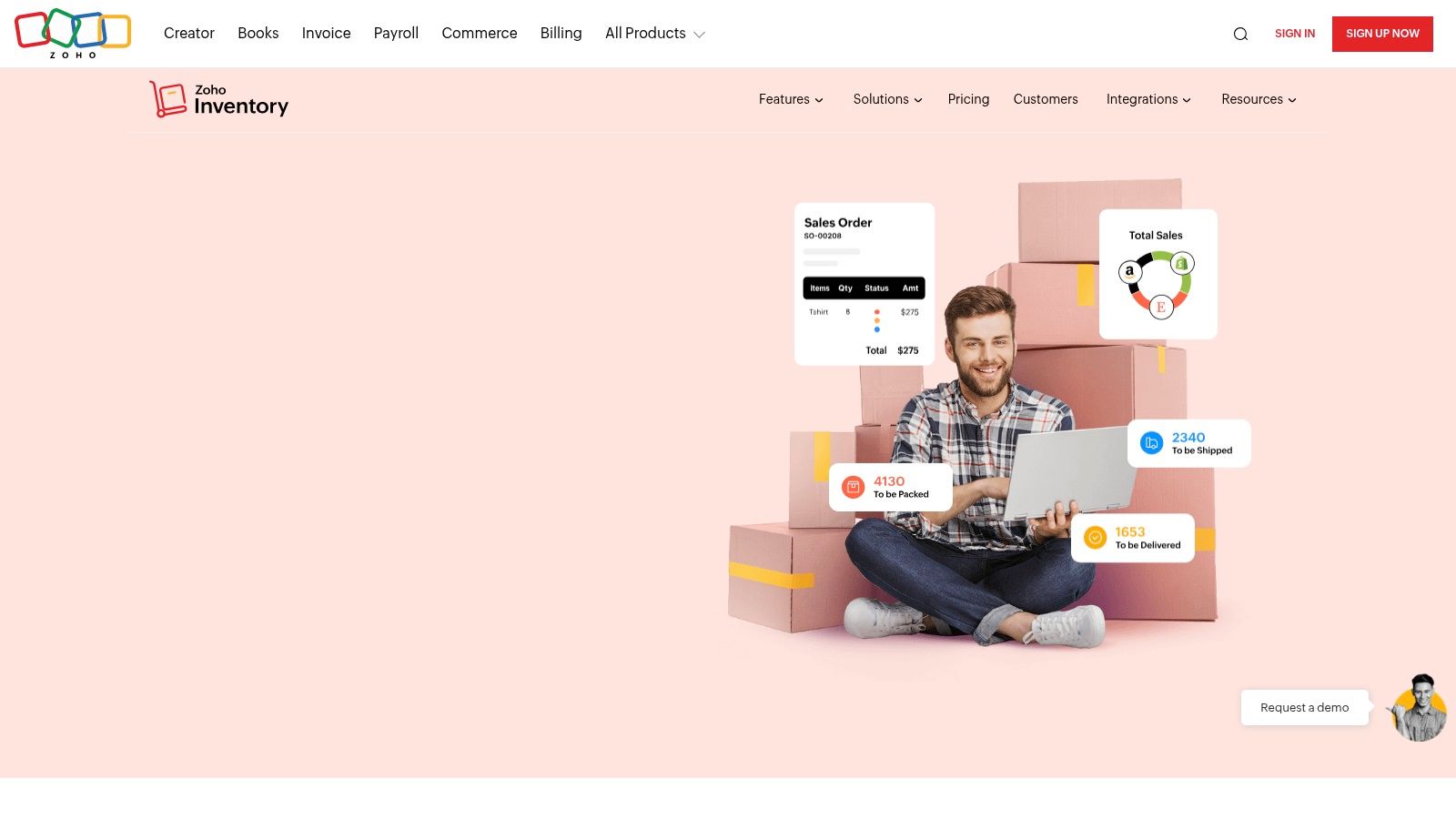
1. Zoho Inventory


Zoho Inventory stands out as some of the best inventory management software for small business owners, particularly for those seeking a powerful, scalable solution with an accessible entry point. It excels in centralizing multichannel sales, allowing you to manage inventory across platforms like Shopify, Amazon, Etsy, and eBay from a single dashboard. This integration prevents stockouts and overselling by providing real-time stock level updates across all channels.


The platform is part of the extensive Zoho ecosystem, which is a major advantage for businesses already using or planning to use other Zoho products like Zoho Books or Zoho CRM. This native integration creates a seamless workflow from lead management to sales, accounting, and fulfillment. You can explore advanced techniques for connecting your systems by learning more about automating inventory management.


Core Features & User Experience


Zoho Inventory's user interface is clean and intuitive, making it relatively easy for new users to get started. Key features are well-organized, and the dashboard provides a clear, at-a-glance overview of your inventory health.


Feature Highlights

Best For

Plan Availability

Multichannel Sync

Businesses selling on multiple ecommerce platforms and marketplaces.

All paid plans

End-to-End Tracking

Companies needing to track items from purchase order to final sale.

All plans

Serial & Batch Tracking

Electronics, food, or pharmaceutical businesses requiring traceability.

Professional, Premium, Elite, Ultimate

Warehouse Management

Businesses with multiple storage locations needing stock transfers.

All paid plans


Pricing and Limitations


Zoho offers a "Free Forever" plan, which is excellent for startups, allowing up to 25 online orders and 25 shipping labels per month. Paid plans scale up, offering higher limits on orders, warehouses, and tracking features. A significant consideration is that advanced features like batch tracking and serial number tracking are reserved for higher-tier plans. While the pricing is transparent, be mindful of order and warehouse limits, as exceeding them will require a plan upgrade.


2. Cin7 Core (formerly DEAR)


Cin7 Core, formerly known as DEAR Systems, is a top-tier choice for scaling businesses that need more than basic stock counting. It offers a powerful, all-in-one platform that handles purchasing, sales, light manufacturing, and warehouse management. This makes it some of the best inventory management software for small business owners planning for significant growth, particularly those expanding into multichannel retail and wholesale operations.


The platform’s strength lies in its extensive integration capabilities, connecting seamlessly with popular ecommerce platforms like Shopify, point-of-sale systems, and third-party logistics (3PL) providers. This deep connectivity ensures that all operational data flows through a central hub, creating a single source of truth for your business. For those new to connecting complex systems, it's helpful to understand what software integration is to maximize the platform's potential.


Core Features & User Experience


Cin7 Core’s interface is comprehensive, which can present a steeper learning curve than simpler tools, but it rewards users with deep functionality. Its dashboard provides detailed operational insights, from sales orders and purchasing to production status.


Feature Highlights

Best For

Plan Availability

B2B & B2C Portals

Wholesalers and direct-to-consumer brands managing different customer types.

All plans

Light Manufacturing (MRP)

Businesses that assemble products, create bundles, or manage bills of materials.

Standard and Advanced plans

Mobile WMS Functionality

Companies needing efficient pick, pack, and ship processes in the warehouse.

All plans

Extensive Integrations

Retailers operating across multiple online stores, POS systems, and 3PLs.

All plans (limits vary)


Pricing and Limitations


Cin7 Core's pricing starts at a higher point than many entry-level solutions, reflecting its advanced feature set. Plans are tiered based on the number of users, integrations, and specific modules like manufacturing. While highly scalable, the initial setup can be complex, and many businesses may benefit from professional onboarding services to configure the system correctly. This makes it less suitable for micro-businesses needing a simple, plug-and-play solution.


3. inFlow Inventory (Cloud)


inFlow Inventory is a strong contender for the best inventory management software for small business owners who need a dedicated, user-friendly system for both inventory and order control. It excels at simplifying complex processes like barcode creation, sales order management, and multi-location tracking, making it ideal for product-based businesses scaling up from spreadsheets. The platform is designed to improve operational efficiency with features like a B2B portal for wholesale customers.


Unlike all-in-one business suites, inFlow focuses purely on inventory and order management, which results in a more streamlined and intuitive user experience. This specialized approach makes it easier for smaller teams to adopt without a steep learning curve. Its mobile app and scanner compatibility further enhance its practicality for managing stock on the go, whether in a warehouse or on a retail floor.


Core Features & User Experience


inFlow's interface is clean and straightforward, with a logical workflow that guides users from purchasing to sales. The dashboard provides clear visibility into stock levels, order status, and business performance metrics, empowering owners to make data-driven decisions.


Feature Highlights

Best For

Plan Availability

Barcode & Labeling

Businesses needing to create and print their own barcodes for products.

All plans

B2B Showroom Portal

Wholesalers or distributors wanting a private portal for B2B customers.

Entrepreneur, Small Business, Mid-Size, Enterprise

Real-Time Multi-Location Sync

Companies with multiple warehouses, retail stores, or storage facilities.

All plans

Built-in Reporting

Owners needing clear insights into sales, costs, and inventory turnover.

All plans


Pricing and Limitations


inFlow offers tiered pricing based on the number of orders per month, users, and locations. A significant point to consider is the mandatory one-time onboarding fee for higher-tier plans, which ensures you are set up correctly but adds to the initial cost. Features like serial number tracking and API access are reserved for more expensive plans, and exceeding monthly order limits can incur extra charges. While the plan structure is clear, businesses should carefully evaluate their projected order volume to select the most cost-effective tier.


4. Ordoro


Ordoro offers a unique, modular approach, making it one of the best inventory management software for small business owners who want to scale their operations incrementally. It’s designed for multichannel ecommerce businesses, allowing you to start with robust shipping features and add comprehensive inventory or dropshipping management as your company grows. This flexibility prevents you from paying for advanced tools before you actually need them.


The platform excels at centralizing multichannel operations, syncing stock levels across storefronts like Shopify, BigCommerce, Amazon, and Walmart to prevent overselling. Its powerful automation rules for kitting and bundling are a standout, simplifying the management of complex product assemblies and ensuring component stock levels are always accurate.


Core Features & User Experience


Ordoro’s interface is straightforward, with separate, well-defined sections for shipping, inventory, and product management. The dashboard provides clear visibility into order status and inventory levels, though the full suite can feel complex initially.


Feature Highlights

Best For

Plan Availability

Modular Platform

Startups needing a powerful shipping solution with the option to add inventory.

All plans (features vary)

Kitting & Bundling

Businesses selling product bundles or kits with complex component needs.

Inventory & Dropship plans

Multichannel Sync

Ecommerce sellers managing multiple online stores and marketplaces.

Inventory & Dropship plans

Open API Access

Tech-savvy businesses needing to build custom integrations or workflows.

Pro and Enterprise plans


Pricing and Limitations


Ordoro’s pricing is transparent and based on monthly order volume, with no long-term contracts. A 15-day free trial is available for all plans. The primary limitation is its pricing model; exceeding your plan’s order limit results in overage fees, which can become costly during high-volume periods. Furthermore, more advanced features like supplier management and purchase order creation are reserved for the higher-tier Pro and Enterprise plans.


5. Katana Cloud Inventory


Katana is a powerful contender for the best inventory management software for small business, especially for businesses that make their own products. It uniquely combines inventory control with manufacturing and production workflows, making it ideal for direct-to-consumer brands, B2B sellers, and light manufacturers. The platform is designed to provide real-time visibility into your entire production cycle, from raw material purchasing to finished goods inventory.


This manufacturing-centric approach sets it apart, allowing you to manage bills of materials (BOMs), production orders, and floor-level operations with ease. Its strong integration capabilities with ecommerce platforms like Shopify and accounting software like QuickBooks and Xero ensure your sales, production, and financial data stay perfectly synchronized, providing a single source of truth for your operations.


Core Features & User Experience


Katana offers a clean, visual interface that simplifies complex manufacturing processes. The drag-and-drop dashboard makes it easy to prioritize production orders and track their progress, giving users a clear overview of their operational status and resource allocation.


Feature Highlights

Best For

Plan Availability

BOM & Production Control

Businesses that assemble or manufacture their own products.

All plans

Real-Time Master Planning

Companies needing to automate raw material purchasing and production scheduling.

All plans

Shop Floor Control

Teams needing to track manufacturing tasks and operator time on the floor.

All plans

Omnichannel Order Management

Sellers managing orders from both B2C and B2B channels simultaneously.

All plans


Pricing and Limitations


Katana’s pricing starts with an Essential plan and scales up to a Professional tier, with all plans including unlimited users and integrations. However, specialized capabilities like warehouse management, shop floor control, and demand forecasting are available as paid add-on modules. This à la carte model provides flexibility but can significantly increase the total subscription cost. A key consideration is that mandatory onboarding is required for all paid plans, which adds an upfront cost to implementation.


6. Sortly


Sortly positions itself as one of the best inventory management software for small business options by focusing on simplicity and a visual, mobile-first approach. It’s particularly effective for businesses managing non-traditional inventory like tools, equipment, supplies, and assets, rather than just retail products. This makes it a top choice for industries such as construction, event management, and field services, where inventory isn't always tied to a SKU number and needs to be tracked on the go.


The platform shines with its intuitive app, which allows users to quickly scan barcodes or QR codes, add photos, and update inventory levels directly from their smartphones, even when offline. Its strength lies in its rapid deployment and minimal training requirements, making it incredibly accessible for teams that need a straightforward solution without complex retail or manufacturing features.


Core Features & User Experience


Sortly’s user experience is clean, visual, and centered around its mobile app. Organizing items into folders and adding custom tags is simple, allowing for flexible tracking that adapts to how a business operates. The photo-rich profiles provide instant visual confirmation of assets, reducing errors.


Feature Highlights

Best For

Plan Availability

Visual & Mobile-First

Teams needing to manage assets and supplies on-the-go or in the field.

All plans

In-App QR/Barcode Scanning

Businesses wanting to quickly check items in or out without extra hardware.

All plans

Customizable Alerts & Reports

Companies needing to track low stock levels and generate simple reports.

Advanced, Ultra, and Enterprise

Offline Mode

Users working in areas with poor or no internet connectivity.

All paid plans


Pricing and Limitations


Sortly offers a free plan limited to 100 entries, which is suitable for very small businesses or for trial purposes. Paid plans (Advanced, Ultra, Enterprise) scale based on the number of entries, users, and access to advanced features like custom reporting and alerts. The primary limitation is its lack of deep ecommerce or manufacturing integrations, such as purchase order management or bill of materials. It excels at asset tracking, but businesses needing comprehensive sales channel synchronization may find it lacking.


7. Lightspeed Retail (X-Series)


Lightspeed Retail is a powerhouse for brick-and-mortar stores, positioning itself as some of the best inventory management software for small business owners who need a consolidated point-of-sale (POS) and inventory system. Its strength lies in providing robust, retail-centric workflows that handle everything from complex purchase orders and vendor management to detailed sales reporting. It is specifically designed to manage the complexities of physical retail environments, especially those with multiple locations.


The platform’s all-in-one nature simplifies operations by unifying sales data with stock levels in real time. For businesses looking to scale, Lightspeed offers a clear growth path, supporting multi-store setups with centralized purchasing and reporting. This allows owners to track performance and manage stock across all their locations from a single interface. The included 24/7 customer support is a significant benefit for retailers who operate outside of standard business hours.


Core Features & User Experience


Lightspeed’s interface is built for the fast-paced retail environment, with a user experience tailored for quick checkouts and easy stock lookups. Its comprehensive back-end features provide deep control over purchasing and supplier relationships.


Feature Highlights

Best For

Plan Availability

Integrated POS & Inventory

Brick-and-mortar retailers wanting a single system for sales and stock.

All plans

Multi-Location Management

Businesses with several physical stores needing centralized control.

Standard, Advanced, Enterprise

Advanced Purchasing Tools

Retailers who manage large vendor catalogs and complex purchase orders.

All plans

In-Depth Reporting & Analytics

Data-driven owners needing insights into sales trends and stock turnover.

All plans (more advanced in higher tiers)


Pricing and Limitations


Lightspeed’s pricing reflects its status as a premium, feature-rich POS system, with monthly costs that are higher than basic inventory apps. The entry-level "Lean" plan offers core POS and inventory features, but multi-store support and advanced analytics are reserved for higher-tier plans like "Standard" and "Advanced." A key consideration is that some functionality and the best payment processing rates are tied to using their proprietary Lightspeed Payments service, which might not be the right fit for every business.


8. Square for Retail


Square for Retail is a powerhouse for brick-and-mortar stores, making it some of the best inventory management software for small business owners who need a unified point-of-sale (POS) and inventory system. It excels at simplifying in-person and online sales by seamlessly integrating its robust POS hardware with a user-friendly inventory backend. This allows retailers to track stock counts, manage suppliers, and create barcode labels from one cohesive platform.


The platform is designed for accessibility, with a straightforward setup and strong educational resources to get new businesses running quickly. For businesses heavily reliant on a point-of-sale system, understanding your options is critical, especially when considering platforms like Shopify; Choosing the Best POS for Shopify can provide valuable insights into making the right decision for your specific retail environment.


Core Features & User Experience


Square's interface is famously intuitive, making daily operations like processing sales, accepting returns, and updating inventory levels incredibly simple. The dashboard provides clear reports on sales trends, item performance, and cost of goods sold, empowering owners to make data-driven purchasing decisions.


Feature Highlights

Best For

Plan Availability

Integrated POS System

Physical retail stores needing an all-in-one sales and inventory solution.

All plans

Barcode Management

Businesses wanting to create, print, and scan labels for faster checkouts.

Free, Plus, Premium

Multi-Location Management

Retailers with multiple storefronts needing centralized stock control.

Plus, Premium

Square Online Integration

Sellers who want to sync in-store and online inventory automatically.

All plans


Pricing and Limitations


Square offers a compelling free plan that is perfect for new or small-scale retailers. Paid plans unlock more advanced features like purchase order management and smarter reporting. One major limitation is that the Retail Plus plan charges per location, which can significantly increase costs for businesses with multiple sites. Additionally, while payment processing fees are transparent and flat-rate, they are fixed unless you can negotiate custom rates for high-volume sales.


9. Fishbowl Inventory


Fishbowl Inventory positions itself as some of the best inventory management software for small business users who are heavily invested in the QuickBooks ecosystem. It's designed for businesses that need more than basic stock counting, offering robust manufacturing and warehouse management capabilities. Its strength lies in adding advanced inventory controls like serial and lot tracking, multi-location management, and order fulfillment directly on top of QuickBooks, effectively supercharging the accounting software.


This platform is particularly suited for small to mid-sized manufacturers, distributors, and wholesalers who have outgrown spreadsheets or simpler inventory apps. With both on-premises and cloud hosting options, Fishbowl provides flexibility in deployment, which can be a key factor for businesses with specific IT infrastructure or security requirements. It helps bridge the gap between simple inventory apps and full-scale, expensive ERP systems.


Core Features & User Experience


Fishbowl's interface is comprehensive, reflecting its deep feature set, which can mean a steeper learning curve compared to simpler tools. The system is powerful, providing detailed control over every aspect of the inventory lifecycle, from raw materials to finished goods.


Feature Highlights

Best For

Plan Availability

QuickBooks Integration

Businesses that use QuickBooks Pro, Premier, or Enterprise for accounting.

All plans

Manufacturing & Work Orders

Small manufacturers needing to manage bills of materials and production stages.

Fishbowl Manufacturing

Advanced Tracking

Companies that need to track items by serial number, lot number, or expiration date.

All plans

Barcode Scanning

Warehouses looking to improve picking, packing, and receiving efficiency.

All plans


Pricing and Limitations


Fishbowl is a one-time purchase software with an annual support and maintenance plan, a different model than the typical monthly SaaS subscription. Pricing is not publicly listed and requires a custom quote, but it represents a significant upfront investment. A mandatory implementation and training package is also required, ensuring users are properly onboarded but adding to the initial cost. While powerful, its complexity and cost structure make it less suitable for micro-businesses or startups looking for a simple, low-cost solution.


10. Odoo (Inventory app)


Odoo presents a unique, modular approach, making it some of the best inventory management software for small business owners who anticipate future growth. Instead of a single, monolithic system, Odoo is an all-in-one business management suite composed of individual apps. Businesses can start with just the Inventory app for free and add other modules like CRM, Accounting, or eCommerce as their operational needs expand. This scalability is its core strength.


The platform’s power lies in its deep integration capabilities. When you add more Odoo apps, they work together seamlessly, eliminating data silos between departments. For a deeper understanding of Odoo's business management capabilities and how it compares to other platforms, you can explore our Odoo vs Shopify comparison.


Core Features & User Experience


Odoo’s interface is clean and modern, though the sheer breadth of its potential functionality can introduce a steeper learning curve compared to simpler tools. The Inventory app itself is robust, offering advanced features often found in more expensive enterprise systems.


Feature Highlights

Best For

Plan Availability

Modular ERP System

Businesses that want a single, integrated platform that can grow with them.

All plans

Advanced Routing

Companies with complex fulfillment rules, like cross-docking or drop-shipping.

All plans

Barcode Scanner Support

Warehouse-heavy operations needing to accelerate picking and receiving.

All plans

Manufacturing (MRP) App

Businesses that assemble or manufacture their own products from raw materials.

Requires additional paid app


Pricing and Limitations


Odoo’s pricing model is highly attractive for startups: you can use one app (like Inventory) completely free for unlimited users. However, the moment you add a second app, you switch to a paid, per-user subscription that includes all apps. While powerful, the initial setup and customization can be complex, potentially requiring paid "Success Packs" or the help of an official Odoo partner for a smooth implementation.


11. QuickBooks Online (Inventory)


For small businesses already managing their finances in QuickBooks, its built-in inventory management function is a logical and powerful extension. It stands as some of the best inventory management software for small business owners who prioritize a unified system for accounting and stock control. By managing inventory within the same platform as your bookkeeping, you can seamlessly track costs, revenue, and profitability without juggling multiple applications.


This all-in-one approach simplifies operations, as sales transactions automatically update both inventory levels and financial statements in real time. The platform's extensive integration marketplace also allows you to connect with sales channels like Shopify and Amazon, pulling sales data directly into your accounting and inventory records. The strong network of QuickBooks ProAdvisors provides an invaluable support system for setup and optimization.


Core Features & User Experience


QuickBooks maintains its familiar, user-friendly interface for inventory management, making it easy for existing users to adopt. The system is designed for core inventory needs, providing clear visibility into stock levels, sales trends, and profitability per item directly from your financial hub.


Feature Highlights

Best For

Plan Availability

Unified Accounting & Inventory

Businesses seeking to simplify their software stack and manage finances and stock in one place.

Plus, Advanced

Real-Time Tracking & Alerts

Retailers and wholesalers needing instant stock updates and low-stock notifications.

Plus, Advanced

FIFO Costing

Companies that need to track the cost of goods sold based on the first-in, first-out method.

Plus, Advanced

Reporting Tools

Users who want to generate integrated sales, profitability, and inventory valuation reports.

Plus, Advanced


Pricing and Limitations


Inventory tracking is only available in the QuickBooks Online Plus and Advanced plans, starting at a higher price point than some standalone inventory tools. While excellent for basic to moderate needs, its capabilities are less robust than specialized systems. Businesses requiring advanced features like multi-location warehousing, kitting, or complex manufacturing may find the online version limiting and will need to explore third-party app integrations from the QuickBooks marketplace. The most advanced inventory features are reserved for the separate QuickBooks Desktop Enterprise product.


12. Capterra - Inventory Management Software for Small Business


Instead of being a singular tool, Capterra serves as a comprehensive discovery platform, making it an invaluable starting point for finding the best inventory management software for small business needs. It is an online directory that curates and compares hundreds of software solutions, providing a powerful way to filter options based on specific features, business size, and industry. This approach saves countless hours of research by presenting a pre-vetted shortlist of relevant tools.


The platform excels at aggregating thousands of verified user reviews, offering honest, real-world insights into each software's performance, ease of use, and customer support quality. This crowdsourced validation is crucial for moving beyond marketing claims and understanding how a system truly functions in a live business environment. You can directly compare top contenders side-by-side to see how their features and pricing stack up.


Core Features & User Experience


Capterra's interface is designed for efficient research. Its powerful filtering tools allow you to narrow down the vast software market to a manageable list tailored to your exact requirements, from barcode scanning to manufacturing workflows.


Feature Highlights

Best For

Plan Availability

Comprehensive Software List

Businesses at the beginning of their research phase needing to see all options.

Free to use

Verified User Reviews

Decision-makers who value peer experiences and unbiased feedback.

Free to use

Side-by-Side Comparisons

Users who have a shortlist and need to compare specific features and pricing.

Free to use

Industry-Specific Filters

Niche businesses (e.g., retail, manufacturing, WMS) seeking specialized solutions.

Free to use


Pricing and Limitations


Using Capterra for research is completely free. The platform makes money through vendor listings and lead generation. The primary limitation is that vendor-provided information, especially pricing, can sometimes become outdated as vendors change their plans. Additionally, some links may direct you to a contact form for a sales demo rather than an immediate free trial, which can slightly slow down the evaluation process. However, for initial discovery and comparison, its value is unmatched.


Top 12 Inventory Software Feature Comparison


Product

Core Features / Capabilities

User Experience / Quality ★

Value & Pricing 💰

Target Audience 👥

Unique Selling Points ✨

Zoho Inventory

Real-time stock, barcode, serial/batch tracking

★★★★☆

Entry-level pricing, free forever plan 💰

Small businesses

Multichannel ecommerce integrations 🏆

Cin7 Core (formerly DEAR)

MRP, multi-location WMS, API automations

★★★★☆

Higher starting price, scalable plans 💰

Growing SMBs to complex ops

Strong manufacturing + WMS focus ✨

inFlow Inventory (Cloud)

Real-time stock, B2B portal, reporting

★★★★☆

Simple plans with add-ons, onboarding fee 💰

Small to midsize businesses

User-friendly with mobile scanning ✨

Ordoro

Modular apps: shipping, inventory, dropshipping

★★★★

Flexible no-contract pricing, overage fees 💰

Ecommerce SMBs

Scalable modular app model ✨

Katana Cloud Inventory

Production, forecasting, BOM control, API

★★★★☆

Add-ons increase cost, mandatory onboarding 💰

Manufacturing SMBs

Manufacturing-centric workflows 🏆

Sortly

Mobile-first, barcode/QR scanning, offline mode

★★★☆☆

Affordable, plan limits on users/items 💰

Field services, small retailers

Visual, quick setup, offline sync ✨

Lightspeed Retail

Multi-location inventory, POS integration

★★★★☆

Higher cost, some features tied to payments 💰

Established brick & mortar stores

All-in-one retail with reporting 🏆

Square for Retail

POS, inventory, payment processing

★★★★

Free plan, flat-rate fees 💰

Small retailers

Easy setup, seamless Square integration ✨

Fishbowl Inventory

Lot/serial tracking, manufacturing, QuickBooks

★★★★

Implementation package needed 💰

SMBs with complex inventory

Strong QuickBooks integration 🏆

Odoo (Inventory app)

Barcode, putaway, routes, cloud hosting

★★★★

Free app, paid Success Packs 💰

Small businesses to enterprises

Modular ERP with extensive integrations ✨

QuickBooks Online

Inventory tracking, sales sync, reporting

★★★★

Part of accounting plans, some add-ons 💰

Small retailers, wholesalers

Accounting + inventory combo 🏆

Capterra (Comparison)

Software shortlist, pricing filters, reviews

★★★★

Free access to vendor info

Small businesses seeking software

Comprehensive curated comparisons ✨


Automate Your Way to Effortless Inventory Control


Navigating the landscape of inventory management software can feel overwhelming, but as we've explored, the perfect solution for your small business is within reach. We've dissected a dozen leading platforms, from the comprehensive ecosystem of Zoho Inventory and the manufacturing prowess of Katana to the retail-centric power of Lightspeed and Square. Each tool offers a unique blend of features designed to tackle specific business challenges, whether you're a burgeoning e-commerce brand, a brick-and-mortar store, or a light manufacturer.


The core takeaway is that there is no single "best" platform for everyone. The best inventory management software for a small business is the one that aligns perfectly with your specific operational needs, budget, and future growth trajectory. Your ideal choice hinges on a clear understanding of your own workflows.


Making Your Final Decision: A Strategic Checklist


Before you commit, it's crucial to distill your findings into a concrete decision. The detailed reviews of platforms like Cin7 Core, inFlow, and Ordoro highlight the importance of scalability and integration. Use this final checklist to guide your selection process and ensure you're choosing a partner for growth, not just a temporary fix.


  • Audit Your Current Processes: Where are your biggest inventory-related pain points? Are they in order fulfillment, stock level accuracy, purchase order management, or reporting? Pinpoint these areas to identify which software features are non-negotiable. For example, if kitting and bundling are central to your operations, a tool like Ordoro or Katana should be at the top of your list.

  • Evaluate Your Tech Stack: Your inventory system doesn't operate in a vacuum. List every piece of software it must connect with, including your e-commerce platform (Shopify, WooCommerce), accounting software (QuickBooks, Xero), and shipping carriers. A seamless integration will save you countless hours and prevent costly data entry errors.

  • Project Future Growth: Where do you see your business in two to five years? Will you be adding new sales channels, expanding into multiple warehouse locations, or introducing more complex product lines? Choose a system like Fishbowl or Odoo that can scale with you, even if you don't need all its advanced features today.

  • Prioritize User Experience: The most powerful software is useless if your team finds it difficult to use. Take full advantage of free trials. Involve the employees who will be using the system daily to get their feedback on its intuitiveness and workflow efficiency. A platform like Sortly, known for its simplicity, might be perfect for a team that needs to get up and running quickly.


Beyond Software: The Power of Seamless Integration


Choosing the right inventory management software is a foundational step, but true operational efficiency is unlocked when that software communicates flawlessly with the rest of your business tools. Manually transferring data between your inventory platform, CRM, and accounting system is a recipe for inefficiency and human error. This is where strategic automation becomes your most powerful asset.


The ultimate goal is to create a fully connected ecosystem where information flows automatically. Imagine a new sale on your Shopify store instantly updating stock levels in Zoho Inventory, which then triggers a low-stock alert that automatically creates a draft purchase order in your system. This level of connectivity eliminates administrative bottlenecks, ensures data integrity across all platforms, and frees your team to focus on high-value activities that drive growth. The best inventory management software for your small business becomes infinitely more powerful when it's integrated into a smart, automated workflow. This is the key to transforming inventory management from a tedious chore into a strategic advantage.


Are you ready to connect your chosen inventory software to the rest of your tech stack and eliminate manual data entry for good? Flow Genius specializes in building custom, automated workflows that sync your disparate systems, from CRMs like Go High Level to automation platforms like Zapier and Make. Visit Flow Genius to discover how we can build a seamless, integrated ecosystem for your business.


bottom of page