top of page

Insights

Short. Precise. Effective.

So, what exactly is low-code workflow automation?


Think of it as building with a high-tech LEGO set. Instead of needing to mold each individual plastic piece from scratch, you get a box full of pre-made, perfectly shaped bricks that you can snap together to create something amazing. This approach lets just about anyone design and automate business processes using visual, drag-and-drop tools, all with very little actual coding involved. It breaks down the old walls that kept automation exclusively in the hands of specialized developers.


The Power of Low Code Workflow Automation Explained



Every business runs on countless small, repetitive tasks that eat up time and energy. We've all been there—manually entering customer info into a CRM, chasing down approvals, or sending the same follow-up emails over and over. These jobs are necessary, but they're a massive drain on efficiency.


In the past, the only way to automate these processes was to kick off a complex, expensive software development project. That meant long timelines and a big investment in a team of programmers.


Low-code workflow automation completely flips that script. It offers a visual canvas where you can map out a process by simply connecting the apps you already use. Instead of writing lines of code to get your email platform to talk to your project management tool, you just drag their icons onto the screen and draw a line to connect them.


Putting Development Tools in Everyone’s Hands


The whole point is to hide all the complicated stuff happening in the background. You don’t need to know what an API is or understand a specific programming language to build a useful workflow. All you need is a solid grasp of the business process you want to improve.


This accessibility has created a new role in the workplace: the "citizen developer." This is someone without a formal tech background—a marketer, a sales manager, an HR coordinator—who can now build custom solutions to solve their team's specific problems.


This shift changes everything:


  • Incredible Speed: Building what you need can be up to 90% faster than with traditional coding. A project that might have taken months can now be up and running in a few days, sometimes even hours.

  • Real Agility: Your business can react to changes almost instantly. Workflows can be tweaked and updated on the fly without having to get in line for IT resources.

  • Team Empowerment: The people on the front lines—the ones who know the problems best—are given the tools to innovate and build solutions that make their own jobs easier and more productive.


The real magic of low-code workflow automation is that it puts the power to build directly into the hands of the people who best understand the problem. It closes the gap between business needs and technical execution.

From Simple Triggers to Complex Orchestration


And this isn't just for automating simple "if this, then that" tasks. Low-code platforms can manage sophisticated, multi-step processes that weave through different departments and software systems.


For instance, imagine a new lead fills out a form on your website. That one action can automatically set off a perfectly coordinated chain of events: the contact is instantly added to your CRM, assigned to the right salesperson, sent a personalized welcome email, and a task is created for a follow-up call in two days.


By getting rid of the friction from manual hand-offs and mind-numbing data entry, low-code automation ensures your processes run smoothly and consistently every single time. It’s not just about saving a few hours here and there; it’s about building a fundamentally more efficient, resilient, and responsive organization.


Understanding What Makes It All Tick



To really get why low-code workflow automation is such a game-changer, you have to look under the hood. It’s not magic; it’s just a clever combination of intuitive design and powerful tech that lets you translate business logic into a real-world process, minus the headaches of traditional coding.


The whole experience is built around a visual drag-and-drop interface. Think of it as your digital whiteboard. Instead of writing lines of code, you’re dragging and dropping pre-made blocks that represent different apps or tasks. You arrange them in a sequence, building what looks more like a flowchart than a complex program.


This visual-first approach is the heart and soul of low-code. It lets you see your entire process laid out, making it incredibly simple to tweak and adjust as things change.


The Building Blocks: Triggers and Actions


Every automated workflow, no matter how complex, boils down to two simple things: triggers and actions. It helps to think of it like a set of digital dominoes. The trigger is the first push, and the actions are all the dominoes that fall in a chain reaction afterward.


  • A Trigger is the specific event that starts your workflow. It's the "If this happens..." part of the equation.

  • An Action is the job the system does automatically once that trigger fires. It's the "...then do that" response.


Let's say a new lead fills out the "Contact Us" form on your website—that’s your trigger. A series of actions could immediately follow: the lead’s info gets added to Salesforce, a notification pops up in a specific Slack channel, and a task is created in your project management tool for a sales rep to follow up.


The real beauty of low-code workflow automation is stringing together multiple actions from a single trigger. You're not just automating one task; you're orchestrating an entire business process across different software platforms, all in one go.

This simple "trigger-action" model is the basic language of automation, and low-code platforms make it incredibly easy for anyone to become fluent.


Pre-Built Connectors: Your Digital Translators


The next piece of the puzzle is the library of pre-built connectors, or integrations. Picture trying to manage a project with a team of people who all speak different languages. It would be total chaos, right? Unless, of course, you had a team of expert translators.


That's exactly what connectors are for your software. They are pre-built links that let all your different apps—like Google Drive, Slack, Salesforce, or QuickBooks—talk to each other without you having to write a single line of custom code. When you drag the Slack icon into your workflow, the connector handles all the messy API calls in the background. All you have to do is tell it which channel to post in.


The Rise of The Citizen Developer


This blend of visual tools, simple logic, and plug-and-play connectors has given rise to a new and powerful role in business: the citizen developer. This isn't a coder by trade. It’s the marketing manager, the HR specialist, or the operations coordinator who knows their department's processes inside and out and can now build their own solutions.


The demand for new business applications is exploding, and most IT departments simply can't keep up. That's why by 2026, it's estimated that 75% of new applications will be built using low-code technologies. These tools can speed up development by as much as 90% and cut costs by around 70%. If you want to dig deeper, you can explore more low-code trends and see the full impact for yourself. This isn't just about convenience; it's becoming a strategic necessity.


What Automation Actually Does for Your Business



It's one thing to understand the nuts and bolts of low-code automation, but it’s another to see what it can actually do for you. The real value isn't in the tech itself—it's in how it changes the way you work. For any manager or business leader, this is about getting real, measurable improvements in how things get done.


The promise is straightforward: get more done with less manual grind. By taking over the predictable, rule-based tasks that eat up your team's day, you build a smarter, more resilient operation. These aren't just pie-in-the-sky ideas; they're practical gains you can see in every corner of the business.


A Huge Boost in Operational Efficiency


Think about a marketing team kicking off a new campaign. The old way means bouncing between spreadsheets, manually entering lead info into a CRM, and then sending out follow-up emails one by one. It’s a messy, disconnected process where it's all too easy for things to fall through the cracks.


Now, imagine that same launch with a low-code workflow in place. A new lead fills out a form, and instantly, they're added to the CRM, dropped into a welcome email sequence, and a task pops up for a sales rep. The whole thing is done in seconds, with zero human intervention.


That's what true efficiency looks like. At its core, workflow automation is about automating repetitive tasks so your team can stop doing busywork and start focusing on the creative, strategic stuff that actually grows the business.


Slash Costs and All but Eliminate Errors


Manual work isn't just slow—it's expensive and a magnet for mistakes. Every hour your team spends on manual data entry or chasing down approvals is a direct hit to your payroll. Worse, a single typo can snowball into a major headache, like an incorrect invoice or a botched customer order.


Low-code workflow automation is your built-in quality control. When you take human hands off the repetitive parts of a process, you practically eliminate the chance for error. The workflow runs the same way, perfectly, every single time.

This kind of precision has a direct effect on your bottom line. In fact, some businesses have cut down their development and setup time by as much as 90%. That’s a massive saving, freeing up cash and people to pour back into growing the company.


Make Your Team Happier and More Focused


Nothing kills morale faster than being stuck doing boring, repetitive work. Your team is full of smart people you hired for their problem-solving skills, not their ability to copy and paste. Forcing them to do tasks a machine could handle is a recipe for burnout.


Putting low-code automation in place shows your team you value their brains, not just their hands. Take an HR department, for example, that automates its new-hire onboarding.


  • Before Automation: They're stuck manually sending offer letters, chasing down paperwork, and trying to coordinate with IT to get laptops ready.

  • After Automation: A signed offer letter kicks off a workflow. It automatically sends out the welcome packet, assigns training modules, and logs tickets for IT and facilities.


This simple change frees the HR team to focus on what matters: making new hires feel welcome and building a great company culture. When you take the grunt work off people's plates, you don't just get more done—you get a workplace where people can do their best, most meaningful work.


If you want to dig deeper into these ideas, our complete guide to business process automation has a lot more on how these strategies can reshape your operations.


Real-World Examples of Low Code Workflow Automation in Action


It's one thing to talk about low-code automation in theory, but seeing it work in the real world is where the lightbulb really goes on. This isn't just a tool for the IT department; it's something every team across the company can use to fix nagging problems and get more done.


Let's dive into a few concrete examples of how different departments are using these tools to make a real difference.


The process for getting started is often simpler than people think. It usually boils down to three core stages: figuring out what you need, designing the solution, and then launching it.
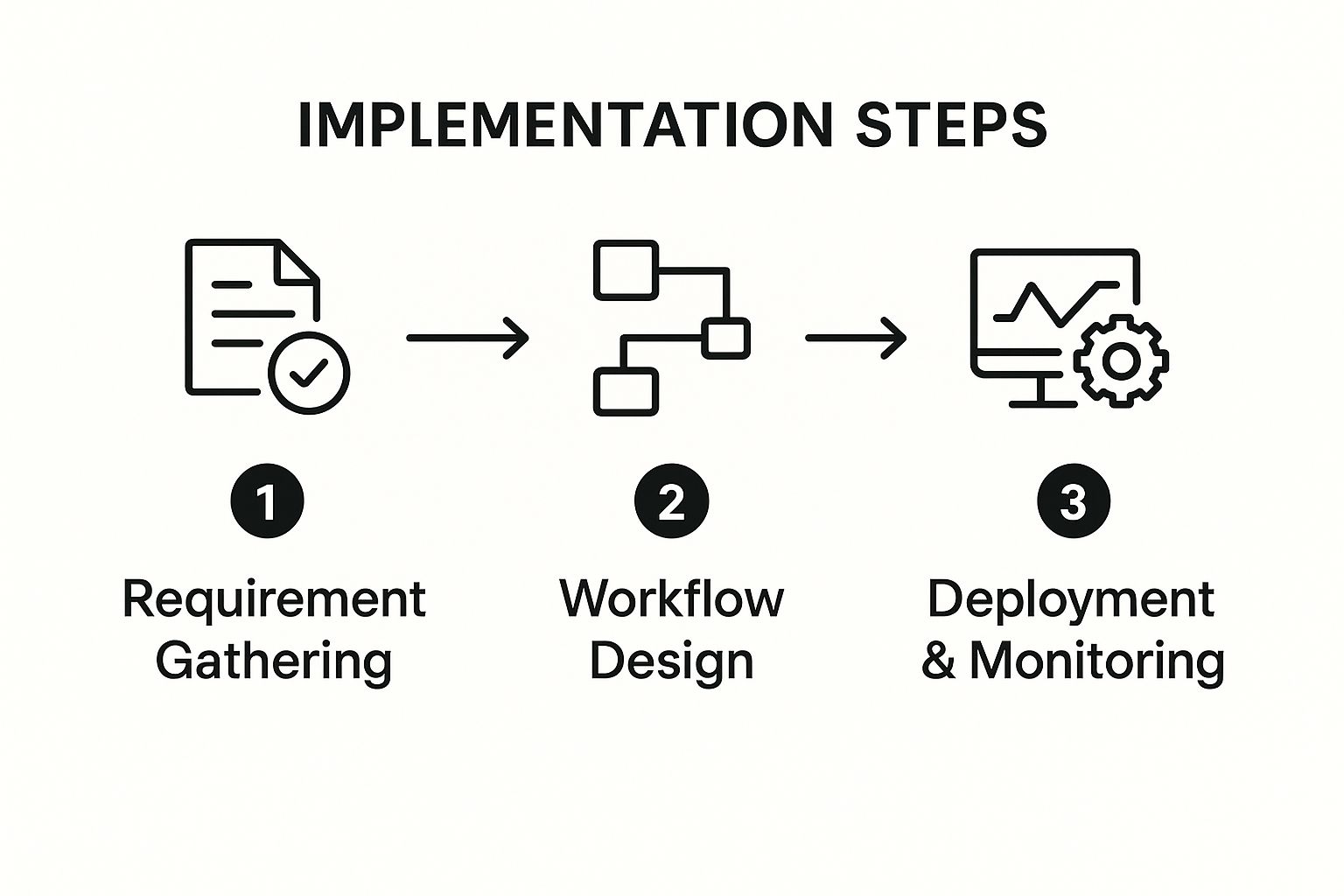


As you can see, a successful rollout starts with clear goals, moves to an intuitive build phase, and finishes with deployment and monitoring. This straightforward approach is what makes it so accessible, even for people who don't write code.


Human Resources: Onboarding and Offboarding


The employee lifecycle is packed with repetitive tasks, making it a goldmine for automation. Just think about everything that goes into welcoming a new team member.


A mid-sized tech company, for example, found its HR team drowning in manual onboarding tasks. They were juggling offer letters, tax forms, IT equipment requests, and training schedules—all tracked with messy checklists and endless email threads.


Here's how they fixed it:


  • The Automated Solution: They built a workflow that kicks off the second a candidate accepts their offer. The system automatically sends a digital welcome packet, adds the new hire to the HR system, generates tickets for IT and Facilities, and enrolls them in their first week of training.

  • The Outcome: The results were immediate. They cut the administrative time spent on each new hire by over 75%. Even better, it created a smooth, professional welcome for new employees and freed up the HR team to focus on culture and talent development.


Finance: Invoice Processing and Approvals


Finance departments are often buried under a mountain of paperwork. From invoices to expense reports, every document requires manual data entry, verification, and a multi-step approval process that can bring things to a grinding halt.


An automated workflow can completely transform this.


When you automate rule-based financial tasks, you can dramatically shorten payment cycles, slash the risk of costly data entry errors, and get a much better handle on cash flow. The system becomes a reliable gatekeeper, ensuring every dollar is accounted for.

Take a construction company that was struggling with a painfully slow invoice approval system. Invoices would arrive by email, get printed, and then sit on a manager's desk for days waiting for a signature.


  • The Automated Solution: They set up a workflow that pulls invoices directly from a dedicated email inbox. It automatically extracts key data—vendor name, invoice number, amount—and routes it to the right project manager for approval with a simple mobile notification.

  • The Outcome: The average invoice approval time plummeted from eight days to just 24 hours. This eliminated late payment fees and even allowed the company to grab early payment discounts, directly boosting its bottom line. For more ideas, you can check out these powerful workflow automation examples that boost efficiency across other business areas.


Sales and Marketing: Lead Management


For sales and marketing teams, speed is the name of the game. A lead that sits untouched for even an hour can quickly go cold, turning a potential customer into a missed opportunity.


  • The Problem: A B2B software company was bleeding leads during the manual handoff from marketing to sales. A prospect would fill out a website form, but it could take hours for someone to manually enter that info into the CRM. By then, the lead's interest had often faded.

  • The Automated Solution: They built a low-code workflow that instantly captures form submissions. The moment a lead comes in, the workflow enriches it with company data, scores it based on their ideal customer profile, and assigns it to the right sales rep in the CRM—all in a matter of seconds.

  • The Outcome: Lead response time went from hours to under five minutes. That simple change led to a 20% increase in sales-qualified leads and gave their sales team a massive head start on the competition.


These examples are just the tip of the iceberg. To see how this applies across the board, let's look at a few more side-by-side comparisons.


Low Code Automation Across Business Departments


The table below shows common manual processes within different departments and how a simple automated workflow can change the game.


Department

Manual Process Example

Automated Workflow Solution

Operations

Manually creating and assigning work orders based on email requests.

A system where service requests automatically create, assign, and track work orders in a project management tool.

Customer Support

Agents manually categorizing support tickets and routing them to the right team.

An automated workflow that uses keywords to categorize tickets and assign them to the correct specialist instantly.

Legal

Drafting standard contracts from templates and emailing them back and forth for review.

A workflow that auto-generates contracts with client data, then routes them through a pre-defined approval chain.


As you can see, the core idea is the same everywhere: take a predictable, repetitive task and let a system handle it. This frees up smart people to do the work that actually requires their expertise and creativity.


How To Choose The Right Low-Code Automation Platform


With so many low-code automation platforms popping up, picking the right one can feel overwhelming. The market is absolutely booming, which is great because it means there are tons of options, but it also makes the decision that much harder.


Just look at the numbers. The global workflow automation market is expected to rocket from USD 29.9 billion in 2025 to a massive USD 87.7 billion by 2032. You can read more about the workflow automation market's rapid expansion on coherentmarketinsights.com. This explosion has created everything from simple cloud-based tools that cost a few bucks a month to heavyweight enterprise systems.


So, how do you cut through the noise? It’s about looking past the shiny features and focusing on what your business actually needs to get work done better.


Start By Looking Inward: Assess Your Core Requirements


Before you even start window shopping for platforms, you need to do a little homework. The first step is to get crystal clear on what you want to automate. Sit down with your team and map out the specific processes you're targeting.


To get a clear picture, ask yourself some tough questions:


  • Who is this for? Is this a tool for the IT department, or do you need something simple enough for "citizen developers" in sales, marketing, or HR to use? The answer here will tell you how important a simple drag-and-drop interface really is.

  • What does it need to connect to? Make a concrete list of the software your business can't live without—your CRM, project management tools, accounting software, you name it. A platform is worthless if it can’t communicate with your existing tech stack.

  • How complicated are your workflows? Are you looking to build simple, A-to-B automations? Or do you need to create complex, branching workflows with if/then logic and multiple steps? Be honest about what you need today and what you might need a year from now.


A common mistake is choosing a platform based on its potential rather than your reality. Start with a clear understanding of the problems you need to solve today, and then look for a tool that can grow with you tomorrow.

Key Criteria For Evaluating Platforms


Once you've got your requirements checklist, you can start sizing up the contenders. Using a consistent set of criteria helps you make a true apples-to-apples comparison and avoid getting swayed by a slick sales demo.


1. Ease of Use and User Interface (UI)The whole point of low-code is to make automation accessible. The platform's interface should feel natural and intuitive, letting people build and manage workflows without needing weeks of training. If the UI is clunky, you’ve already lost half the battle.


2. The Integration LibraryThe real power of a low-code workflow automation platform is its ability to act as the glue between all your other tools. Dig into its library of pre-built connectors. Make sure it has solid, well-supported integrations for the apps you rely on every day.


3. Scalability and PerformanceAs your business grows, your automation needs will too. Your platform has to keep up. Can it handle a higher volume of workflows and more data without slowing to a crawl? Make sure its architecture can support both simple tasks and enterprise-scale processes down the road.


4. Security and ComplianceWorkflows often touch sensitive customer or company data, so security is absolutely non-negotiable. Look for must-have features like role-based access control (RBAC), detailed audit logs, and compliance with standards like GDPR or HIPAA if they're relevant to your industry.


5. Pricing ModelsThis is where things can get tricky. Some platforms charge per user, others by the number of workflows you run or even by the individual task. Try to model your expected usage to figure out the total cost of ownership. A tool that looks cheap at first glance might get very expensive as you scale. For a deeper look at the strategy behind this, check out our guide to digital process automation.


Finally, don't make the decision in a vacuum. Get your end-users involved. The best way to know if a platform is right for you is to take it for a test drive. Run a pilot project with your top one or two choices on a small, high-impact workflow. There’s no substitute for seeing how it performs in the real world with your actual team.


Here is the rewritten section, designed to sound human-written and natural.


Getting It Right: Best Practices for Low-Code Automation


Picking a great low-code tool is only half the battle. How you roll it out is what truly separates a successful automation initiative from one that fizzles out. A smart strategy is everything—it’s what turns a cool piece of tech into something that delivers real, measurable value.


The secret? Start small. Don't try to boil the ocean by automating an entire department's operations on day one. Instead, look for the quick wins: those high-impact, low-complexity tasks that everyone hates. Think of things like routing expense approvals or copying data between systems.


Nailing these simple projects first does something incredibly important: it builds momentum. When people see a frustrating part of their day disappear in a week, they become your biggest champions. That kind of buy-in makes every future project ten times easier.


Set Up Some Guardrails with Clear Governance


Once you empower your team to start building their own solutions, you need a plan to keep things from going off the rails. Without a clear set of rules, you can accidentally create a new version of "shadow IT"—a tangled web of unmanaged workflows that create security risks and data headaches.


That's where governance policies come in. These aren't meant to stifle creativity, but to guide it. You need to define what citizen developers can build, what data they can touch, and what the approval process looks like before an app goes live.


Think of a good governance model as a safe sandbox. It gives people the freedom to experiment and solve real problems, all while ensuring everything they build is secure and aligned with the company’s goals.

Make It a Team Sport and Offer Real Support


The best automation happens when business experts and IT work together. Your business teams know the processes inside and out—the pain points, the exceptions, the workarounds. Your IT team provides the technical oversight to make sure the solutions are secure, scalable, and don't break anything.


When these two groups collaborate, you get solutions that are both practical and technically sound. But this partnership only works if you give people the support they need to succeed. Don't just hand them a login and wish them luck. You have to invest in them with resources like:


  • Hands-on workshops to get them comfortable with the platform's basics.

  • A self-service knowledge base with simple how-to guides and video tutorials.

  • An internal community forum or chat where users can ask questions and share what they've built.


This kind of environment is more important than ever. With so many powerful tools now in the cloud, it's no surprise that 75% of businesses view workflow automation as a major competitive advantage. You can explore the strategic impact of workflow automation on mordorintelligence.com to dig deeper into the data. Equipping your team properly is how you turn that potential into a reality.


Finally, figure out what success actually looks like. Before you even start, define the metrics you'll use to track the ROI of your low code workflow automation projects. Are you trying to reduce manual errors? Save a certain number of hours per week? Speed up project delivery? Tracking these outcomes proves the value of your work and helps you decide what to automate next.


Frequently Asked Questions


Even after seeing the benefits, it's natural to have a few practical questions before jumping into low-code workflow automation. Let's tackle some of the most common ones so you can move forward with confidence.


Is Low-Code Automation Secure?


This is a big one, and rightly so. Workflows often touch sensitive company and customer data. The good news is that reputable low-code platforms are built from the ground up with security as a top priority—they aren't some insecure shortcut.


Of course, security is a partnership. The platform provider handles the heavy lifting of securing the core infrastructure, but you still need to follow smart practices on your end. This means:


  • Role-Based Access Control (RBAC): Giving people permissions only for the data and workflows they absolutely need to do their jobs. Nothing more.

  • Audit Logs: Keeping an eye on who is building, changing, and running workflows using the platform’s built-in tracking features.

  • Secure Integrations: Making sure any connections to other apps are properly authenticated and managed, not just left wide open.


Think of it this way: a well-managed low-code platform can actually be more secure than old-school manual processes. It replaces scattered spreadsheets and ad-hoc emails with a standardized, trackable system, cutting down on the risks that come with shadow IT.

What Is a Citizen Developer?


You'll hear this term a lot. A "citizen developer" is simply an employee who builds applications and automates processes using low-code tools, even though they aren't a professional programmer.


Imagine the marketing manager who sets up an automated follow-up sequence for new leads, or the finance analyst who builds a simple workflow for approving expense reports. They are the experts on their department's real-world problems. Low-code platforms give them the power to build the solutions themselves instead of waiting in a long queue for the IT department.


This trend is exploding. Some analysts predict that soon, as many as 80% of applications will be built by people outside of traditional IT roles.


Can Low-Code Automate Everything?


Nope, and that's by design. Low-code workflow automation shines when it's applied to structured, rule-based processes—the kind of repetitive and predictable work that eats up so much time. It's fantastic for tasks like data entry, multi-step approvals, sending notifications, and keeping information synced between different software tools.


But it’s not a silver bullet. Processes that demand complex human judgment, genuine creativity, or require building something with truly unique, specialized system logic are better suited for custom code or just leaving them in human hands.


The goal isn't to automate everything. It's to automate the right things so your team can focus on the work that truly matters.


Ready to stop wasting time on manual tasks and start building a more efficient business? The team at Flow Genius specializes in designing and implementing custom automation solutions that fit your exact needs. Visit us at https://www.flowgenius.ai to schedule your free consultation and discover your automation potential.


Picking the right business intelligence software isn't just about buying a tool; it's the difference between drowning in data and gaining a real competitive edge. This guide cuts through the marketing noise to give you a detailed business intelligence software comparison, helping you find the platform that turns raw numbers into smart, real-time decisions.


Why This Decision Matters More Than Ever


Every business is sitting on a mountain of data. The problem is, that data is usually spread all over the place—in your CRM, your accounting software, your operations logs. Stitching it all together manually in spreadsheets is a recipe for disaster. It’s slow, full of errors, and simply doesn't scale.


This is where a solid BI platform steps in. Think of it as the connective tissue for your company's data. It helps you:


  • Tame the Chaos: Pull all your scattered data sources into one place for a single, reliable view of what's happening.

  • Get Answers Faster: Ditch the static reports. Dynamic dashboards give you live metrics so you can see what’s working (and what isn’t) right now.

  • Empower Your Team: Let people outside of the IT department actually explore the data themselves, ask their own questions, and find their own answers.


The BI Boom is Real


The market numbers back this up. The global business intelligence software market hit $41.74 billion in 2024 and is expected to explode to $151.26 billion by 2034. That's a compound annual growth rate of 13.74%, which tells you just how essential these tools have become. You can explore more market growth projections on precedenceresearch.com.


This explosive growth makes choosing the right platform a high-stakes decision. It’s a significant investment that will touch every part of your business, from day-to-day operations to your biggest strategic bets.


A great BI platform doesn’t just show you charts and graphs; it tells you a story. It uncovers trends you never would have spotted, points out new opportunities, and warns you about risks before they become problems.

To make the right call, you need to look past the sales pitches and compare the leading tools on the things that actually matter. We’ll dive deep into everything from data connectivity and visualization to how well each platform scales as you grow. The following sections break down the top contenders with clear, practical recommendations to help you find the perfect fit for your team.


Setting Up Your BI Comparison Framework


Choosing the right business intelligence software starts with building a solid framework for your comparison. If you don't have a clear plan, you'll end up dazzled by slick sales demos and features that sound great but don't actually solve your problems. Think of this framework as your scorecard, making sure you judge every platform by what truly matters to your business.


The idea is to get past a simple feature checklist and really understand how each tool would fit into your day-to-day operations. Before you look at a single demo, define what success looks like for your team. Are you trying to speed up reporting? Get deeper insights into your operations? Or maybe you just want to empower non-technical staff to pull their own data.


Your answers will determine how much weight you give to each category, from raw technical power to how easy it is to use. Nailing this down first is the only way to make a smart, informed decision that will pay off for years to come.


Evaluating Data Connectivity and Sources


The first real test for any BI tool is its data connectivity. A platform is pretty useless if it can't get to the data you need. You have to be sure it can connect to your entire data ecosystem, not just the easy parts.


This goes way beyond standard databases. Take a hard look at all your critical systems:


  • Cloud Applications: Does it have built-in connectors for the SaaS tools you rely on, like Salesforce, HubSpot, or Shopify?

  • On-Premise Databases: Can it securely tap into older SQL databases or data warehouses that are still running behind your firewall?

  • Flat Files: How well does it handle the basics? Think about all the crucial data living in Excel files, Google Sheets, or CSVs across different departments.


If a platform has weak or clunky connectors, you're signing up for immediate headaches. It either means expensive custom coding projects or forcing your team to manually piece data together. The best tools offer a huge library of pre-built integrations that make connecting to a new data source a simple, click-and-go process. That's how you get a complete view of your business without bogging down your IT team.


Analyzing Visualization and User Experience


Data visualization is where the magic happens, turning rows of numbers into a clear story. But not all charts are created equal. Your evaluation needs to look beyond whether a tool can make a bar graph. What really matters is interactivity and customization.


Can your team easily click on a data point to see what's behind it? Can they filter a dashboard in real-time to answer a new question? The best BI platforms make data exploration an active process, not a passive one. This is what helps people uncover trends they never would have spotted otherwise and encourages everyone to get more curious about the data.


The true test of a BI platform's user experience is its ability to serve two distinct audiences simultaneously: the technical analyst who needs granular control and the business stakeholder who needs clear, immediate insights.

The overall user experience (UX) is just as critical. Some tools are built for data scientists and have a massive learning curve. Others are designed with business users in mind, offering intuitive drag-and-drop interfaces. A tool that's too complicated for your team will just sit there unused, making your investment a total waste. Your comparison has to put a premium on a UX that fits the technical skills of the people who will actually be using it every day.


A Detailed Comparison of Leading BI Platforms


Trying to pick the right BI tool can feel overwhelming. Instead of just running down a generic checklist, let's take a practical look at the three heavyweights in the space: Microsoft Power BI, Tableau, and Qlik Sense. Each one has its own philosophy and core strengths, meaning the "best" platform really depends on your company's budget, tech stack, and how your teams work with data.


We’re going to dig into how each tool actually performs where it counts—from its analytical engine to its user experience and ability to connect with your other systems. This isn't about marketing fluff; it's about giving you the real-world insights needed to choose a platform that will truly drive your business forward.


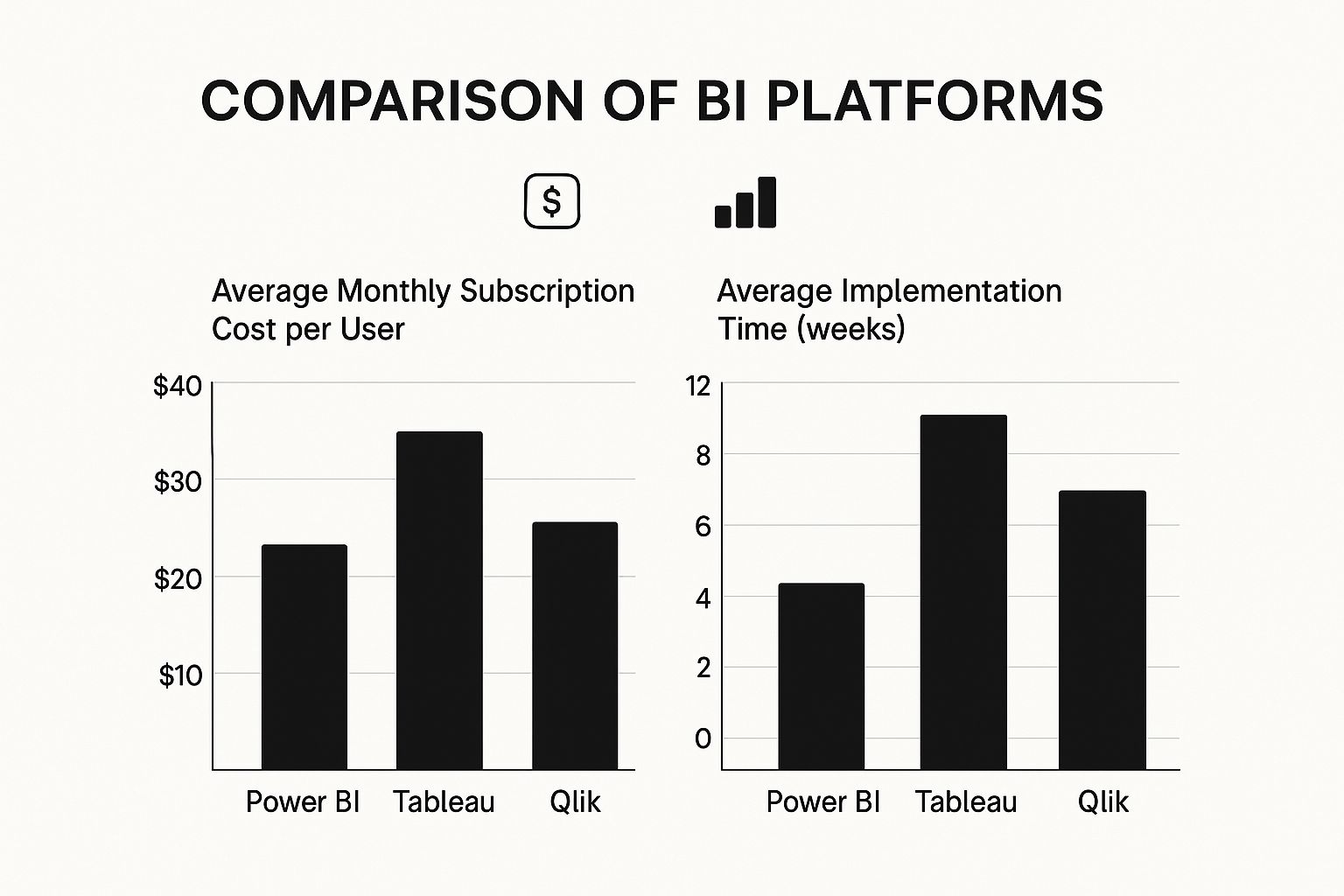
First, a quick snapshot of what you can expect in terms of cost and setup time.


As you can see, Power BI often comes out ahead on cost-effectiveness and a faster rollout. Tableau and Qlik Sense typically represent a more significant investment, which reflects their deep, specialized capabilities.


Microsoft Power BI: The Ecosystem Integrator


Power BI shot to the top of the market for one huge reason: its seamless integration with the entire Microsoft ecosystem. If your business already runs on Office 365, Azure, or Dynamics 365, plugging in Power BI feels less like adopting a new tool and more like flipping a switch on analytics you already own.


The user interface is instantly familiar to anyone who’s spent time in Excel, which drastically cuts down on training time. This is a massive strategic advantage, as it encourages people across all departments to actually use the tool, rather than being scared off by a complex new platform.


Power BI's real magic isn't as a standalone product, but as the analytical glue holding the Microsoft suite together. It turns everyday apps like Teams and SharePoint into powerful, data-driven hubs.

This approach makes Power BI a fantastic choice for companies that want to get data into more hands without a huge training budget. It has a massive footprint in the market, holding over 30% market share as of 2021. For comparison, Tableau, another major player, had about 16.99% of the BI market that same year, with over 100,000 customers.


Tableau: The Visual Analytics Powerhouse


For years, Tableau has been the benchmark for brilliant data visualization and interactive analysis. The platform was built from the ground up to help people truly see and understand their data. Its drag-and-drop interface is incredibly intuitive, allowing just about anyone to create beautiful, insightful visuals without touching a line of code.


This intense focus on visual storytelling makes Tableau a go-to for marketing teams, researchers, and anyone who needs to communicate complex findings to a non-technical audience. It’s simply unmatched at turning a spreadsheet full of numbers into a clear, compelling story.


Here’s where Tableau really shines:


  • Unmatched Visualization Quality: It offers a huge library of charts, graphs, and maps with deep customization, letting you design dashboards that are both beautiful and incredibly informative.

  • Intuitive User Experience: The platform is built for exploration. Users can drill down, apply filters, and ask new questions on the fly without having to start over.

  • Strong Community Support: Tableau has a massive and passionate user community that’s always sharing templates, tips, and solutions. It's an incredible resource.


While it often comes with a higher price tag, organizations that value top-tier data visualization and user-led exploration find it's worth every penny. For a deeper look at how it stacks up, check out our business intelligence tools comparison which is best for your needs.


Qlik Sense: The Associative Engine for Data Discovery


Qlik Sense brings something totally different to the table with its powerful and unique Associative Engine. Traditional, query-based BI tools force you down a linear path of questioning. Qlik’s engine, however, lets you explore data from any direction.


When you click on a data point, the entire dashboard instantly reacts. It shows you not just the data you selected, but—crucially—all the data that is not associated with it. This "power of gray" is what makes Qlik so good at unearthing insights you weren't even looking for.


The Associative Engine is more than just a dashboarding tool. It's a genuine data exploration environment that rewards curiosity, helping you spot hidden patterns and outliers that linear tools would almost certainly miss.

This core capability, combined with its strong data governance and enterprise-level scalability, makes Qlik a top contender for large organizations with messy, complex data and a need for deep, unguided exploration.


Head-to-Head Feature Comparison


To really understand the differences, it helps to see these platforms side-by-side. The table below breaks down how they compare across several key areas.


BI Platform Feature Comparison


Feature

Microsoft Power BI

Tableau

Qlik Sense

Ease of Use

High. Very familiar for Excel users. The interface is clean and straightforward for building standard reports.

Very High. The drag-and-drop UI is the industry gold standard for intuitive, user-friendly data exploration.

Moderate. The Associative Engine requires a new way of thinking, but it's incredibly powerful once you get the hang of it.

Data Visualization

Good. Offers a solid range of visuals and a marketplace for custom additions. Functionally very strong.

Excellent. Best-in-class for visual quality, interactivity, and design flexibility. Built for data storytelling.

Good. Focuses on functional, highly interactive visuals, but with less emphasis on the aesthetic polish of Tableau.

Data Connectivity

Excellent. Has native connectors for the entire Microsoft suite plus a massive library of third-party sources.

Very Good. Connects to a wide range of databases, cloud applications, and local files.

Very Good. Provides robust connectivity options, with a strong focus on enterprise systems and complex data sources.

Pricing Model

Very Cost-Effective. A free desktop version and a low-cost Pro license make it extremely accessible.

Premium. Generally a higher per-user cost, with tiers based on roles like Creator, Explorer, and Viewer.

Premium. Subscription-based pricing that scales with users and data, often representing a significant investment.

Governance

Strong. Taps into Azure's security and governance framework for robust, enterprise-level control.

Good. Offers solid security and permissions features, but can require more manual setup than Power BI.

Excellent. Built from the ground up for enterprise governance, with granular control over data access and security.


Ultimately, there's no single winner here. The right choice comes down to balancing your budget, technical resources, current infrastructure, and what you're trying to achieve. Power BI is a clear leader on cost and Microsoft integration, Tableau is the champion of visual analytics, and Qlik excels at deep data discovery and enterprise governance.


Analyzing Real-World BI Software Use Cases


A theoretical business intelligence software comparison is one thing, but seeing how these platforms actually perform in the wild is where the rubber meets the road. Their true value comes to light when they’re put to work solving specific, high-stakes business problems.


From untangling retail supply chains to directly improving patient outcomes in healthcare, these tools are much more than just chart-makers. They're engines for operational excellence. Every industry faces its own unique data challenges, and the right BI platform can transform that complexity into a serious competitive edge. Let’s dive into some practical applications to see where these tools really shine.


By connecting specific platform features to real-world needs, it becomes clear why a tool like Tableau is a favorite for marketing's visual storytelling, while Power BI's sheer scalability makes it a go-to for manufacturing. These examples give you a concrete framework for figuring out which platform truly fits your business.


Optimizing Retail and Supply Chain Logistics


In the cutthroat world of retail, winning or losing comes down to understanding your customers and keeping your supply chain from breaking. BI software is the critical link that turns a flood of transaction and inventory data into strategies that actually work. Imagine a national retailer using a BI tool to analyze sales by region, right down to the specific store and hour.


This kind of granular view lets them spot buying trends the moment they start, keeping hot items on the shelves and preventing warehouses from filling up with products that aren't moving. We're not just talking about looking back at last month's numbers; this is about predictive inventory management that directly boosts the bottom line.


A key differentiator in retail BI is the ability to merge sales data with external factors like local events, weather patterns, or social media trends. This creates a holistic view that explains why sales are changing, not just that they are.

By visualizing all these interconnected data points, managers can make smarter calls on everything from a weekend marketing push in one city to re-routing national logistics. The payoff is a more agile supply chain, happier customers, and much healthier profit margins.


Enhancing Healthcare and Patient Outcomes


The healthcare industry is built on a mountain of critical data, from individual patient records to massive operational datasets. BI tools are essential for making sense of it all to improve both patient care and hospital efficiency. Providers rely on BI dashboards to keep a finger on the pulse of key performance indicators in real time.


For instance, a hospital network could dig into patient readmission rates. By slicing that data by diagnosis, attending physician, and patient demographics, administrators can uncover patterns pointing to preventable readmissions. Those insights can then drive direct changes to post-discharge care, leading to better patient health and significant cost savings.


This is all powered by core BI capabilities like data mining, predictive modeling, and dashboard reporting, which make complex trends and KPIs easy to grasp. While a retailer is using BI to watch sales, a hospital is using it to improve care—a great example of how versatile these platforms are. You can get a broader sense of how BI is applied across different sectors by exploring these market insights.


Driving Decisions in Finance and Manufacturing


In the financial sector, risk management and regulatory compliance are non-negotiable. BI software takes the pain out of creating complex compliance reports, drastically cutting down on human error and freeing up hundreds of hours. At the same time, financial analysts use live dashboards to monitor market shifts and portfolio performance, giving them the ability to react in an instant.


Over in manufacturing, BI platforms are plugged directly into the factory floor to watch over production line efficiency. By connecting to IoT sensors on machinery, these tools can predict when a piece of equipment needs maintenance before it breaks down, preventing expensive downtime. This is a perfect example of how predictive analytics in BI directly protects a company's assets and keeps operations running smoothly.


How to Choose the Right BI Software for Your Business


Okay, we've broken down the major players. Now comes the hard part: making a choice. The truth is, there's no single "best" BI platform. The right tool for you hinges entirely on your company's reality—your size, budget, technical skills, and what you're actually trying to achieve. The goal is to find a perfect match between a tool's capabilities and your business's needs.


Think of this section as your practical guide to making that final call. Instead of picking a single winner, I'll give you clear, situation-based recommendations. This way, you can weigh the trade-offs and choose a platform that not only works today but grows with you tomorrow.


For Startups and Small Businesses


If you're running a smaller operation, your priorities are almost always the same: keep costs down, get up and running fast, and make it easy for everyone to use. You need powerful insights, but you can't afford a dedicated data science team or a huge upfront investment to get them. It’s all about getting actionable data to your decision-makers without breaking the bank.


In this situation, Microsoft Power BI is often the smartest place to start. Its free desktop version makes it a no-brainer to try, and the low cost of its professional tier is hard to beat. Because it feels so much like Excel, your team can pick it up quickly, which means people will actually use it from day one.


The best BI tool for a small business is one that gets used. Prioritizing a simple user interface and minimal training requirements over complex, enterprise-grade features ensures the investment provides a fast return.

Another thing to look for is a clear upgrade path. The tool that fits you perfectly now should have room to grow as your data and ambitions expand, so you aren't forced into a painful migration down the road.


For Mid-Sized Companies with Diverse Systems


Mid-sized companies live in a tricky middle ground. Your tech stack is way more complicated than a startup's, but you don't have the massive IT department of a large enterprise. Your CRM, ERP, and marketing platforms probably all come from different vendors, creating data silos that are a real pain to connect.


For a business like this, robust integration capability is non-negotiable. You need a BI tool that can effortlessly pull data from a wide variety of cloud apps and on-premise databases. This is where a platform like Tableau really shines. It’s known for its huge library of connectors that can bring all your disconnected data sources together into one unified view.


You also need a good balance of scalability and governance. The platform has to handle more and more data while giving you the security controls to manage who sees what across different departments. When multiple teams depend on the same data, automation is your best friend. You can learn more by reading our https://www.flowgenius.ai/post/a-guide-to-business-process-automation to see how workflows can help maintain data integrity.


For Large Enterprises with Complex Data Needs


At the enterprise level, the game completely changes. You’re operating in a massive, intricate data ecosystem. The conversation shifts from simple dashboards to ironclad security, governance, and sheer performance at scale. The tool you choose must enforce strict data policies and handle complex queries from thousands of users at once without breaking a sweat.


This is the territory of heavy-hitters like Qlik Sense and the enterprise-level plans for Power BI and Tableau. Their key advantages are:


  • Advanced Governance: They provide fine-grained control over data access, user permissions, and tracking data lineage.

  • High-Performance Processing: These platforms are engineered to chew through queries on billions of rows of data from multiple enterprise systems.

  • Scalability: They are built from the ground up to support thousands of concurrent users across a global organization.


The decision here is less about a single feature and more about how the platform fits into your entire enterprise architecture. Can it integrate with your existing data warehouses and security protocols? At this scale, the total cost of ownership—including maintenance, support, and training—becomes a massive factor in the final decision.


Answering Common Questions About BI Software


Even after doing a side-by-side comparison of BI software, you're often left with practical questions. The final call goes beyond a feature list; it's about anticipating real-world challenges like implementation timelines and getting your team on board. This section tackles those common concerns head-on so you can move forward with clarity.


Let's be honest, picking the platform is just the first step. The real win comes from a smooth deployment and company-wide adoption. That’s what delivers the return on your investment. So, let's get into the questions that pop up during this critical stage.


How Long Does BI Implementation Take?


The timeline for getting a BI platform up and running can vary wildly, but it's almost never an instant flip of a switch. For a smaller project connecting to just a couple of clean data sources, you might be looking at 4 to 8 weeks. For a typical mid-sized business juggling multiple data systems, a more realistic window is 3 to 6 months.


For large enterprises, these rollouts can easily stretch past a year. The timeline really hinges on a few key things:


  • Data Readiness: This is the big one. How clean and organized is your source data? If it's a mess, you'll spend a lot of time on prep work before you can even think about building dashboards.

  • Integration Complexity: The number and type of data sources you need to connect will directly affect how long the setup takes.

  • Customization Needs: If you're building out specific, tailored reports and dashboards for different departments, that's going to add to the initial deployment phase.


How Can We Ensure High User Adoption?


There's no bigger waste of money than a powerful BI tool that sits on the shelf collecting dust. Getting people to actually use it is everything. It starts with picking a tool that fits your team's technical comfort level, but true success comes from building a culture that values data.


The goal isn't just to provide access to data; it's to make engaging with data a natural part of everyone's daily workflow. This requires a strategic focus on training, accessibility, and demonstrating early wins.

A great place to start is with our guide on how to turn data into actionable insights a practical guide, which lays out strategies for fostering this kind of environment. A pro tip? Launch with just a few high-impact, easy-to-read dashboards. This shows the tool's value right away and helps build momentum.


Is Migrating Between BI Tools Difficult?


In a word, yes. Moving from one BI platform to another is a major project, not a simple copy-and-paste job. The problem is that every single dashboard, report, and data model you've built is tied to the unique architecture of your current tool.


This means a migration usually involves rebuilding everything from scratch in the new system. It's a time-consuming and expensive process, which really underscores how important it is to choose a flexible and scalable platform from day one. Making a smart choice now can save you from a painful migration down the road.


Ready to streamline your operations and make data work for you? At Flow Genius, we specialize in designing and implementing smart automation solutions that eliminate manual tasks and unlock your business's full potential. Schedule a consultation today and discover how we can build a more efficient future for your company.


When people talk about streamlining business processes, they’re really talking about a fundamental shift in how work gets done. It’s about moving away from chaotic, manual tasks and building a system where work flows logically and smoothly. This frees up your team to focus on high-value activities instead of just keeping their heads above water. Think of it less as a minor tweak and more as a core strategy for growth.


Why Streamlining Is No Longer Optional


In a market this competitive, clinging to outdated workflows is a major liability. Rising operational costs, intense competition, and sky-high customer expectations mean that inefficient processes are a direct threat to your bottom line. Ignoring these problems doesn't just slow you down; it creates very real risks for your business.


The consequences of doing nothing are pretty clear:


  • Employee Burnout: Your best people get stuck doing repetitive, mind-numbing tasks. This leads to frustration, disengagement, and eventually, high turnover.

  • Data Silos: When systems don't talk to each other, departments can't share crucial information. This causes missed opportunities and decisions based on incomplete data.

  • Customer Dissatisfaction: Slow service, preventable errors, and inconsistent experiences will send customers straight to your competitors.


The goal is to treat process optimization as an ongoing business strategy, not a one-and-done project. This builds a resilient organization that can adapt and thrive, no matter the pressure.

If you want a deeper dive into the foundational principles, this guide on how to streamline business processes is an excellent place to start.


The Real-World Impact on Your Bottom Line


Making the move to optimize your processes delivers substantial returns, particularly when automation is involved. Companies that invest in these technologies report an average reduction in operating costs of around 22%.


Some automation projects, like those using Robotic Process Automation (RPA), can generate a return on investment between 30% and 200% within the first year. Of course, this all hinges on having a solid strategy—many digital projects fall short of their goals without one.


How Streamlining Transforms Key Business Functions


These improvements don't just happen in a vacuum; they create a positive ripple effect across the entire organization. When you remove bottlenecks and clarify workflows, every team—from sales to finance—reaps the benefits.


The table below gives a snapshot of the "before and after" picture for some key business functions, showing how process optimization can completely change the game.


How Streamlining Transforms Key Business Functions


Department

Common Bottleneck

Streamlined Outcome

Sales

Manual CRM data entry and follow-ups.

Automated lead nurturing and instant data sync.

Marketing

Disconnected campaign planning and reporting.

Centralized asset management and real-time analytics.

Finance

Slow, error-prone invoice processing.

Automated approvals and faster payment cycles.

HR

Cumbersome employee onboarding paperwork.

Digitized forms and automated task assignments.


As you can see, the impact goes far beyond just "saving time." It's about enabling each department to perform at its peak by removing the friction that holds them back.


How to Identify and Map Your Core Workflows


Before you can fix a process, you have to truly understand it. This is where the real work begins—pinpointing which workflows will give you the biggest bang for your buck and then drawing them out to see where the hidden problems lie. You don't need fancy software for this. Honestly, a whiteboard and the people who do the work every day are your best assets.


The goal here is to get past the official, often outdated, process documents. What you're really after are the informal workarounds and shadow systems your team has invented just to get things done. That’s where you'll find the most significant bottlenecks and the best opportunities for improvement.


Starting with High-Impact Areas


Don't try to boil the ocean. If you attempt to map every single process at once, you'll get overwhelmed and give up. Instead, focus your energy where it matters most. Look for workflows that are either high-volume, a constant source of frustration for your team, or directly impact your customers.


A few great places to start are usually:


  • Customer Onboarding: This is your new client’s very first impression of your business.

  • Invoice Processing: A classic hotspot for delays, human error, and mind-numbing data entry.

  • Inventory Management: This directly affects your cash flow and ability to deliver on promises.

  • Hiring and Recruitment: A notoriously complex dance with tons of steps, people, and paperwork.


For a deep dive into a specific example, you can see how this plays out by looking at Recruitment Process Mapping for Smarter Hiring.


Over the years, I've learned that the processes worth fixing are almost never the ones written down in a manual. They're the ones people complain about during coffee breaks. That's your goldmine.

Creating Your "As-Is" Workflow Map


Once you've picked a process, get the people who actually do the work into a room. Their hands-on knowledge is non-negotiable if you want an accurate map. The mission is to create a simple visual of how things work right now—this is often called the "as-is" workflow.


Kick off the mapping session with a few straightforward questions:


  1. What’s the very first thing that kicks this process off?

  2. What happens next, and who does it?

  3. What decisions have to be made along the way?

  4. Where are the handoffs between different people or software?

  5. What's the final result that tells everyone, "We're done"?


This kind of dashboard view is a great example of how you can organize tasks and see where automation fits in.


Just by drawing it out, you give your team immediate clarity on where things are breaking down and where automation could make a real difference.


As you map the process, the friction points will start to jump out at you. A single task that makes someone jump between three different apps? That’s a bottleneck. An approval that gets stuck in an inbox for days? That's a delay. A step that involves manually copying information from one screen and pasting it into another? That’s a perfect candidate for automation.


This visual blueprint does more than just show you what's broken. It gives you a roadmap. It takes that vague feeling of "we need to be more efficient" and turns it into a concrete, actionable plan for making changes that actually matter.


Selecting the Right Automation Tools for the Job


Alright, you’ve mapped your workflow and found the sticking points. Now for the exciting part: picking the technology to smooth things out. The automation market can feel like a maze of jargon and flashy promises, but choosing the right tool doesn't have to be a headache.


The secret is to focus on your specific problem. Don’t get swayed by the platform with the most buzz; find the one that actually fits your process, your budget, and your team’s technical comfort level. This is how you streamline business processes without paying for a ton of features you’ll never touch.


Matching the Tool to the Task


Not all automation tools are built the same. They generally fall into a few key categories, and knowing the difference is the first step to making a smart investment.


Here’s a quick rundown of what you’ll find:


  • Workflow Automation Platforms: Think of tools like Zapier or Make. These are the ultimate connectors for your cloud-based apps. They’re brilliant for simple, linear tasks based on a trigger, like "when a new form is submitted, add the contact to my CRM."

  • Business Process Management (BPM) Suites: These are the heavy hitters. BPM software is designed for complex, multi-step operations that weave through different people and departments. They give you the power to model, run, and monitor entire business workflows from start to finish.

  • Robotic Process Automation (RPA): This is a different beast entirely. RPA uses software "bots" that you train to mimic human actions on a computer—clicking, typing, and navigating applications. It's a lifesaver for working with older, legacy systems that don't have modern APIs for things like data entry or report generation.


RPA, in particular, has become a cornerstone of modern business strategy. In fact, experts predict the global RPA market, valued at around $22.79 billion in 2024, will continue its explosive growth. This makes sense when you consider that nearly 45% of typical work activities can be automated. You can dive deeper into these figures and find more insights on Flobotics.io.


A Simple Framework for Your Decision


To cut through the marketing fluff, just ask yourself these three practical questions. The answers will point you directly to the right category of tool.


Question

Simple Processes

Complex Processes

How complex is the process?

A simple workflow tool like Zapier is probably all you need.

You’ll want to look at a BPM suite or a custom solution.

What's the budget?

Start with low-cost or free-tier workflow tools.

A larger investment in BPM or RPA can deliver a huge ROI.

What are your team's skills?

Stick with user-friendly, no-code platforms.

You might need to bring in specialists or hire a business process automation consultant.


Let’s make this real. A marketing team that wants to automatically post blog updates to social media just needs a simple workflow tool. But a finance department that needs to reconcile thousands of invoices across three different systems? That’s a prime job for the power of RPA.

By aligning the problem with the right kind of solution, you avoid paying for an industrial crane when all you needed was a simple pulley. This focused approach ensures you streamline business processes where it matters most and get the best bang for your buck.


Navigating the Human Side of Change and Getting Your Team Onboard


Let's be honest: bringing in new tech is the easy part. The real challenge, where most automation projects either sink or swim, is getting your team to actually use it. Success isn't about mandates or top-down orders. It’s about making the new way so obviously better that your team can't imagine going back.


The secret is to position automation as their new secret weapon. It’s not here to replace them; it's here to kill the most soul-crushing parts of their jobs—the copy-pasting, the manual data entry, the repetitive tasks. This frees them up to do the more creative, strategic work that actually requires a human brain. When people see how a new process directly benefits them and makes their day easier, resistance melts away and you start building real buy-in.


Start Small, Win Big


Don't try to boil the ocean with a massive, company-wide launch. That’s a recipe for chaos. Instead, kick things off with a small, contained pilot program. Find a couple of eager team members or one friendly department to be your guinea pigs. This creates a safe space to test everything out and iron out the wrinkles without massive pressure.


This pilot phase is your golden opportunity for raw, honest feedback. What’s working? What feels clunky? Is the training making sense? Use every bit of this feedback to tweak and perfect the workflow before rolling it out to the entire organization. A successful pilot creates your first internal advocates—people who will become your most powerful evangelists.


Nothing drives adoption faster than a colleague's success story. "This new automation saved me five hours this week" is infinitely more powerful than any memo from management.

To make these new habits stick, it helps to understand the psychology behind it. Applying proven behavioral change techniques with your team can make all the difference.


Great Training Isn't Optional, It's Essential


Never, ever assume people will just "figure it out." If you want a smooth transition, you have to provide crystal-clear training and easily accessible documentation. Ambiguity breeds frustration, which leads to mistakes and a quick retreat to the old, comfortable (and inefficient) way of doing things.


Your training arsenal should be practical and to the point. Make sure you have:


  • Visual, step-by-step guides with plenty of screenshots. Show, don't just tell.

  • Quick video walkthroughs that demonstrate the new process from start to finish.

  • A living FAQ document to answer common questions and solve minor issues fast.


Investing time in this upfront saves you a mountain of headaches later. It flattens the learning curve, cuts down on errors, and empowers your team to use the new systems with confidence. The data backs this up, too. Over 90% of IT pros say process automation lets their teams focus on higher-value work. This trend is only accelerating as cloud platforms, which are set to power over 95% of digital workloads by 2025, make these integrated workflows even more seamless. You can explore more about these business process automation trends on cflowapps.com.


Measuring Your Success and Fostering a Culture of Improvement


Getting a new, automated workflow live is a great feeling, but it’s really just the beginning. The job isn't done. True optimization is a cycle, not a one-and-done project. The real payoff comes when you start measuring the impact of your changes and build a culture that's always hunting for the next improvement.


You don't need a team of data scientists for this. It’s about setting up simple, honest ways to see if your efforts are actually moving the needle. This is how you turn a quick win into long-term, sustainable momentum.


Defining Your Key Performance Indicators


Before you can measure success, you have to define what success looks like. Vague goals like "improving efficiency" are useless because you can't track them. You need to get specific with Key Performance Indicators (KPIs) that act as a health check for your new process.


The best KPIs are directly tied to the bottlenecks you originally set out to fix. Here are a few I always recommend starting with:


  • Process Cycle Time: How long does it take, from the very first step to the last, to complete the entire workflow? This is your big-picture speed metric.

  • Error Rate: What percentage of outcomes have mistakes and need to be redone? This is a direct measure of quality and accuracy.

  • Cost Per Transaction: When you factor in labor and resources, what does it cost to run this process one time? This is how you track your financial ROI.

  • Team Member Satisfaction: Are your people less frustrated? Do they feel like they can focus on more valuable work? A quick survey can capture this critical human element.


When you track these numbers, you stop guessing and start knowing. I once worked with a marketing agency to overhaul their chaotic client onboarding. After automating a few key steps, they tracked their cycle time and watched it drop by 50% in just two months. That single, clear metric built incredible buy-in for more projects.


The goal is to create a simple dashboard—it can even be a shared spreadsheet—that makes these KPIs visible to everyone. When the team sees the direct results of their work, it creates a powerful feedback loop that drives them to find the next win.

Making Continuous Improvement Part of Your DNA


With data in hand, you can start weaving this improvement mindset into your company's culture. The best companies don't wait for a process to become a problem. They’re constantly, proactively looking for ways to get better. This requires a shift where everyone, not just managers, feels empowered to spot issues and suggest ideas.


A great way to encourage this is to schedule regular process reviews—maybe once a quarter. These meetings aren't about pointing fingers. They're collaborative sessions focused on three simple questions:


  1. What’s working really well with the new process?

  2. Where are we still hitting snags or feeling friction?

  3. Are there new tools or methods we could explore?


This ongoing conversation is where your next big opportunities will come from. That agency that cut its onboarding time in half didn't just stop there. In their next quarterly review, the team identified that generating kickoff reports was now the main bottleneck. This led to a new, targeted automation project.


If you want a more structured approach, looking into some key process improvement techniques to use in 2025 can give you a solid playbook for these discussions.


Ultimately, truly improving your business processes means committing to a journey of constant refinement. By measuring what matters and empowering your team to always ask, "What's next?", you build a much more resilient and agile organization that's ready for whatever comes its way.


Answering Your Top Questions About Streamlining Processes


Even with the best plan, you're going to have questions. It's only natural. Let's tackle some of the most common concerns and sticking points I hear from leaders when they start digging into process improvement.


Where Should a Small Business Start?


If you're a small business, don't try to boil the ocean. The biggest mistake is aiming for a huge, complex process right out of the gate. You'll get bogged down and lose momentum.


Instead, find a quick win. Look for a task that’s high-volume, relatively simple, and a constant source of frustration for your team.


Good places to hunt for these early victories are tasks like:


  • Manually creating and sending customer invoices.

  • The back-and-forth of onboarding a new client or employee.

  • Keeping track of your social media content calendar.


These are often riddled with manual data entry and are ripe for human error, which makes them perfect candidates for simple, low-cost automation. Start here, get a win on the board, and use that success to build confidence for tackling bigger challenges.


How Do I Convince My Team Automation Is a Good Thing?


This is a big one, and you have to get it right. Team buy-in is everything. The conversation absolutely must be framed around augmentation, not replacement.


Make it clear that you're bringing in tools to act as a digital assistant, not to take anyone's job. These tools are here to handle the mind-numbing, repetitive tasks so your team can focus on the interesting, strategic work that actually requires a human brain.


A tactic that works wonders is to pull your team into the discovery process. Ask them, "What's the most annoying, tedious part of your day?" Then, show them exactly how a new tool or workflow will eliminate that specific pain point. Celebrating the "before and after" makes the benefit tangible and personal.

When you do this, you shift the narrative from fear to excitement. Your biggest skeptics can quickly become your most vocal champions.


What Is the Difference Between Process Automation and RPA?


It's easy to get these terms jumbled, but they refer to different things. Here’s a simple way to think about it.


Business Process Automation (BPA) is the big-picture strategy of using technology to run a workflow from start to finish. It can be something as basic as an email autoresponder or as sophisticated as a multi-department project approval system. You can get a much deeper look in our guide to business process automation.


Robotic Process Automation (RPA), on the other hand, is a specific tool within that broader strategy. It uses software 'bots' that you train to mimic human keystrokes and mouse clicks. These bots can log into apps, copy and paste data, fill out forms, and move files around—perfect for interacting with older, clunky software that doesn't have a modern API.


Think of RPA as a digital temp worker for highly-structured, rules-based tasks that don't need any creative thinking. It’s a fantastic way to bridge the gap between legacy systems and modern applications.


Ready to stop wrestling with inefficient workflows? Flow Genius specializes in designing and implementing smart automation solutions that eliminate manual tasks and free your team to focus on growth. Book a discovery call today and find out how we can build a more productive future for your business.


bottom of page