top of page

Insights

Short. Precise. Effective.

When we talk about real estate lead management, we're not just talking about software. It's the entire game plan for how you capture, track, nurture, and ultimately convert a potential client into a closed deal. This is the system that makes sure no lead—whether they found you on Zillow, walked into your open house, or got your name from a friend—ever slips through the cracks. It’s what turns the chaos of follow-up into a predictable, money-making pipeline.


Why Your Lead Management System Is Leaking Money



Let’s get real for a second. Most deals aren't lost because you don't have enough leads. They're lost because the follow-up fell apart somewhere along the way.


Picture this: a hot new inquiry from your website just came in. At the same time, you have three new sign-ins from Sunday's open house to call, and a warm referral from a past client is waiting for an email. Without a solid system, it's dangerously easy to let that promising online lead go cold while you're scrambling to handle whatever feels most urgent.


This scattered approach isn't just stressful—it's a direct drain on your bank account. Every missed call, every delayed email, represents thousands in potential commission just vanishing. The real cost of a disorganized system isn’t the one deal you know you lost; it’s the dozens of opportunities that quietly went stale from neglect.


Shifting From Chaos to Control


The answer is to implement a modern real estate lead management process. This goes way beyond just buying a CRM and hoping it works magic. It’s about building a strategic framework—a well-oiled machine—that transforms how you handle every single contact from the moment they enter your world until you hand them the keys.


This system is built on four core pillars that work in harmony. Getting these right is what creates a predictable sales pipeline, ensuring every lead gets the attention they deserve.


The Four Pillars of Modern Lead Management


A successful system isn't just one thing; it's a combination of four critical functions that have to work together. Here's how they break down:


Pillar

Core Objective

Example Action

Capture

Centralize every lead from every source into one place.

Connecting your website's "Contact Us" form to automatically create a new contact in your CRM.

Qualification

Quickly identify and prioritize leads who are serious.

Using an intake form that asks about a buyer's mortgage pre-approval status and timeline.

Nurturing

Build relationships with prospects who aren't ready yet.

Sending an automated monthly email with local market updates and helpful tips for future homebuyers.

Conversion

Guide ready-to-act leads toward signing a contract.

Setting automated task reminders in your CRM to make personalized phone calls at key moments.


When these pillars are in place and working together, you're doing much more than just collecting names on a spreadsheet.


You're building a scalable, reliable engine for your business that nurtures relationships and closes deals consistently, month after month.

Building Your Lead Capture and Qualification Funnel


An effective real estate lead management system kicks into gear the second a potential client shows interest. This is where you stop chasing prospects and start attracting and sorting them automatically. The aim is to create one central hub where every single lead lands—it doesn't matter if they came from your website's IDX search, a Facebook ad, or a business card you picked up at a coffee shop.


Having one predictable place for all your leads is the first move to stop them from slipping through the cracks. Without it, you’re left scrambling to manage contacts across different platforms, and opportunities inevitably get lost in the shuffle. A unified system makes sure every inquiry is captured and ready for the really important part: qualification.


The Power of Instant Qualification


Instant qualification is all about figuring out a lead's real intentions right from the start. Instead of just grabbing a name and email, you can build smart intake forms that ask targeted questions. This simple change turns a generic "contact us" form into a powerful data-gathering tool.


For instance, your website's contact form could ask a few key questions:


  • What is your ideal timeline for moving?

  • Have you been pre-approved for a mortgage?

  • Are you currently working with another real estate agent?


Your system can then use these answers to automatically tag and segment new leads. Someone with a 30-day timeline and a pre-approval letter is instantly flagged as a "Hot Buyer," which should trigger a completely different follow-up sequence than someone who is "just looking" and might move in a year. This kind of automated sorting means you’re always focusing your energy on the people closest to making a decision.


A well-designed funnel doesn't just collect leads; it intelligently sorts them for you. This ensures your most valuable time is always spent on the most promising opportunities.

The workflow below shows a simple but effective way to think about qualifying new inquiries as they come in.
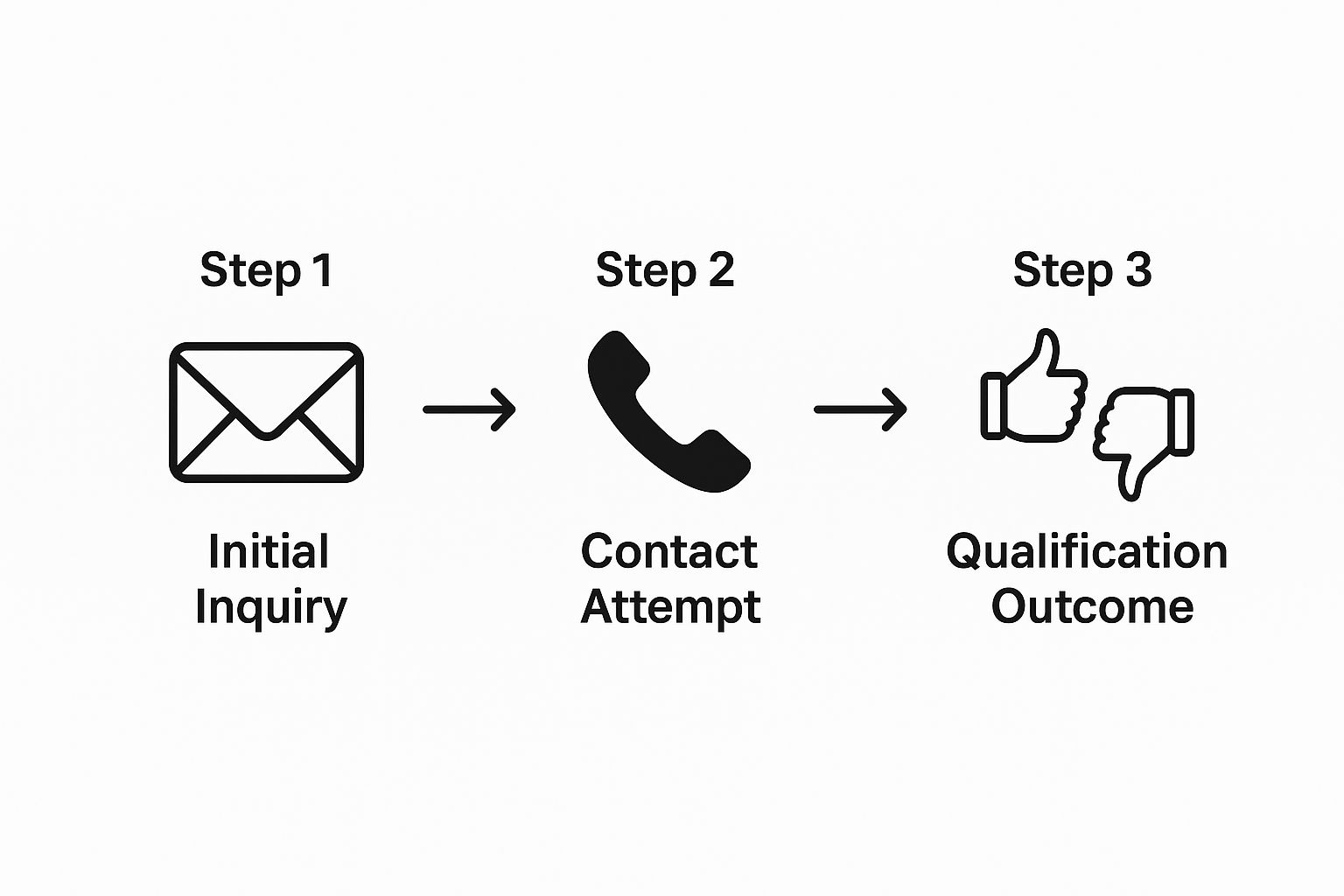


This flow shows how a lead moves from that first point of contact to a clear qualification status, which really is the backbone of any efficient system.


Creating an Automated First Touch


Your very first response sets the tone for the entire relationship. So, instead of a generic "Thanks for your message," your auto-responder should keep the qualification process going. A much stronger first email could thank them for their interest and immediately ask a follow-up question, like, "To help me find the perfect properties, could you tell me which neighborhood you're most interested in?"


This does more than just show you're paying attention; it gathers more data to flesh out their profile in your CRM. Beyond gauging their initial interest, a key part of qualifying leads is educating them on the true market value for property. Doing this early helps align their expectations with reality right from the get-go.


By setting up these automated capture and qualification steps, you’re building a system that works for you 24/7. It guarantees no lead gets forgotten and every prospect is nurtured based on their specific needs and timeline. If you're looking for more ways this approach can sharpen your operations, take a look at our guide on how to improve business efficiency with proven strategies for success. A proactive funnel like this is the foundation of a real estate business built to scale.


Designing Automated Nurturing Workflows That Actually Work


Let's be honest—most leads aren't ready to pull the trigger the moment they land in your CRM. The real game in real estate lead management isn't about the instant sale. It's about playing the long game, building a genuine relationship so that when they are ready, you're the first person they think of. This means ditching the generic email blasts and building smart, automated campaigns that feel personal and deliver real value.


Think about it this way: you could set up a "First-Time Homebuyer" workflow. Instead of just spamming them with listings, it sends a helpful email once a month breaking down a confusing part of the process, like what really happens at closing. A few weeks later, an automated text could ping them just to check in. At the same time, your retargeting ads could be showing them great starter homes in their target zip codes. You're building trust and authority, all while you're out showing properties.


Start with Smart Segmentation


To make your automation feel less like a robot and more like a helpful expert, you have to slice up your audience. A one-size-fits-all approach is a recipe for getting ignored. If you want to create nurturing that connects, you need to lean into some effective customer segmentation strategies.


At a minimum, you should have dedicated workflows for your main lead types.


  • First-Time Homebuyers: These folks are hungry for knowledge. Send them guides on getting pre-approved, deep dives into local neighborhoods, and checklists for their first home tour.

  • Growing Families (Upsizers): Their priorities have shifted. They want to know about school districts, parks and recreation, and homes with that extra bedroom or a bigger yard.

  • Empty Nesters (Downsizers): They’re looking for a new lifestyle. Content about low-maintenance properties, the perks of condo living, or the financial upsides of downsizing will resonate here.

  • Future Sellers: Hook them with value. Offer free home valuation tools, tips for boosting curb appeal, and hyper-local market reports that show you know their neighborhood inside and out.


When you segment like this, every single piece of communication feels relevant. That’s how you keep people engaged for the long haul.


The whole point of a nurturing workflow is to stay top-of-mind by being consistently helpful. When a lead feels like you get their unique situation, they’re infinitely more likely to call you when it’s time to make a move.

The sales cycle in real estate can feel incredibly long, and that’s where persistence really makes a difference. Don't get discouraged when leads don't convert right away—the average conversion rate is a sobering 2.4%. This number proves that real estate is built on trust, and it’s why a consistent, personalized nurturing system isn’t just a nice-to-have; it's absolutely critical to your success.


Weave in Multiple Channels


Great nurturing doesn’t just live in an email inbox. A truly effective workflow uses different channels to create a seamless experience for your leads.


Let’s map out what a "Future Seller" campaign might look like after someone uses your online home valuation tool:


  1. Day 1: An automated email instantly sends their valuation report, along with an offer for a more detailed, human-powered analysis.

  2. Day 14: A follow-up email arrives with a link to a blog post you wrote: "5 Simple Updates That Add Thousands to Your Home's Value."

  3. Day 45: An automated text message offers a soft touchpoint: "Hi [Name], just wanted to see if you had any questions about the local market. Happy to help!"

  4. Ongoing: Retargeting ads pop up in their social media feeds, showcasing homes you recently sold in their area and cementing your status as the local expert.


This multi-channel approach meets people where they are. By automating these touchpoints, you build a scalable system that nurtures relationships without burning yourself out. For a deeper dive, check out our guide on how you can automate lead generation to grow your business for more practical ideas.


Using Technology for Smter Lead Prioritization


So, your nurturing campaigns are up and running. Great. But now you're facing the classic problem: who do you actually call today? A CRM packed with hundreds of leads is just a list until you can figure out who's hot and who's not. This is exactly where technology steps in, shifting your real estate lead management from a guessing game to a smart, data-backed strategy.


Instead of spending hours manually digging through your database, the right tools can surface the best opportunities for you. This frees you up to do what you do best—have meaningful conversations—instead of getting bogged down in administrative work. It’s all about spending your time on the leads who are closest to making a move.


Using Lead Scoring to Spot Serious Intent


Lead scoring is one of the most powerful features you’ll find in a good real estate CRM. It’s a system that automatically assigns points to leads based on their specific actions. Think of it as a virtual assistant that’s constantly monitoring your prospects, flagging anyone who shows signs they’re getting serious.


Let's look at how this plays out in the real world:


  • A lead visits the same luxury condo listing on your website three times in a single week. (+15 points)

  • They open every single email in your "First-Time Homebuyer" drip campaign. (+5 points per open)

  • They click the link in your email to check out your mortgage calculator. (+10 points)


Once a lead's score hits a certain number—let's say 50 points—the system can shoot you an alert. That's your cue to pick up the phone. This way, you’re not just calling randomly; you’re reaching out at the exact moment their interest is at its peak. To get a better handle on the tools available, this guide to lead scoring software is a fantastic resource for sorting through your options.


Unlocking the Power of Predictive Analytics


Ready to take it a step further? The most advanced systems go beyond just tracking what leads are doing now; they use predictive analytics to forecast what they’ll do next. Imagine your CRM telling you which homeowners in your farm area are statistically most likely to sell in the next 12 months. This isn't science fiction anymore—it's a massive advantage for agents who want more listings.


These platforms crunch thousands of data points to find the subtle patterns that come before a sale. The data often includes:


  • Property Data: How long it's been since the last sale or the current loan-to-value ratio.

  • Market Trends: Recent comps and price appreciation in their specific neighborhood.

  • Life Events: Demographic indicators that often trigger a move, like kids reaching school age or an owner nearing retirement.


This is the kind of intelligence that turns prospecting from a numbers game into a precision exercise.



The screenshot above is a perfect example of how this works in practice. A tool like this can literally map out your highest-potential leads, making geographic farming incredibly efficient.


Platforms like Smartzip have been at the forefront of this, analyzing everything from MLS records to credit and demographic data to predict which homeowners are likely to list within a year. They often package this intel with a pre-populated CRM and marketing tools, making it a targeted and powerful investment for listing-focused agents.


By combining behavioral lead scoring for your buyers with predictive analytics for potential sellers, your lead management system becomes a two-sided engine. It’s designed to spot opportunities before your competition even knows they exist.

Optimizing Your Process from Contract to Close



Getting that signed purchase agreement is a fantastic feeling. It's a huge win, but it’s a critical milestone, not the finish line. An often-overlooked piece of real estate lead management is what happens after that lead officially becomes a client. This is the crucial handoff from nurturing a prospect to managing an active transaction.


Too many agents fall into the trap of immediately diving back into prospecting, letting the mountain of administrative tasks from the active deal pile up for their nights and weekends. This frantic juggle between finding new business and servicing current clients is a fast track to burnout, and it's where service quality can start to slip.


A truly solid system doesn't just stop once a contract is signed. It carries you all the way to the closing table, ensuring a smooth ride for your client and freeing you up to get a head start on your next deal.


The Game-Changing Role of a Transaction Coordinator


One of the best moves you can make to dial in this phase is to bring on a Transaction Coordinator (TC). A TC is a specialist who wrangles all the administrative details of a real estate transaction, from the moment it goes under contract until it's officially closed.


Think of them as the operational backbone of the deal. They manage the paperwork, track all the critical deadlines, and act as the central communication hub between all the players—the lender, the title company, the inspector, and the other agent.


By delegating this administrative burden, you're not just buying back your time; you're buying back the mental energy needed to generate and nurture your next client. Instead of being buried in compliance checklists, you can be on the phone with a new lead.

This isn't just a theory; it's a proven strategy top producers have been using for years to scale their businesses. The impact is so significant that in many markets, using a TC is just standard practice. In fact, research shows that over 50% of top-selling brokerages use TCs for every single sale, leading to a remarkable 25% boost in agent productivity. You can find more insights on this trend at AgentUp.com.


From Manual Chaos to a Streamlined Closing Machine


Bringing a TC into your world is a perfect example of intelligent delegation. Their entire job is to make sure nothing falls through the cracks, which allows you to focus on your highest-value activities—building relationships and negotiating deals.


Here’s a quick snapshot of what this handoff looks like in the real world:


  • You: Get the contract signed and make a warm introduction between your client and your TC.

  • The TC: Immediately opens escrow, sends contract copies to everyone involved, and maps out a timeline of key dates (inspection, appraisal, loan contingency, etc.).

  • You: Head to your next listing appointment, feeling confident the transaction is moving forward smoothly without you.

  • The TC: Coordinates the inspection, follows up with the lender on appraisal status, and makes sure all required disclosures are signed and submitted on time.


This systematic approach drastically minimizes the risk of costly errors and creates a much better experience for your client. When everything is handled professionally and proactively, your clients feel supported and confident. That feeling leads directly to more five-star reviews and, most importantly, future referrals. It's one of the most effective business process improvement techniques for 2025 an agent can put into practice.


Common Questions About Real Estate Lead Management


Jumping into a more structured lead management system always brings up a few questions. I've heard the same ones pop up time and again from agents, and getting them answered upfront is the key to building a system you'll actually use—one that gets you real results.


Here are the most common questions I get, with some straight-shooter answers to help you move forward.


What Is the Best Real Estate CRM for a Solo Agent on a Budget?


Honestly, the best CRM for a solo agent is the one you’ll actually open and use every single day. You don't need a system with a million features you'll never touch. Instead, look for a platform with a solid free plan or a low-cost tier that absolutely nails the fundamentals: contact management, task reminders, and a simple pipeline view.


A lot of the newer CRMs are built to grow with you. You can start on a basic, affordable plan and only move up when your business actually needs the extra horsepower. The biggest mistake I see is agents getting locked into a pricey, complicated system they barely use.


The goal isn't to find the most powerful CRM on the market. It's to find the most effective tool for where your business is right now. A simple system you use daily will always beat a complex one that just sits there.

How Much Should I Automate in My Follow-Up?


Automation is your best friend, but it's not a replacement for you. Think of it this way: automate the routine so you have more time for the personal.


Here’s a practical way to balance it:


  • Automate the first touch. A new lead comes in? An automated email or text should go out immediately. Speed is everything at that moment.

  • Automate the long-term nurture. For those "maybe next year" leads, an automated monthly newsletter or a quarterly market update keeps you top of mind without you having to think about it.

  • Keep high-intent follow-up personal. When a lead starts acting like a buyer—re-visiting your site, saving listings—that’s your cue. Pick up the phone. Don't send another automated message.


When Should I Consider Hiring Help?


Most agents wait until they're completely drowning in paperwork to hire someone. The right time is actually just before you hit that breaking point. If you look at your week and realize you're spending more time on admin than on dollar-producing activities (like talking to clients and showing homes), it’s time.


And you don't have to go all-in. Start small. A part-time virtual assistant for a few hours a week can be a game-changer. Or, bring on a transaction coordinator on a per-deal basis. Both are great ways to buy back your time without the commitment of a full-time employee.


Ready to build a system that actually works for you? Flow Genius specializes in designing and implementing smart automation that eliminates manual tasks, giving you back the time to focus on closing deals. Schedule your free consultation today!


Trying to compare construction management software can feel like you're drowning in options. Every platform promises to be the silver bullet for your job site headaches, but let's be real—there's no one-size-fits-all solution. The best tool is the one that actually fits your workflow, whether you're focused on nailing down budget tracking or simplifying daily field reports. This guide is here to help you cut through the marketing fluff and give you a clear, practical way to evaluate the top players.


Choosing Your Digital Job Site Partner


The days of relying solely on paper blueprints and clunky spreadsheets are numbered. The construction industry is making a decisive shift to integrated digital platforms, and it’s not just for show. This move is a direct response to the same old problems that plague projects: budget overruns, frustrating schedule delays, and communication breakdowns that can sink even the most carefully planned jobs.


Think of the right software as the central nervous system for your entire operation. It connects the office to the field in real-time, creating a single source of truth for every owner, architect, and subcontractor involved. It’s about much more than just cloud storage for your files.


This isn't just a niche trend; the market numbers tell the story. The global construction management software market was valued at USD 9.94 billion in 2023 and is expected to climb to around USD 24.12 billion by 2032. This explosive growth shows just how much the industry is banking on these tools to get more efficient and keep projects under control. You can explore the full market growth analysis to see the data for yourself.


Key Functions of Modern Construction Software


At its core, a good construction management platform should simplify your project's entire lifecycle, from the first bid to the final punch list. The most valuable tools deliver in four key areas:


  • Improved Collaboration: Keeps owners, architects, general contractors, and subs on the same page by centralizing all communication.

  • Enhanced Financial Control: Gives you a live look at job costs, change orders, and the overall financial health of a project. No more waiting for last month's numbers.

  • Better Document Management: Makes sure everyone is working off the latest plans, RFIs, and submittals, which prevents costly rework.

  • Streamlined Field Operations: Puts daily logs, safety checklists, and task lists directly into the hands of your field teams via mobile devices.


The real magic happens when you connect workflows that used to be separate. Imagine your bidding process automatically populating your project budget, or a field report instantly updating the master schedule. That’s how you get rid of the friction that causes expensive mistakes and delays.

A huge piece of that puzzle is managing all your subcontractors and suppliers. To get them organized effectively within a new system, it helps to lean on proven strategies. We put together some useful tips in our guide covering 9 vendor management best practices for 2025.


How to Define Your Selection Criteria


Before you even think about comparing different construction management software, you need to take a hard look at your own business. The best software isn't about having the most bells and whistles; it’s about finding the tool that actually fixes your biggest headaches. If you jump into demos without this clarity, you'll just get dazzled by features you'll never use.


Start by sketching out your current process, from the first bid to the final punch list. Where do things get stuck? Are you drowning in RFIs, struggling to keep change orders straight, or spending hours chasing down daily reports from the field? Identifying these specific pain points gives you a non-negotiable list of "must-have" features. This changes the game from passively watching demos to actively hunting for a real solution.


This focused approach is more critical than ever. The construction software market in North America was worth USD 1.73 billion in 2024 and is expected to climb to USD 3.08 billion by 2032. Why? Because smart companies are moving past generic tools and looking for software that solves specific problems in how they plan and run their projects. You can learn more about these construction tech market trends.


Assessing Your Team and Project Needs


The most powerful software on the market is useless if your team won't use it. You have to be realistic about your crew's comfort level with technology. A feature-rich system that’s a nightmare to navigate on a phone will collect digital dust. Be honest about your team's willingness to learn something new and make that a key part of your decision.


The type of work you do matters, too. A custom home builder and a large commercial GC operate in completely different worlds, and their software should reflect that.


  • Residential builders usually need strong client communication tools, ways to track homeowner selections, and straightforward invoicing.

  • Commercial GCs are often looking for heavy-duty financial tools, subcontractor compliance management, and complex scheduling features.

  • Specialty contractors might need hyper-focused tools for things like mobile time tracking, detailed daily logs, and perfect document control for their specific trade.


Your goal here is to build a personalized scorecard before you see a single demo. This isn't just a list of features; it's a weighted checklist that reflects what truly matters to your business, giving you a clear, objective way to judge each platform.

Building Your Evaluation Scorecard


Now it's time to turn those needs into a practical checklist. Grouping your criteria into categories ensures you don't miss anything important when the sales pitches start flying.


  1. Core Functionality: Does the software nail the top three things you need it to do? Think estimating, scheduling, or document control.

  2. Field Usability: Is the mobile app actually easy to use? Is it fast? Does it work when cell service is spotty?

  3. Financial Management: How well does it handle the money side—job costing, change orders, and getting invoices out the door?

  4. Integration Capability: Will it play nice with the software you already use, like your accounting or estimating programs?

  5. Implementation and Support: What kind of training do they offer? When you have a problem, will a real person be there to help you?


By getting this all defined upfront, you put yourself in the driver's seat. You’re not just buying software anymore; you’re making a strategic investment in a tool that’s built for the way you work.


Comparing The Top Construction Software Platforms


Picking the right construction software isn't just a tech upgrade; it's a fundamental business decision that will ripple through every part of your operations. When you put the big names side-by-side, you'll see that most of them—like Procore and Autodesk Construction Cloud—offer a similar menu of core features. The real difference isn't if they have a financials module, but how that module actually handles a change order or talks to your accounting system.


This is where you have to look beyond the sales pitch. Forget the simple feature checklists. The only way to properly vet these tools is to see them through the lens of your daily grind on the job site. One platform might be a powerhouse for enterprise-level financial controls, making it the perfect fit for a large general contractor. Another might win on its dead-simple mobile app, which is exactly what a specialty contractor needs when their team lives and breathes in the field.


Differentiating Workflows And Core Strengths


Let's get practical and break down how these platforms actually differ on the ground. Procore has earned its reputation as a true all-in-one solution, with a laser focus on financial management and tight project controls. It’s built to be the single source of truth for massive, complex jobs, connecting everything from the initial bid to the final closeout package. Its core strength is its unified, comprehensive environment.


Autodesk Construction Cloud, on the other hand, plays to its heritage in design software. Its killer feature is the seamless connection to tools like Revit and AutoCAD, making it a no-brainer for firms that are heavily invested in Building Information Modeling (BIM). The platform truly shines at bridging that critical gap between the design and construction phases, letting model data flow straight to the field teams.


Then you have players like Buildertrend, which are hyper-focused on the residential construction space. Sure, it does project management, but its real value lies in its client-facing tools. Things like homeowner portals and selection management are absolute game-changers for custom home builders and remodelers. For a broader look at the options available, check out our guide to the 12 best construction project management tools for 2025.


The key takeaway is to match the software's philosophy to your business's operational style. Are you a data-driven GC who needs granular financial control, or a design-build firm where BIM collaboration is paramount? The answer will point you to the right ecosystem.

Evaluating Usability And Field Adoption


Let's be honest: a platform's power is useless if your field crew won't touch it. User adoption is probably the single most important metric for success, and it all comes down to a great mobile app and an intuitive design. When you’re comparing platforms, you have to get your hands dirty. Can a superintendent actually complete a daily log with spotty cell service? How many taps does it take to snap a photo and attach it to an RFI? Those are the questions that matter.


This is Procore's dashboard, designed to give you a quick health check on your project at a glance.


This visual-first approach helps project managers spot potential fires without having to dig through dense reports. It’s a clear focus on the end-user experience.


The structured process of evaluating software isn't unique to construction; it applies to almost any business need. This detailed visitor management software comparison, for example, offers a great framework for comparing features against real-world benefits, even though it's for a different industry.


In the end, the best platform is the one that just works, fading into the background so your team can build more efficiently without extra headaches. Don't settle for a canned demo. Demand a real-world trial for your field team and listen closely to their feedback. Their buy-in will tell you everything you need to know about whether it's a smart investment.


Software Feature And Use Case Comparison


To help you visualize where each platform fits, this table breaks down their core strengths and ideal use cases. It's a starting point for matching a solution to your specific company profile and project types.


Software

Core Strength

Best For (Company Size)

Ideal Project Type

Key Integration Capability

Procore

Unified project & financial management

Mid-size to Enterprise

Commercial, Industrial, Institutional

ERP & Accounting (Sage, Oracle)

Autodesk Construction Cloud

BIM & Design-to-Field workflow integration

All Sizes

Design-Build, Complex Commercial

Autodesk Suite (Revit, AutoCAD)

Buildertrend

Residential client management & sales tools

Small to Mid-size

Custom Homes, Remodeling

QuickBooks, Houzz


This comparison shows there's no single "best" platform—only the one that's best for your business. A large GC managing a hospital build has vastly different needs than a custom home builder managing client selections. Use this as a guide to narrow down your choices before you dive into demos.


Analyzing Advanced Features and Integrations


Beyond the standard project management tools, the top-tier platforms really start to separate themselves with their advanced features and integration capabilities. Any basic software can probably get you through a project today, but the real test is whether it can grow with your company and adapt to new industry tech. This means you have to look past the core modules and see how committed a platform is to innovation.


Take Building Information Modeling (BIM) integration, for instance. If you're a design-build firm or a contractor on a complex commercial job, the ability to pull data directly from Autodesk Revit into the field is a massive advantage. We're not just talking about looking at 3D models on a tablet. It's about connecting the designer's intent directly to the crew on-site, spotting clashes before they happen, and making sure everyone is building from the absolute latest version of the model.


Future-Proofing With Technology


Construction tech is moving fast. When you're comparing software, a huge piece of the puzzle is seeing how well each platform brings in next-generation tools. This is where you can tell the difference between a solution that's just "good enough" and one that's truly exceptional.


One of the biggest shifts we're seeing is the use of artificial intelligence (AI) and machine learning (ML) to get ahead of problems. Think of these technologies as a smart assistant, constantly analyzing project data to flag potential risks and safety issues before they escalate. This proactive approach helps slash cost overruns by refining designs, boosting productivity, and even helping to manage labor shortages more effectively.


This image from Autodesk Construction Cloud is a perfect example of how data-rich models become part of the daily project management workflow.


When you have this level of integration, a 3D model stops being just a static design file and becomes a living, data-driven tool for the entire project team.


Evaluating The Integration Ecosystem


Let's be realistic—no software operates in a silo. How well it connects to the rest of your tech stack is absolutely critical. If it doesn't play nicely with your accounting system like Sage or your go-to scheduling tools, you're signing up for frustrating workarounds and mind-numbing manual data entry. That completely defeats the purpose of having a unified system in the first place.


When you're looking at integrations, keep an eye out for a robust, open API. That's a strong signal that the platform was built for flexibility. It means you can create custom connections that fit your specific workflows and the tools your team already knows and trusts.

For a truly connected job site, you need efficient real-time data synchronization to keep information consistent across every system. Powerful scheduling is another common pain point, and sometimes you need a dedicated tool for that. To see what's out there, take a look at our deep dive into the 12 best construction scheduling software tools for 2025. This will help ensure whatever central platform you choose can talk to the specialized apps that handle your most critical processes.


Diving into Real-World Scenarios


A spec sheet can tell you what a piece of software does, but it can't tell you how it will hold up on a real job site. The true measure of any construction management platform is its performance in the controlled chaos of an actual project. Let's step away from feature lists and see how these tools fit into specific, day-to-day construction roles.


The right software really comes down to your company's DNA. A powerhouse platform built for a massive commercial general contractor could easily overwhelm a small residential remodeler with features they'll never use. The key is matching the software’s core strengths to how your team actually works.


Scenario One: The Large Commercial General Contractor


Picture yourself at the helm of a $50 million hospital expansion. Your day is a constant juggle of complex financial controls, mountains of compliance paperwork, and herding dozens of subcontractors. In this high-stakes environment, an all-in-one platform isn't a nice-to-have; it's the only way to stay sane.


For this kind of job, [Procore](https://www.procore.com/) is hard to beat. Its entire system is engineered for this level of complexity.


  • Financial Management: It gives you that hawk-eye view you need, connecting the initial budget directly to live job costs, change orders, and invoices. That kind of granular control is non-negotiable for a large GC.

  • Subcontractor and Compliance Tracking: This is where it really earns its keep. It masterfully handles the endless stream of lien waivers, insurance certificates, and other compliance docs for every single sub, drastically cutting down your risk exposure.

  • A Unified Platform: Procore becomes the central nervous system for the project, linking the owner, architect, and every trade in a single space. For a job with hundreds of stakeholders, that single source of truth is critical.


When you're a large-scale GC, your biggest battles are against complexity and risk. You need your software to be a fortress of control and a central hub for every dollar and document. That's why Procore's comprehensive toolset just makes sense.

Scenario Two: The Specialty MEP Contractor


Now, shift gears. You're a mid-sized mechanical, electrical, and plumbing (MEP) contractor. Your crews are always in the field, so your top priorities are field productivity, getting accurate daily reports, and making sure your work aligns perfectly with the GC's latest plans. You don't need a clunky, back-office-heavy system; you need something built for the field, something fast and mobile.


This is where a more focused, field-first solution really shines. A tool like [Fieldwire](https://www.fieldwire.com/) (formerly Fieldlens) or the mobile-centric parts of [Autodesk Construction Cloud](https://construction.autodesk.com/) are a much better fit.


These platforms are designed with the person holding the tools in mind. They make it dead simple for a foreman to knock out a daily report with photos, track labor hours, and manage a punch list right from a tablet. The whole point is speed and simplicity, which means your field crews will actually use it. And for any MEP contractor neck-deep in BIM, Autodesk's seamless connection to Revit models is a huge leg up for spotting clashes before they become costly problems.


Scenario Three: The Custom Homebuilder


Finally, let’s look at a custom homebuilder juggling five unique, high-end projects at once. This business is all about managing client relationships, tracking countless finish selections, and keeping homeowners in the loop on budget and schedule. The heavy financial tools of an enterprise system are complete overkill here. The real priority is the client experience.


[Buildertrend](https://buildertrend.com/) and [CoConstruct](https://www.coconstruct.com/) were practically born for this role. These platforms excel with features that directly solve the headaches of residential building.


They both offer slick, integrated client portals where homeowners can log in to approve selections, browse progress photos, and see exactly where their budget stands in real time. This level of transparency not only builds immense trust but also cuts out the endless back-and-forth of phone calls and emails. It frees up the builder to do what they do best: build beautiful homes and keep their clients happy.


Common Questions About Construction Software


Once you've narrowed down your options, a few final questions always seem to pop up. Getting straight answers to these is the key to choosing with confidence and making sure the rollout to your team goes smoothly. Here are the most common things we hear from construction pros at this stage.


What Is The Biggest Mistake to Avoid When Choosing?


Hands down, the single biggest mistake is picking software based on a flashy feature list while completely overlooking user adoption. You can have the most powerful platform on the market, but if your project managers, supers, and field crews find it clunky or confusing, it’s worthless.


Focus on platforms with a clean, intuitive interface and a rock-solid mobile app. Good training and support are just as important. The real value of any software is whether it actually gets used on the job site every single day.


My best advice? Get your end-users—the superintendents, foremen, and field staff—involved in the demos. Their buy-in is the single most accurate predictor of whether you'll see a genuine return on your investment.

How Do I Calculate The True ROI?


Figuring out the real return on investment (ROI) for construction software means looking beyond the monthly subscription fee. You have to account for both the hard numbers and the "softer" gains to understand the full impact on your business.


First, look at the direct financial wins. Track the time saved on tasks like daily reports and document control, the cost savings from catching mistakes before they lead to rework, and how much tighter your budget tracking has become. These are your quantitative benefits.


Then, you need to consider the qualitative improvements, which are just as valuable:


  • Better Client Relationships: A polished client portal can make all the difference, leading to happier customers and more repeat business.

  • Stronger Safety Culture: When safety checklists and incident reports are digitized, you can reduce incidents and potentially lower your insurance premiums.

  • Smarter Risk Management: Having all your data in one place helps you spot trends and get ahead of problems before they blow up your budget.

  • Happier Team: Nobody likes paperwork. Giving your team tools that cut down on administrative grunt work makes their jobs less frustrating and more productive.


A true ROI calculation puts all of these benefits up against the total cost of ownership, which includes subscription fees, any one-time setup costs, and the time your team invests in training.


All-In-One Platform Or Best-In-Class Solutions?


The choice between a single, all-in-one platform and a stack of specialized "best-in-class" tools really comes down to your company's size, complexity, and how comfortable you are with technology. There’s no one-size-fits-all answer here.


An all-in-one system like Procore gives you a single source of truth. Data flows seamlessly from financials to project management, which is a huge plus for larger firms that need to standardize processes across many teams and projects.


On the other hand, a best-in-class strategy lets you pick the absolute best tool for each specific job, whether it’s bidding, scheduling, or safety. This approach can be perfect for specialty contractors or companies with very specific workflows, as long as you have a solid plan for making sure all the different tools talk to each other.


How Important Is Mobile Accessibility?


It’s not just important—it is absolutely critical. Construction happens in the field, not in the office. If your software doesn’t have a fast, reliable, and easy-to-use mobile app, you’re missing the entire point.


Your crews need to be able to pull up the latest drawings, fill out daily logs, complete safety forms, and manage RFIs right from their phone or tablet. A clunky mobile experience creates an information bottleneck that slows everything down. When you’re doing your construction management software comparison, put every mobile app through its paces in a real-world setting. Don't forget to test its offline capabilities, too.


Ready to stop wasting time on manual processes that slow your projects down? Flow Genius specializes in designing and implementing smart automation workflows that connect your software, eliminate data entry, and give your team back valuable hours. Book a discovery call to build your custom automation blueprint.


Think of commercial cleaning management software as the central nervous system for your entire business. It's what connects every moving part, replacing the messy web of spreadsheets, sticky notes, and late-night phone calls with one clean, unified platform. This isn't just a digital filing cabinet; it's a strategic tool that shifts your operation from reactive and chaotic to proactive and organized.


What Is Commercial Cleaning Management Software?


Trying to run a modern cleaning company with old-school manual methods is like trying to navigate a major city with a crumpled paper map. You'll probably get there eventually, but you’ll be late, frustrated, and you'll have wasted a lot of gas circling the block.


Commercial cleaning management software is your company’s GPS. It gives you a real-time, bird's-eye view of everything happening on the ground. It coordinates all the critical pieces—from dispatching crews and managing supply levels to handling client billing and performing quality checks. Instead of trying to piece together information from a dozen different places, you get a single source of truth.


The Shift From Manual Chaos To Digital Control


Without a solid system, the little problems snowball into big ones. A missed clean, a crew sent to the wrong address, an invoice that never gets sent—these aren't just minor hiccups. They're costly mistakes that hurt your bottom line and your reputation.


The industry is catching on fast. A 2025 industry report showed that 32% of commercial cleaning firms are planning to invest in new software and tech. Even more telling is that 40% of those companies specifically want end-to-end platforms that connect all their operations. You can dig deeper into these industry trends over at Facilities Management Advisor. It's a clear signal that just "going digital" isn't enough; the goal is to get smarter with data.


This software doesn't just digitize your existing processes; it fundamentally redesigns them for efficiency. It’s about working smarter, not just harder, by letting technology handle the repetitive administrative tasks that consume valuable time.

This transition frees you and your managers up to focus on what really grows the business: landing new clients, nurturing relationships, and coaching your teams—not just putting out operational fires all day.


To see what this looks like in the real world, let's break down the difference between the old way of doing things and the new, software-driven approach.


From Manual Chaos to a Digital Command Center


This table gives you a quick snapshot of how software transforms core parts of your business, turning daily headaches into smooth, automated workflows.


Operational Area

The Old Way (Manual Chaos)

The New Way (Software Solution)

Scheduling

Whiteboards, clunky spreadsheets, endless text chains.

Automated, drag-and-drop calendars with real-time updates.

Job Tracking

Paper checklists and "did you finish?" phone calls.

Live mobile app check-ins, photo proof, and task completion.

Invoicing

Manual data entry, printing, and mailing paper invoices.

Automated billing cycles and simple online payment options.

Client Communication

A jumble of emails, voicemails, and forgotten requests.

A central client portal with a complete communication history.

Supply Management

Guesswork, over-ordering, and frantic last-minute trips.

Automated inventory tracking with low-stock alerts.


Simply put, a dedicated software solution gives you the structure and visibility needed to scale your business without the growing pains.


Essential Features That Drive Business Efficiency


It’s one thing to know that cleaning management software is your command center, but it’s another thing entirely to see how its specific parts work together to actually grow your business. Think of the software like a high-performance engine. The real power isn’t just the engine block; it’s the pistons, gears, and belts all firing in perfect sync.


These features aren’t just shiny digital toys. They are purpose-built tools designed to fix the most common—and costly—headaches that cleaning businesses face every single day. From chaotic schedules to chasing down late payments, each feature directly tackles a point of friction in your operations.


Smart Scheduling And Job Management


At the heart of any cleaning operation is the schedule. If you’re still using a whiteboard or a clunky spreadsheet, you know how fragile that system is. One last-minute client request or an employee calling in sick can send the entire day’s plan into a tailspin, leading to missed jobs and unhappy customers.


Smart scheduling tools are the perfect fix. They give you a dynamic, drag-and-drop calendar where you can assign jobs, see who’s available, and adjust everything on the fly. But the real magic is in the optimization. The software can automatically map out the most efficient routes for your crews, slashing fuel costs and travel time.


For example, instead of a manager spending an hour manually planning five job sites, the system calculates the best sequence in seconds. This can easily save 30-60 minutes of drive time per team, per day. Over a month, that’s dozens of hours you can fill with more paying jobs.


A great software feature shouldn't feel like another tool you have to manage. It should feel like a smart assistant that already knows what you need. Smart scheduling solves the logistical puzzle of who goes where and when, freeing you up to focus on the quality of your service.

Centralized Client And Team Management


Scattered information is the enemy of great service. When client details are buried in emails, spreadsheets, and sticky notes on a monitor, important instructions get lost. A centralized Customer Relationship Management (CRM) feature solves this by giving every client a single, easy-to-access digital file.


This file holds everything you need at your fingertips:


  • Contact Information: Every phone number and email for your key contacts, all in one spot.

  • Service History: A complete log of every job, including dates, services, and any notes the crew left.

  • Special Instructions: This is where you document security codes, sensitive areas to avoid, or a client's preference for certain cleaning products.

  • Billing Records: A clear history of every invoice, payment, and outstanding balance.


This level of organization does more than just streamline your day-to-day. A manager can quickly review a client’s history and proactively suggest an annual deep clean, turning a simple database into a sales tool. Just as important is how you manage your people. To get the most out of your team, it's vital to use the top workforce management solutions for efficiency, which are often built right into these platforms.


Automated Invoicing And Financial Tracking


Cash flow is the lifeblood of your business, and manual invoicing is often the biggest bottleneck. The whole process of creating, sending, and chasing down invoices eats up valuable time and is filled with opportunities for human error. The result? Delayed payments and administrative chaos.


This is where automation delivers a massive return on investment. Automated invoicing tools link directly to your schedule and job completion data. As soon as a job is marked "complete," the software can instantly generate and email a professional invoice. Many platforms also integrate with payment gateways, so clients can pay you immediately online. To dig deeper, you can improve business efficiency with proven strategies for success by checking out our detailed guide.


This simple change completely transforms your financial workflow. Instead of burning hours at the end of the month on billing, the system does it for you. You get paid faster, more consistently, and with a lot less stress.


How Smart Software Unlocks Business Growth


Running a smooth operation is one thing. But turning your cleaning company into a serious growth engine? That's a whole different game. This is where commercial cleaning management software makes its biggest impact, shifting your focus from just getting through the day to strategically scaling for the future.


Think of it this way: your software is your silent business partner, working 24/7. Every single job, client message, and piece of team feedback is a breadcrumb of data. On their own, they’re just small details. But when the software pieces them all together, you get a crystal-clear picture of what’s really happening in your business—and where your next big opportunity is hiding.


This is why the market is buzzing. The global cleaning services software market is expected to jump from USD 4.25 billion in 2024 to an incredible USD 8.35 billion by 2033. That growth is right in line with the industry's workforce boom, with an anticipated 10% increase in jobs between 2021 and 2031. You can dig into more of these industry trends over at Verified Market Reports.


From Reactive Management to Proactive Strategy


Without a central system, it’s easy to get stuck putting out fires. You’re so busy fixing a scheduling mix-up for tonight’s shift that you have zero time to think about next quarter’s sales targets. It’s a classic reactive loop, and it kills growth.


Smart software is designed to break that cycle. By automating the tedious administrative work, it gives you back your most valuable resource: time.


Instead of sinking hours into manually building schedules or chasing down invoices, you’re free to focus on what actually grows the business:


  • Strengthening Client Relationships: You can finally call your best clients just to check in, not because there's a problem.

  • Driving New Sales: You can look at the data, spot an underserved market, and build a marketing campaign to go after it.

  • Developing Your Team: You can invest in training that turns your good cleaners into truly exceptional ones.


Suddenly, you’re no longer just working in your business. You’re working on it.


Uncovering Hidden Profits with Job Costing


One of the most eye-opening features for any owner is job profitability reporting. The cleaning industry runs on tight margins, and it's shockingly easy to assume every contract is a winner when, in reality, some might be quietly draining your bank account.


Job costing tools give you the hard numbers by tracking what each contract actually costs you.


  • Labor Hours: How much time are crews really spending on-site versus what you quoted?

  • Supply Usage: Are you burning through more chemicals and materials than planned?

  • Travel Time: How much are you paying your team just to sit in traffic?


Once you see this data, the path forward becomes much clearer. You might find out your small office contracts are 25% more profitable than the big retail jobs because they require less management and fewer specialized supplies.


This isn't about firing unprofitable clients. It's about getting smarter. You can now confidently adjust your pricing, create more profitable service packages, or laser-focus your sales team on landing more of your ideal, high-margin customers.

Using Performance Data to Build a Stronger Team


The software also gives you an unbiased look at your team's performance. You can track metrics like on-time arrivals, how quickly tasks are completed, and scores from client inspections. This isn't about micromanaging; it's about managing with facts instead of feelings.


This data-driven approach takes the guesswork out of leadership. If one crew consistently finishes jobs ahead of schedule with great reviews, you can dive in, see what they're doing differently, and make it the new company standard. If another team is struggling, you know exactly what to train them on.


It’s this kind of proactive coaching that builds a highly skilled, efficient, and motivated team—and that’s the real secret to sustainable growth.


Choosing the Right Cleaning Management Software


Picking the right commercial cleaning management software is a lot like buying a new vehicle for your business. Some companies just need a nimble, efficient compact car for quick city jobs. Others need a heavy-duty truck with all the bells and whistles to manage a huge, complex fleet. The goal is to find the perfect fit for your specific needs, so you're not paying for a V8 engine when a four-cylinder gets the job done.


This decision doesn’t have to be overwhelming. If you break it down into a few logical steps, you can confidently land on a platform that solves today's problems and scales with you for tomorrow's growth. It all begins with an honest look in the mirror.


Start With a Business Needs Audit


Before you even think about watching a software demo, you have to look inward. A thorough audit of your current operations will shine a light on exactly what needs fixing. Are you constantly putting out scheduling fires? Is your invoicing process a monthly migraine? Are client messages getting lost in the shuffle?


Get really specific about your pain points. A small crew of five might just need a simple but powerful mobile app for on-the-go job tracking. On the other hand, a larger company with 50+ employees will likely need advanced tools like detailed job profitability reporting and multi-location management.


Ask yourself these questions to guide your audit:


  • What's the single biggest time-waster in our daily operations? This usually points directly to the most critical feature you need, whether it's automated scheduling, billing, or team communication.

  • How do we track job progress and quality right now? If the answer is "a jumble of phone calls and text messages," then a system with photo proof and digital checklists should be at the top of your list.

  • Where do we see ourselves in three to five years? Software that works today but can't handle double the clients or staff will quickly become a roadblock.


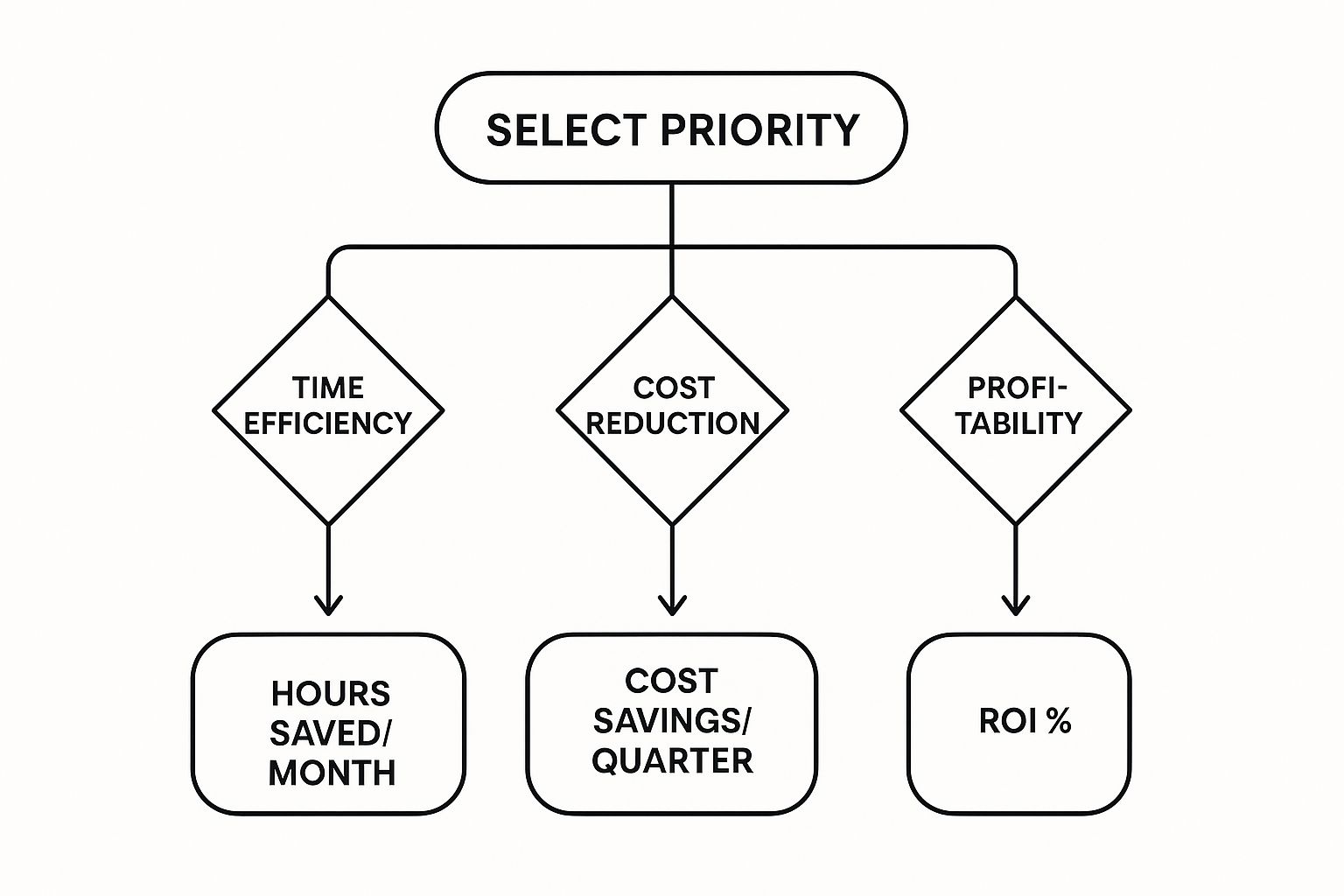
This visual breaks down how to connect your business goals to the real-world results you should expect from your software.


Whether your main goal is saving time, cutting costs, or boosting profits, this decision tree shows there are clear metrics you can track to measure your success.


Evaluate Scalability and Mobile Functionality


Once you know what you need, it's time to vet the options. Scalability is a huge one. The right software should grow with you, not hold you back. Ask vendors how their pricing and features adapt as you add more employees, clients, and services. A platform with rigid, expensive tiers can become a financial burden just as your business starts to take off.


Just as important is the quality of the mobile app. Your cleaning crews are your boots on the ground, and their primary tool for connecting with the office is their smartphone. A clunky, confusing, or buggy mobile app will only create frustration and lead to your team not using it.


The best mobile app feels like it was designed with a cleaner in mind. It should provide instant access to schedules, job instructions, and communication tools without a steep learning curve. If the app isn't intuitive, your team won't use it effectively.

Prioritize Integrations and Customer Support


No software lives on an island. Your new cleaning management platform has to play well with the other tools you already rely on, especially your accounting software. A seamless connection means that when a job is marked complete, the invoice data flows straight into your financial system. This alone can eliminate hours of mind-numbing data entry and reduce the risk of costly mistakes.


As you compare options, make sure you understand a comprehensive guide to accounting software integration to ensure your chosen platform works flawlessly with your existing financial tools. This link is the key to building a truly efficient back-office workflow.


Finally, never underestimate the value of good customer support. When you hit a snag or have a critical question at the start of a busy day, you need responsive, knowledgeable help—fast. Look for companies that offer multiple ways to get in touch (phone, email, chat) and have a strong reputation for taking care of their customers. A great product with terrible support can quickly become a major liability.


To tie this all together, use this checklist to compare your top software candidates. It will help you stay focused on what truly matters for your business.


Your Software Selection Checklist


Evaluation Criteria

What to Look For

Why It Matters for Your Business

Core Features

Does it solve your top 3-5 operational pain points (e.g., scheduling, invoicing, quality control)?

Focus on what you need, not just flashy features you'll never use. This ensures you get immediate value.

Mobile App Usability

Is the app intuitive, fast, and reliable? Does it work well offline?

High adoption by your field team depends entirely on this. A poor app leads to poor results.

Scalability

Can the software grow with you? Check for flexible pricing tiers and features that support more staff/clients.

Avoid being forced to switch systems in a few years. Choose a partner for the long haul.

Integrations

Does it connect seamlessly with your accounting software (QuickBooks, Xero, etc.) and other essential tools?

This eliminates manual data entry, saves massive amounts of time, and reduces human error.

Customer Support

Is support readily available via phone, email, or chat? Check online reviews for feedback on responsiveness.

When things go wrong, you need a reliable partner to help you get back on track quickly.

Pricing and ROI

Is the pricing transparent and predictable? Does the value it provides justify the cost?

A clear return on investment means the software is saving you more money and time than it costs.


Think of this checklist as your compass. By systematically evaluating each potential solution against these criteria, you can cut through the marketing noise and choose a platform that will become a genuine asset to your cleaning business.


Future-Proofing Your Business with Automation


Looking ahead isn't just a nice-to-have anymore; it's a core part of running a successful cleaning business. While today’s cleaning management software is great for solving the daily headaches, its real value is in setting you up for what’s next. The next big leap in efficiency isn’t about just managing tasks better—it's about building an operation that’s intelligent, predictive, and always one step ahead.


This shift from simple management to smart automation is exactly where the industry is headed. Bringing on commercial cleaning management software is a crucial part of your company's digital transformation, allowing you to modernize how you work and stay sharp. By getting comfortable with these new tools now, you're building a real, lasting advantage over the competition.


The Rise of Predictive and Smart Operations


Imagine a world where your software tells you what you need before you even realize it. That's the promise of integrating newer concepts like the Internet of Things (IoT) and Artificial Intelligence (AI) into your workflow. These aren't just sci-fi ideas; they're becoming practical, everyday tools for savvy cleaning businesses.


Let's make it real. Think about smart soap and paper towel dispensers. With IoT sensors, they can automatically signal your software when they’re running low. Instead of someone having to walk the entire building to check levels, your system just adds "refill dispenser in 3rd-floor restroom" to a cleaner's checklist. This one tiny change gets rid of stockouts, saves countless wasted steps, and streamlines your supply chain without anyone lifting a finger.


Automation is no longer about just following a pre-set list of instructions. It's about creating a system that thinks, adapts, and helps you build a more efficient future.

This move toward intelligent operations is why the market for these tools is exploding. The cleaning service software market was valued at around USD 1.79 billion in 2024 and is expected to climb to USD 2.92 billion by 2029. The numbers don't lie—the industry is clearly betting big on smarter, more automated systems. You can find more detailed projections about the cleaning service software market at Research and Markets.


Leveraging AI for Hyper-Efficient Scheduling


Artificial intelligence is what turns all this raw data into pure gold. For example, an AI can analyze building traffic patterns using data from existing security sensors or footfall counters. It can learn which parts of a building get the most use and at what specific times.


Your software can then use that intel to create incredibly efficient cleaning schedules on the fly. Instead of a rigid "clean every restroom every two hours" rule, the system might build a dynamic plan:


  • High-Traffic Zones: The lobby restroom gets a quick clean every hour between 8 AM and 10 AM.

  • Low-Traffic Zones: The conference room area on the fourth floor only needs servicing once in the afternoon.

  • Event-Based Triggers: A large meeting ends in the main boardroom, and a cleanup task is automatically scheduled.


This kind of data-driven approach means your team is always in the right place at the right time, maximizing both cleanliness and your labor budget. If you're looking for more ways to get your time back, you can discover how to automate tasks and win back your time with our in-depth guide.


When you invest in a platform with these forward-thinking features, you’re not just buying software. You’re laying the foundation for a smarter, more resilient business that’s ready for whatever comes next.


Common Implementation Challenges to Avoid


Bringing new commercial cleaning management software into your business is a fantastic move, but let's be real—the road from buying it to actually using it effectively can be a bit bumpy. It's a classic mistake to think you can just flip a switch and everything will magically work. A smooth rollout really comes down to having a smart plan to handle the inevitable hurdles and get your team on board.


Interestingly, the biggest headaches usually aren't about the software itself. The most common problems are human problems: teams pushing back, messy data causing chaos, and training that just doesn't stick. If you get ahead of these things, you're setting yourself up for a much smoother launch.


Overcoming Team Resistance


Probably the biggest challenge you'll face is right inside your own company: getting your people to actually want to use the new system. Your cleaners and managers are used to their old ways—maybe it’s a jumble of spreadsheets, text messages, and sticky notes. To them, this shiny new platform might just look like one more thing to learn, not a tool to make their lives easier. If they don't buy in, you'll see adoption rates plummet, and that big investment won't do you much good.


The trick is to get them involved right from the start.


  • Bring Key Staff into Demos: Got a tech-savvy crew leader? A skeptical office manager? Pull them into the software demos with you. Getting their take on it is priceless, and it makes them feel like they're part of the decision, not just having it forced on them.

  • Explain the "Why" Clearly: Don't just show them what it does; tell them why it matters to them. Frame it in terms of real-world benefits: less paperwork to chase down, schedules that are always up-to-date on their phone, and way fewer confusing, late-night calls.

  • Find Your Internal Champions: Look for a few people on your team who are genuinely excited about the new software. Make them your "champions." Give them the power to help train their coworkers and be the go-to person for quick questions. It creates a much friendlier support system.


Navigating Data Migration


Okay, let's talk about data. Moving years of client info, job notes, and contact lists from a bunch of different spreadsheets into one clean system can feel like a monster task. If you don't handle this migration carefully, you end up with lost information, duplicate clients, and a chaotic start. You need a clean dataset to get a clean start.


The best way to tackle this is usually in stages. Don't try to move everything at once. Start with your most active clients, get their information migrated and double-checked, and then move on to the less frequent ones. This lets you test the waters and iron out any wrinkles with a smaller batch of data. Seriously, take the time to "scrub" your data first—delete old contacts, fix typos, standardize addresses. It feels tedious, but it will save you so many headaches later on.


Think of it like moving into a new house. You wouldn't just toss every box from your old place into the new living room. You'd go through them, throw out the junk, and organize everything so your new home is actually livable from day one.

Ensuring Proper Training and Support


Here’s a surefire way to fail: just give everyone a login and hope they figure it out. It never works. Without real training, your team will either fall back on their old habits or only use about 10% of what the software can actually do. That’s a huge waste of potential and money. The first few weeks are absolutely critical for building their confidence and helping them form good habits.


Make sure you use all the resources your software provider gives you. Most have great onboarding programs, video libraries, and live customer support. Schedule actual training sessions for your team—and make them mandatory, not an optional afterthought squeezed into a busy day. For a closer look at how putting these kinds of structured systems in place pays off big time, check out our guide on the key business process automation benefits for 2025. When your team is well-trained, they're empowered, and that's when you'll really see the benefits of your new system shine.


Got Questions? We've Got Answers


Stepping into the world of cleaning management software can feel like a big move, and it's natural to have questions. Let's tackle some of the most common ones we hear from cleaning business owners just like you.


Can a Small Cleaning Business Actually Afford This?


Yes, absolutely. It's a common myth that this kind of powerful software is only for the big players with huge budgets. The reality is quite different.


Most modern platforms are built with scalability in mind, offering flexible pricing tiers. You might start on a basic plan that just handles your core scheduling and invoicing needs. Then, as your business grows and you bring on more teams, you can easily upgrade to access more advanced tools like in-depth analytics. The idea is simple: you only pay for what you use, making it a smart investment right from the start.


How Long Until We're Up and Running?


Probably a lot faster than you think. Gone are the days of long, complicated software installations. Most of today's cloud-based systems are designed to get you going quickly—often in a matter of days.


The biggest variable is usually getting your own data into the system.


The secret to a fast, smooth launch? A little prep work. If you have your client lists, job schedules, and pricing details organized beforehand, the import process is a breeze. Any good software partner will also have a support team ready to walk you through it.

When Should I Make the Switch to Software?


Don't wait until your paperwork is overflowing and your schedule is a complete mess. Being proactive is key. If any of these sound familiar, it’s a good sign that it's time to make a move:


  • Scheduling headaches: You’re spending hours wrestling with spreadsheets or a whiteboard just to figure out who goes where.

  • Details are falling through the cracks: Key client requests or special instructions get lost in a sea of text messages and sticky notes.

  • Getting paid is slow: Creating and sending invoices is a manual chore, which means your cash flow suffers from delays.

  • You're stuck in the weeds: You're so buried in admin work that you have zero time left to chase new clients or think about growth.


At the end of the day, if your manual systems are costing you time, money, and peace of mind, you're more than ready. This kind of software isn't just another expense; it's the operational backbone for a more profitable and scalable cleaning company.


Ready to stop managing chaos and start building a smarter business? Flow Genius specializes in creating custom automation systems that give you back your time. We design workflows that handle your scheduling, invoicing, and client communication, freeing you up to focus on what really matters.


bottom of page