top of page

Insights

Short. Precise. Effective.

Boosting operational efficiency is all about a simple, powerful loop: find broken processes, automate the repetitive stuff, and then measure the results. It's a systematic hunt for those small, pesky drags on time and resources that, when added up, can bring your whole business to a crawl.


How to Find the Real Bottlenecks Holding You Back



Before you can fix anything, you have to know exactly what’s broken. Jumping straight into solutions without a proper diagnosis is like trying to fix a car engine without even opening the hood. You might get lucky, but you'll probably just waste a ton of time and energy fixing the wrong things.


The first real step is to conduct a thorough 'efficiency audit.' This isn't about blaming anyone; it's about getting a crystal-clear picture of where the friction is. Your goal is to walk away with a prioritized list of the inefficiencies that are costing you the most time, money, and maybe even team morale.


Look at the Numbers, Then Talk to Your People


To get the full story, you have to go beyond the spreadsheets. The best audits I've seen combine hard data with real human feedback. The numbers tell you what is happening, but your team can tell you why.


Start by digging into the metrics for a specific workflow, like your client onboarding process.


  • Completion Time: On average, how long does it take to get a new client from a signed contract to their project kickoff?

  • Error Rate: How often are new client files missing key information that forces someone to circle back and follow up?

  • Wait Time: What’s the average delay between one person finishing their part of the process and the next person picking it up?


This data gives you a solid baseline. Now, go talk to the people who live in this process every single day. Their on-the-ground perspective is pure gold. Ask them direct questions like, "What's the single most frustrating part of onboarding?" or "If you had a magic wand, what's the one step you'd change immediately?"


An efficiency audit is a fact-finding mission, not a fault-finding one. The goal is to understand the process, not to criticize the people running it. Your team's honest feedback is the most valuable resource you have for identifying hidden bottlenecks.

Where to Start Your Search


You can’t boil the ocean, so focus your initial audit on areas known for hidden inefficiencies. These are the places where a small improvement can often have an outsized impact on the rest of the business.


Key Areas for Your First Efficiency Audit


Focus Area

What to Look For

Quick Win Example

Client Onboarding

Manual data entry, delays between teams, inconsistent communication with the new client.

Use a tool like Zapier to automatically create a project in your PM tool when a contract is signed in DocuSign.

Lead Management

Slow lead response times, leads getting lost in spreadsheets, manual follow-up reminders.

Set up an automation that instantly assigns a new lead from your website form to a sales rep in your CRM and sends a welcome email.

Invoicing & Billing

Creating invoices by hand, manually chasing late payments, reconciling payments with bank statements.

Implement an accounting system that automatically generates recurring invoices and sends payment reminders.

Internal Reporting

Team members spending hours pulling data from multiple sources to create weekly or monthly reports.

Create a centralized dashboard in a BI tool that pulls data from all sources automatically, updating in real-time.


Starting with one of these high-impact areas allows you to demonstrate value quickly, which helps get buy-in for bigger changes down the road.


It’s a Marathon, Not a Sprint


This focused audit is really just the start. More and more businesses are adopting company-wide Operational Excellence (OPEX) strategies. Projections show that by 2025, 42% of organizations plan to have these strategies in place, a significant jump from just 37% in 2023.


This isn’t just a buzzword. It’s a real commitment to making sure every single part of the organization is contributing to and benefiting from being more efficient. For a deeper dive into this trend, check out the top insights from the 2025 Global State of OPEX.


Mapping Your Workflows to Find Hidden Bottlenecks


Once you've got a hunch about where things are slowing down, it's time to make those problems visible. You can't fix what you can't truly see, which is why I always start by mapping out the workflow. This isn't about creating a perfect diagram; it's a visual investigation into how work actually gets from point A to point B in your business.


Think of it as a hands-on diagnostic. We're going to lay out every single task, decision point, and handover. The goal is to create a clear, shared picture of a process from start to finish. For many teams, this is the very first time everyone involved sees the entire journey.


Turning Invisible Processes into a Tangible Map


Let's pick a process you flagged earlier as a potential headache—say, your customer support ticket resolution. The most crucial part of this step is to get the people who actually do the work in the room. Their ground-level insights are pure gold because the official process manual and the real-world process are often two completely different animals.


Grab a whiteboard or fire up a simple digital tool like Miro or Lucidchart. Don't get hung up on formal flowchart symbols; clarity is what matters.


  • Define the Start and Finish: Where does it all begin? Be specific. "Customer submits a support ticket" is a great starting point. And the end? "Ticket is resolved and customer is notified."

  • Trace Every Single Step: Now, fill in the middle. Document each action, no matter how small. Think: "Ticket arrives in Zendesk," "Tier 1 support agent reviews ticket," "Agent escalates to Tier 2." The more granular, the better.

  • Spot the Decision Points: Where do choices happen? You can use a simple diamond shape for questions like, "Is this a billing issue?" with arrows pointing down different paths for "Yes" or "No."

  • Highlight the Handoffs: Pay extra close attention to when work moves from one person or team to another. These transfer points are notorious breeding grounds for delays and miscommunication.


Going through this exercise almost always leads to a few "aha!" moments. You'll quickly see where work gets stuck, where someone is doing duplicate data entry, or where communication consistently falls apart.


This infographic illustrates perfectly how a simple process map can expose the hidden bottlenecks that are secretly dragging your entire operation down.
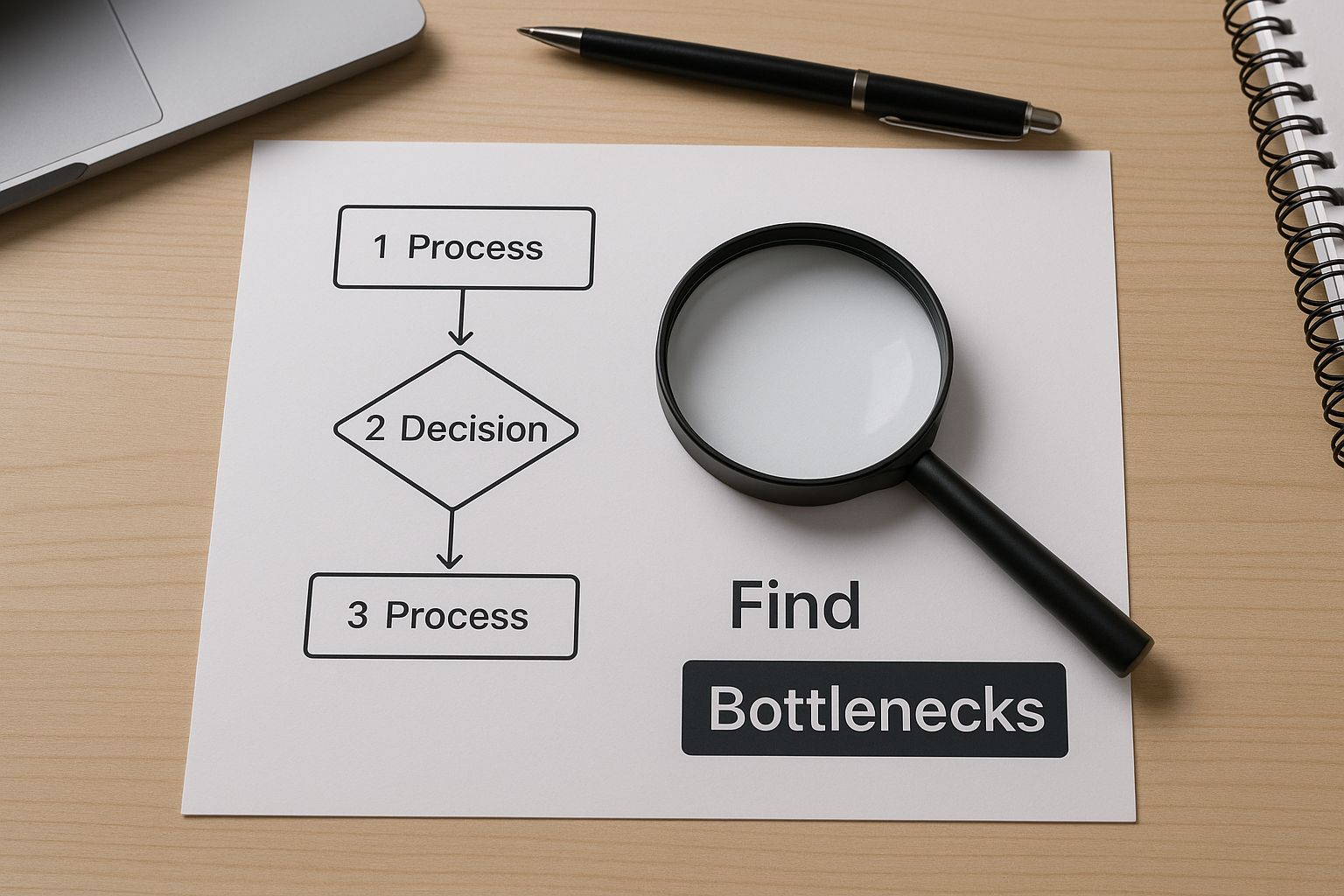


By laying it all out visually, you turn an abstract concept into a concrete map. Suddenly, the delays and redundant tasks have nowhere to hide.


Analyzing Your Map for Inefficiencies


With your map complete, it's time to put on your detective hat. You're hunting for common patterns that scream "inefficiency."


Where Does Work Wait?


Look for any step where a task just sits idle, waiting for someone to act on it. A classic example I see all the time: a sales contract needs a manager's approval, but that manager only reviews them once a day at 4 PM. You've just found a bottleneck. That "wait time" is pure waste.


Is There Repetitive Work?


Scan your map for tasks that are done over and over again. A perfect candidate for automation is when a team member has to copy a new customer's info from an email and paste it into three different spreadsheets. Every single time that happens, it's not just a time-sink; it’s a wide-open door for human error.


A process map is a mirror for your business. It doesn't judge; it simply reflects the reality of how work gets done. The most powerful insights often come from the surprising gaps between how you think a process works and how it actually works.

Where are the Communication Gaps?


Zero in on those handoffs between teams. Does your marketing team manually email a spreadsheet of new leads to the sales team at the end of each day? That’s a point of failure just waiting to happen. Information gets lost, delays are inevitable, and nobody has real-time visibility.


By systematically questioning every part of your map, you’re creating a blueprint of your company’s inefficiencies. This clarity is the foundation for building targeted, effective fixes. Instead of guessing where the problems lie, you’ll know for sure. Once these bottlenecks are crystal clear, you can start exploring the top workflow automation solutions for business success to see how technology can wipe them out for good. This map becomes your guide to deploying automation where it will deliver the biggest impact.


Using Automation to Reclaim Your Team's Time



The image above shows a simple but classic automation: connecting Google Sheets to Asana with a tool like Zapier. This is the core of modern operational efficiency. It's about figuring out how automation can streamline your marketing efforts and then applying those same principles across the entire business.


Once you’ve mapped your workflows, you have a treasure map pointing directly to all the time sinks, manual data entry headaches, and mind-numbing repetitive tasks. Now, it's time to start digging.


The best place to begin is with the low-hanging fruit. I’m talking about those predictable, rule-based jobs you identified that don’t require an ounce of human creativity but somehow manage to eat up hours every single week.


Starting with No-Code and Low-Code Tools


The good news? You absolutely do not need to be a developer to build incredibly powerful automations. Tools like Zapier, Make, and n8n have completely changed the game, making it easy to connect the apps you're already using.


They all work on a simple "trigger-and-action" principle. Think of it as a digital chain reaction. When one thing happens (the trigger), it automatically sets off a series of other events (the actions).


Let's look at a common scenario:


  • The Trigger: A potential customer fills out a contact form on your website.

  • Action 1: Their info is instantly sent to your CRM.

  • Action 2: A new task pops up in your project management tool, assigned to the right salesperson.

  • Action 3: A notification is posted in your team's Slack channel.


In just a few minutes, you've built a bulletproof system that ends the manual shuffle of lead information between three different platforms. This isn't just about saving time; it's about minimizing the risk of human error. No more leads will go cold because someone forgot to copy and paste an email.


A Real-World Lead Management Automation


Let's get more specific and see this in action. Imagine you run a service business with a standard tech stack: a WordPress site, HubSpot for your CRM, Asana for projects, and Slack for team chat.


Here's the painful manual process you're currently stuck with:


  1. A prospect submits your "Request a Quote" form.

  2. An email lands in a generic inbox that someone has to babysit.

  3. That person has to copy the lead's details from the email.

  4. They switch to HubSpot and paste the info to create a new contact.

  5. Then, they jump over to Asana to create a "Follow up with new lead" task.

  6. Finally, they pop into Slack to tell the sales team about it.


It’s slow, tedious, and a recipe for mistakes.


By automating this workflow, you can slash your lead response time from hours down to seconds. In a competitive market, that speed is often the deciding factor in winning the business.

Now, let's rebuild it using a tool like Zapier.


The Trigger:


  • App: WordPress (or a form plugin like Gravity Forms)

  • Event: New Form Submission


The First Action:


  • App: HubSpot

  • Event: Create or Update Contact

  • Details: You simply map the fields from your form (Name, Email, Phone) directly to the corresponding fields in HubSpot. No more typing.


The Second Action:


  • App: Asana

  • Event: Create Task

  • Details: The task name can be created dynamically. For example: "Follow up with [Lead Name] from [Company Name]," pulling info straight from the form. You can even assign it to a specific person and set a due date for 24 hours out.


The Final Action:


  • App: Slack

  • Event: Send Channel Message

  • Details: Craft a custom alert like, "🚀 New Lead Alert! [Lead Name] from [Company Name] just requested a quote. Task is live in Asana."


This multi-step automation (called a "Zap") runs in the background, 24/7, without fail. You've just built a reliable, hands-off system that guarantees every lead gets immediate attention. This is a game-changer, and you can dive deeper with our guide on how to automate repetitive tasks and boost productivity.


Going Beyond the Basics with Custom Scripts


No-code tools are brilliant for connecting existing apps, but what about processes that are totally unique to your business? This is where a custom script might be the answer.


Don't let the word "script" scare you. These are often small, targeted bits of code built to do one specific job perfectly.


A Quick Example: Custom Reporting Script


Imagine your finance team spends four hours every Monday morning wrestling with data. They pull sales figures from a database, export it, clean it up in a spreadsheet, and build a report from scratch.


This is a prime candidate for a script.


  1. A simple Python or Google Apps Script can be scheduled to run at 6 AM every Monday.

  2. The script queries the database for last week's sales, formats the data cleanly, runs any needed calculations, and drops the final numbers into a pre-made Google Sheet template.

  3. The result? Your team walks in on Monday to a complete, accurate report sitting in their inbox. You've just given them back half a day of high-value time, every single week.


The key is to spot any process that involves manually moving and manipulating data. If the rules are consistent, I can almost guarantee you can automate it.


Measuring Success and Proving ROI


It's easy to feel productive when you’re changing workflows and setting up new automations. But here's the hard truth: without data, you’re just guessing. Proving that your new systems actually work is what separates a quick fix from a genuine leap in operational efficiency. This is where you turn all that effort into real, measurable business value.


The whole point is to move beyond feelings and into facts. Good data justifies the time and money you spent, and more importantly, it gives you a clear map of what to improve next. It’s how you build a continuous cycle of getting better and better.


Start With Your Baseline—Always


Before you can celebrate an improvement, you have to know where you started. This step is non-negotiable. Without a solid "before" picture, your "after" results are meaningless.


So, before you roll out a single new automation or process change, stop and measure how things work right now. This is your baseline. For instance, if you’re about to automate how you handle new leads, your baseline metrics might look something like this:


  • Average Lead Response Time: How long does it take for a new lead to get a real follow-up? Are we talking minutes, hours, or even days?

  • Lead Leakage Rate: What percentage of leads from your website form never even make it into your CRM? Be honest.

  • Time Spent on Manual Entry: How many hours is someone on your team spending each week just copying and pasting lead info?


Get these numbers down on paper (or a spreadsheet). They are the bedrock of your entire case for success.


Define Your Key Performance Indicators


Once you've got your baseline, you need to decide exactly what you're going to measure to see if your changes are working. These are your Key Performance Indicators (KPIs). Don't go overboard here; just focus on the metrics that tie directly back to the problem you were trying to solve.


Proving ROI isn’t just about saving a few bucks. It’s about showing you’re faster, more accurate, and can handle more work—all of which are the lifeblood of an efficient operation.

For most businesses, a handful of core KPIs will tell you everything you need to know.


Essential Efficiency KPIs to Track


KPI

What It Measures

Why It Matters

Process Cycle Time

The total time it takes for a task to get from start to finish.

A shorter cycle time means you're delivering value to customers faster and can take on more.

Throughput

The number of tasks completed in a given timeframe (e.g., invoices processed per week).

Higher throughput means your team is getting more done without burning out.

Cost Per Transaction

The total cost, including labor, to complete one unit of work, like onboarding a new client.

This is a direct measure of financial health. A lower number here is a clear win.

Error Rate

The percentage of outcomes that have mistakes and need to be redone.

Cutting down on errors saves a ton of time and money while keeping customers happy.


Pick one or two of these that are most relevant to the process you just improved and laser-focus on them. Trying to measure everything at once usually means you end up measuring nothing well.


Use Simple Dashboards to Visualize Progress


You don't need a complicated, expensive business intelligence tool to track your wins. Honestly, a simple dashboard in something you already have, like Google Sheets, is often all you need to see your progress and show it off to the rest of the team.


Start a spreadsheet with your baseline data. Then, every week or month, plug in the new numbers for your chosen KPIs. Use the built-in charting tools to create a simple line or bar graph that shows the trend over time.


Think about it: a line graph showing your Process Cycle Time dropping from 48 hours to just 2 hours after you implemented an automation is incredibly powerful. It tells a clear, undeniable story of success. For a more detailed walkthrough, our guide on Your Guide to Automation ROI Calculation breaks down the steps and formulas you can use.


This data-driven approach does more than just prove your work was worth it. It builds momentum. It gets the whole team excited about finding that next big opportunity to work smarter, not harder.


It All Comes Down to a Culture of Continuous Improvement


Look, automated workflows and slick processes are fantastic, but they're only half the story. Real, lasting efficiency isn't just about the tools you buy; it's about the people who use them every single day. The goal is to build a culture where every team member is actively looking for smarter ways to work.


When you get this right, improvement stops being a one-off project and becomes part of your company's DNA. It’s about creating a place where curiosity is encouraged, and "that's just how we've always done it" is a reason to ask questions, not to stop them. When your whole team is on this mission, you'll discover innovations a single manager could never find alone.


Psychological Safety is Non-Negotiable


Before anyone on your team will stick their neck out to suggest a better way, they have to feel safe. This is crucial. It means creating an environment where someone can point out a broken process without worrying about being blamed for it. Leadership has to set the tone here by celebrating the effort, even if an experiment doesn't pan out perfectly.


So, when a new automation idea doesn’t quite work, the conversation needs to be "What did we learn?" not "Whose fault is this?" This is how you encourage the kind of smart risks that lead to major breakthroughs. That feeling of safety is what turns people who just do their jobs into people who actively improve their jobs.


True continuous improvement kicks in when your team is more excited about solving a problem than they are afraid of pointing it out. You want to make spotting an inefficiency feel like a collaborative, constructive puzzle, not a personal critique.

This cultural bedrock is essential for getting the most out of new tech. When people feel secure, they're far more open to adopting tools that help them work smarter. And the data shows this works—a solid four out of five workers feel that AI actually makes them more productive. You can learn more about where things are headed and discover productivity statistics for 2025.


Open Up Simple Channels for Feedback


If you want your team to feel empowered, you have to give them an obvious, easy way to share their ideas. You don’t need some complicated, bureaucratic system. A few simple feedback loops can make all the difference. The trick is to make it ridiculously easy for someone to flag an idea the second it pops into their head.


Here are a few practical ways I’ve seen this work really well:


  • A dedicated Slack channel: Seriously, just create a channel called or . It’s low-friction and captures those fleeting thoughts in the moment.

  • A monthly "What's Bugging Us?" meeting: Carve out 30 minutes once a month with one goal: find things to fix. It’s a dedicated space that prevents good ideas from being swallowed by daily deadlines.

  • An anonymous suggestion box: A simple Google Form works perfectly for this. It gives a voice to team members who might not be comfortable speaking up in a public channel.


The specific tool you use matters less than your consistency. When your team sees their ideas are actually heard, considered, and occasionally implemented, they become genuinely invested. That proactive spirit is the engine that drives a culture that never stops getting better.


Answering Your Top Efficiency Questions


It's natural to have questions as you start digging into your company's operations. Let's be honest, overhauling how work gets done can feel like a huge undertaking. Tackling these common concerns upfront will give you the confidence to move forward.


Here are a few of the most frequent questions I hear from business owners who are just starting to optimize their workflows.


How Much Time Will This Actually Take?


This is always one of the first things people ask. The good news? We’re not talking about a year-long project.


A smart approach is to focus on one single, painful workflow at a time. Picking a core process, like how you onboard a new client or manage leads from your website, and really dialing it in—from audit to automation—can usually be done in a few weeks.


You're not trying to boil the ocean here. The goal is to get small, quick wins that build momentum. For instance, setting up a simple automation in a tool like Zapier to route new web leads might take you an afternoon, but it could easily save your team 5-10 hours every single week. That's an immediate impact.


What If My Team Pushes Back on New Processes?


Getting pushback is completely normal. Most of the time, resistance isn't about the change itself—it's rooted in a fear of the unknown or the feeling that another new system is just being piled on top of their existing work.


The secret is to bring your team into the process from day one. When you're first auditing your workflows, their on-the-ground insights are pure gold. By making them part of finding the solution, you shift the entire dynamic. It's no longer a mandate from the top; it becomes a project you're all working on together.


And always, always frame the changes in terms of what's in it for them. This isn't about replacing people; it's about getting rid of the most mind-numbing, repetitive tasks on their plate.


Instead of saying, "We're implementing a new CRM automation," try this: "We're building a system to kill manual data entry so you can spend more time on actual strategy." That simple shift in language focuses on a personal benefit, not just a process change.

Show them how this frees them up for more interesting, high-value work—the kind of work that actually helps them grow in their careers.


Isn't Automation Just for Big Companies?


That's a myth that needs to die. The truth is, automation tools have never been more accessible or affordable, which makes them a game-changer for businesses of all sizes. In many ways, small teams feel the sting of inefficiency even more because every wasted hour is a massive hit to your capacity.


Platforms like Zapier or Make offer free or low-cost plans that can handle thousands of automated tasks every month. The return on your investment is almost immediate. If a $20/month subscription saves just one employee two hours of manual work, it’s already paid for itself many times over.


The question isn't whether you can afford to automate—it's whether you can afford not to. For a deeper look at maximizing your impact, check out this guide on how to improve business efficiency with smart leverage.


Ready to stop wasting time on manual work and start building a more efficient business? At Flow Genius, we specialize in designing and implementing the exact automated workflows you need to reclaim your team's time and scale your operations. Book a discovery call today and let's build your blueprint for success.


Automating the boring, repetitive parts of your job is all about finding those predictable, rule-based tasks and then letting a tool handle them for you. You connect your apps, build a simple workflow, and let it run in the background. It's about letting software do the grunt work so you can focus on what really matters.


Reclaim Your Time Through Smart Automation


Imagine getting hours back in your week—not by rushing, but by getting smarter with your processes. That's what real-world automation delivers. This guide will walk you through how to spot and eliminate the tedious tasks that kill your productivity, from mind-numbing data entry to compiling the same report over and over again.


The goal here is simple: free yourself from the mundane so you can pour your energy into the creative, strategic work that actually moves the needle. It all starts with a close look at your daily routine to find the best tasks to automate first.


Why Automation Is No Longer a "Nice-to-Have"


Let's be honest, manual processes are a huge drag on momentum. Too many of us spend way too much time on tasks that feel like a copy-paste marathon, which leads to burnout and kills productivity. The move toward automation is a direct answer to this problem, making it an essential part of how modern businesses operate.


In fact, automation has become standard practice. A staggering 94% of organizations admit they have repetitive tasks that could be automated. For the teams that have already made the jump, 90% of knowledge workers say their jobs have improved, and 66% report a direct boost in their own productivity.


The core idea is simple: if a task is predictable and happens regularly, a machine can probably do it better and faster than a human. This isn't about replacing people; it's about empowering them.

Spotting Your First Automation Wins


Finding the right tasks to automate is half the battle. You're looking for things you do over and over, that follow the same steps every single time. These are your quick wins.


Here are a few common starting points I see all the time:


  • Data Entry: Copying information from an email or a form into a spreadsheet or CRM.

  • Notifications: Manually sending a Slack message or email when a task is completed.

  • Social Media Posting: Scheduling and posting content across multiple platforms.

  • File Management: Moving and renaming files based on their content or source.


To give you a better idea, here’s a look at some typical automation opportunities you can find in almost any company.


Common Automation Opportunities Across Departments


Department

Repetitive Task Example

Automation Benefit

Sales

Manually logging new leads from web forms into a CRM

Faster lead response time and zero data entry errors.

Marketing

Copy-pasting social media updates to different platforms

Consistent posting schedule and more time for content creation.

HR

Sending welcome emails and paperwork to new hires

A smoother, more professional onboarding experience.

Finance

Chasing late payments with reminder emails

Improved cash flow and less time spent on collections.

Operations

Creating a new project in Asana from a signed contract

Seamless handoff between teams and faster project kickoff.


These are just a handful of examples, but they show how small, automated workflows can make a huge impact on day-to-day efficiency across the board.


Understanding the Core Concepts


To really get the most out of automation, you need to understand the basics of What is workflow automation. At its heart, it’s about setting up a digital assembly line where information flows automatically between the apps you already use. No more manual hand-offs.


In this guide, we're going to break down exactly how to:


  • Pinpoint the daily activities that are perfect candidates for automation.

  • Choose the right tools, whether it’s a simple no-code platform or a more robust solution.

  • Build and test your first automated workflow to make sure it runs like clockwork.


Finding and Evaluating Your Automation Opportunities


Before you ever build a single workflow, you've got to figure out what’s actually worth the effort. So many people get excited about automation, jump in headfirst, and end up automating the wrong things. The real secret is to start small by looking at your own daily and weekly grind to spot the hidden time-wasters.


Think of yourself as a detective for a week. Your mission? Find out where your time really goes. Keep a simple log of every repetitive thing you do. I mean everything—from copying customer info from an email into your CRM to sending that same "just checking in" follow-up for the tenth time.


Just this one act of paying attention can be a game-changer. One study found that most office workers feel like 60% of their time is sucked up by work-about-work and duplicative tasks. Your log gives you the hard data on your own habits, making it obvious which tasks are ripe for automation.


Asking the Right Questions


Once you have a list of suspects, you need to interrogate them. Not every annoying, repetitive task is a good candidate for automation. I run every potential task through a quick mental checklist to see if it makes the cut.


A great automation opportunity will get a clear "yes" to most of these:


  • Is it based on clear rules? Automation needs a predictable, logical sequence. If you find yourself thinking "if this, then that," you're on the right track.

  • Does it involve moving data around? The classic sign is copy-pasting. Anytime you're manually moving information between two or more apps, a little red flag should go up.

  • How often do you do it? The more frequently a task happens, the more time you'll get back. Automating something you do 10 times a day is a massive win.

  • Is it easy to mess up? Let's be honest, manual data entry is boring, and that's when mistakes happen. Automation is perfect for eliminating typos and other human errors.


If you want to get even better at spotting these time-sinks, our guide on how to automate tasks and win back your time has some great strategies.


Prioritizing Your First Automation Project


Okay, you have your list. Now what? Don't try to boil the ocean. Seriously, the biggest mistake I see is people trying to automate their entire life in one weekend. The key is to find the quick wins—the projects that give you the biggest return for the least amount of setup.


Here's a simple scoring method I use: multiply the time you spend on a task each week by its frequency. The tasks with the highest scores shoot to the top of your list. These are your biggest productivity drains.

For example, that weekly sales report you spend an hour manually pulling together every Friday? That's a much better first project than automating a five-minute task you only do once a month. Start there, get a win under your belt, and you'll build the momentum you need to tackle the next thing.


Choosing Your Automation Toolkit


Now that you’ve pinpointed which repetitive tasks are eating up your time, it's time for the fun part: picking the right tools to automate them. The great news is you don’t need to be a coding genius to start. Most of the best solutions today are built for people like us, not just developers.


The world of automation tools really boils down to three main categories: no-code, low-code, and custom scripts. Which path you take depends entirely on what you're trying to build and your comfort level with tech. For most people, a no-code platform is the best place to start and the fastest way to get a win.


No-Code and Low-Code Platforms


This is where the magic happens for most businesses. No-code platforms like Zapier and Make have become absolute game-changers. They give you a visual, drag-and-drop canvas to connect all the different apps you use every day—think Gmail, Slack, Trello, or your CRM. You can make them talk to each other without writing a single line of code.


Low-code tools are the next step up, offering a bit more muscle. They provide the same visual interface but also let you add small bits of code for those moments when you need a little more custom logic. They’re perfect for workflows that are just a bit too quirky for a standard no-code recipe.


The impact of these tools is huge. By leaning on cloud-based platforms, some teams have cut down on their repetitive work by as much as 60-95%. That’s a massive amount of time handed back to you for more valuable, strategic work.


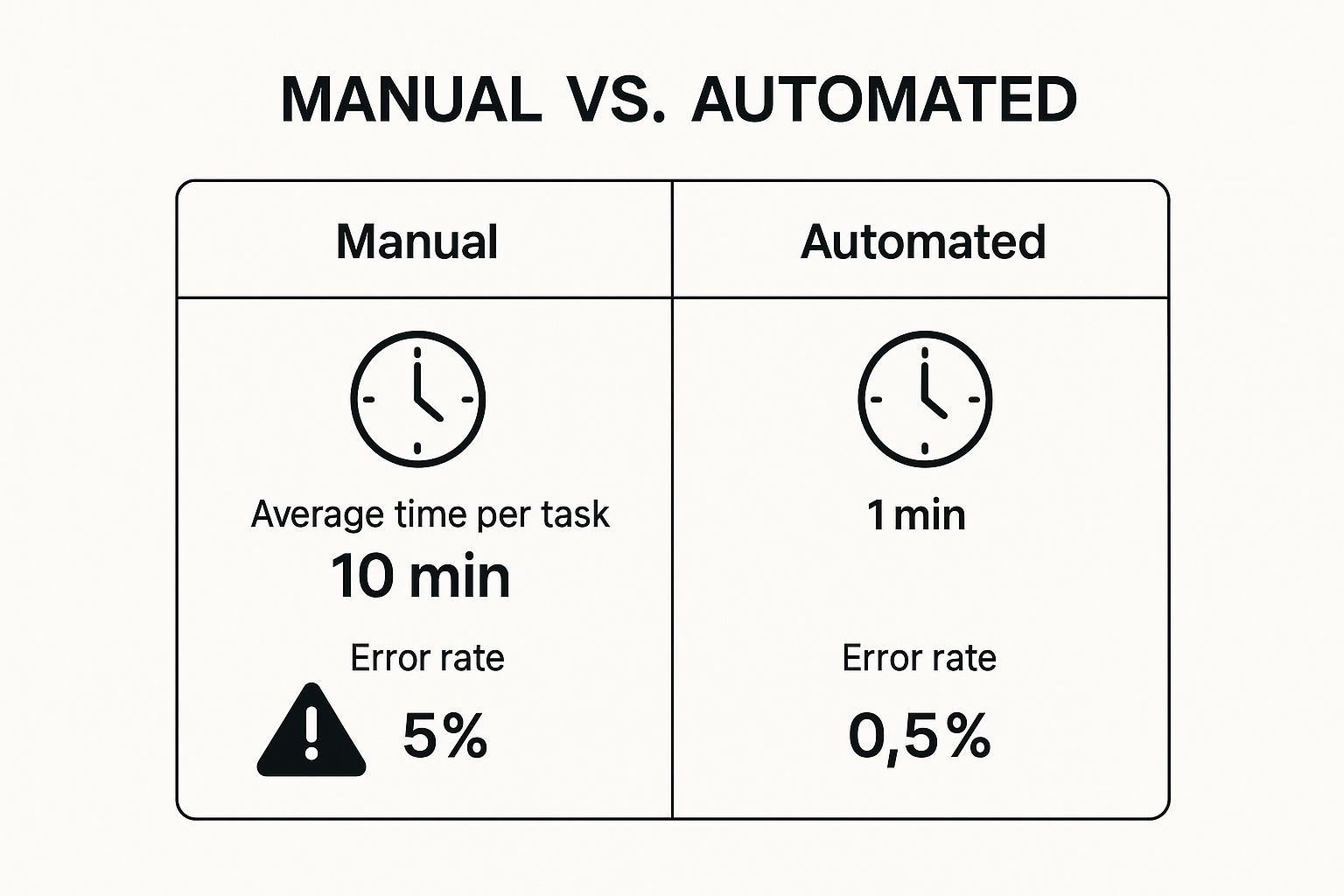
This visual really drives home the difference between sticking with manual work and embracing automation.


The numbers don't lie. Moving to an automated process can make things ten times faster and slash errors almost completely.


When to Consider Custom Scripts


Of course, sometimes an off-the-shelf tool just won't cut it. Maybe you have a very specific internal process or need to connect with an old-school piece of software that doesn't have a modern API. This is when custom scripting enters the picture.


Languages like Python or Google Apps Script give you the ultimate power and flexibility to build exactly what you need. A custom script puts you in complete control, but it's a heavier lift that requires some real development skills. It's the most powerful option, for sure, but also the most expensive and time-consuming. I usually only recommend this route for those mission-critical automations where the ROI is massive and undeniable.


To help you decide which path makes the most sense, here’s a quick breakdown of your options.


Comparing Automation Tools at a Glance


Tool Type

Best For

Technical Skill Required

Example Tools

No-Code

Everyday business users automating tasks between common web apps.

None. Uses a visual drag-and-drop interface.

Zapier, Make, IFTTT

Low-Code

Teams needing more customization than no-code offers, without full development.

Basic. Some familiarity with logic or simple scripting helps.

Retool, Appian, OutSystems

Custom Scripts

Highly specific, complex, or mission-critical workflows with unique requirements.

High. Requires proficiency in a programming language.

Python, Google Apps Script, PowerShell


Ultimately, your choice comes down to balancing power with simplicity.


When you're ready to dig deeper, browsing a list of top workflow automation solutions for business success can give you a clearer picture of what's out there. And if you’re focused on marketing, a good roundup of social media automation tools can point you toward the right solution for that specific need.


Building Your First Automated Workflow


Let’s get our hands dirty and build something. It's one thing to talk about automation, but it’s another to see it in action. The good news? Modern tools make it surprisingly straightforward.


Take a look at that interface from Zapier. You’re essentially just telling it what to do in plain English. This is the core of how these platforms work: you define a starting point (the trigger) and an outcome (the action). Everything else is just connecting the dots.


Understanding Triggers and Actions


Every automation you'll ever build, no matter how simple or complex, boils down to two key ingredients: triggers and actions.


Think of it as a basic "if this, then that" command.


A trigger is the event that kicks everything off. It’s the "if this happens..." part of the equation. An action is what your workflow does in response—the "then do that" part.


  • Trigger Example: A new lead fills out your form on your website.

  • Action Example: Add that lead's information to a specific Google Sheet and create a new contact in your CRM.


Once you get your head around this simple cause-and-effect relationship, you've unlocked the fundamental logic behind almost all no-code automation.


A Practical Walkthrough: Saving Email Attachments


Theory is fine, but seeing is believing. Let's build one of the most common and immediately useful workflows out there: automatically saving email attachments to cloud storage and notifying your team. This simple automation can completely eliminate the tedious task of manually downloading files and pinging people on Slack.


Here’s the plan:


  • The Goal: We want to grab invoices from a specific client, save them to a dedicated "Client Invoices" folder in Google Drive, and then post a heads-up in the finance channel on Slack.

  • The Trigger: A new email lands in a specific Gmail inbox from .

  • Action #1: The workflow will find the attachment in that email and upload it to the "Client Invoices" Google Drive folder.

  • Action #2: It will then send a message to the channel in Slack that says, "New invoice from Client Company just arrived."


Just like that, you’ve connected Gmail, Google Drive, and Slack. It’s a seamless process that runs in the background, 24/7.


Mapping Your Data Fields


When you set up an action, you have to tell the tool what information to use. This is called data mapping, and it's easier than it sounds. You’re just pointing the system to the right piece of data from the previous step.


You'll see a list of all the data fields pulled from your trigger. In our invoice example, it would look something like this:


  1. In the Google Drive "Upload File" step, you'd click on the "File" field.

  2. From the dropdown list of data from Gmail, you'd select the "Attachment" field.

  3. You could even get clever and map the email's "Subject" line to the "File Name" field to keep everything organized.


This mapping process is the real magic of no-code automation. It’s how you build dynamic workflows that intelligently move the right information to the right place, every single time.

Adding Filters for Precision Control


But what if that client sometimes sends emails with other junk attached, like images in their signature? You don't want those clogging up your invoice folder. This is where filters are a game-changer.


A filter acts like a bouncer for your workflow. It's a simple conditional step that checks if certain rules are met before letting the automation proceed. For our invoice bot, we could add a filter right after the trigger.


  • The Rule: Only continue if... the "Attachment File Name" from the Gmail trigger ends with .pdf.


Now your automation is smarter. It will completely ignore any non-PDF attachments, ensuring your Google Drive stays clean and organized. Adding this one little step transforms a good automation into a great one—making it far more reliable for real-world use.


How to Test and Monitor Your Automations


Building an automation is a great start, but just letting it run without any checks is asking for trouble. A broken automation that silently fails or, worse, creates a digital mess can cause way more damage than the manual task it was meant to replace. That's why testing and monitoring aren't just extra steps—they're absolutely critical to making your automation a reliable asset.


Before you unleash your new workflow on live data, you have to put it through its paces. Never, ever assume it's going to work perfectly the first time around. The real goal here is to catch all the weird errors and edge cases in a safe, controlled setting.


The Sandbox Phase: Your Dry Run


Think of testing as a dress rehearsal. You wouldn't hit the stage without practicing, right? The same goes for your automation. The process is pretty straightforward, but it's the key to making sure your workflow holds up in the long run.


Start by feeding it sample data. If your workflow is supposed to process invoices, for example, send it a few test emails with sample PDF attachments. The trick is to use a variety of data to see how it reacts:


  • Perfect Data: A clean, correctly formatted file. This confirms the main path of your workflow runs as expected.

  • Imperfect Data: An email with the wrong file type, like a .docx instead of a .pdf. This is to make sure your filters are working correctly and rejecting bad input.

  • Empty Data: An email with no attachment at all. This tests whether the workflow simply stops gracefully instead of throwing a confusing error.


Working through these scenarios helps you find and fix the weak spots before they can affect your actual business operations.


Setting Up Smart Alerts


Look, even the most carefully tested automations will eventually fail. It's inevitable. An app's API might get an unexpected update, a login credential could expire, or a service might have a temporary outage. You need to know the moment something breaks, not find out a week later when you realize nothing has been done.


This is where error handling and notifications save the day. Most automation platforms, like Zapier or Make, have features for this built right in.


I always set up a "fallback" step in my workflows. If any part of the automation fails, it triggers a final action that pings me directly in a private Slack channel with the specific error details.

This simple safety net turns a potential crisis into a minor, easily fixable issue. It gives you the peace of mind that comes from knowing you’re always in the loop.


Measuring Your True Return on Investment


So, how do you actually prove that all this automation work is paying off? Monitoring isn't just about catching errors; it's about measuring success and calculating your return on investment (ROI). The potential is huge—robotic process automation (RPA) can deliver an ROI between 30% and 200% in its first year alone. But be warned: about 70% of automation projects don't hit their goals, which really highlights why you need to monitor things closely. You can dig deeper into these automation industry insights to see why.


You don't need a complicated dashboard to get started. Just track these simple but powerful metrics:


  1. Hours Saved: This is the most obvious win. If a task took you 20 minutes every day and is now done instantly, you've just saved yourself over an hour and a half each week.

  2. Errors Reduced: Compare the error rate of the old manual process to your new automated one. This is a game-changer for things like data entry, where one tiny typo can be a big headache.

  3. Speed of Execution: How much faster does the process get done now? Quicker lead follow-ups or faster project kickoffs have a real, tangible impact on the business.


By keeping a simple log of these outcomes, you create a crystal-clear picture of the value you've created. It makes it much easier to justify investing even more of your time into learning how to automate repetitive tasks.


Got Questions About Automation? Let's Clear Things Up.


Jumping into automation for the first time naturally brings up a few questions. I hear them all the time. People worry about the cost, the technical skills needed, and what could go wrong. Let's walk through the most common concerns I see, so you can move forward feeling confident.


It's a common myth that automation is some massive, expensive undertaking reserved for big companies with dedicated IT teams. That might have been true a decade ago, but the game has completely changed.


Isn't This Going to Be Expensive?


Honestly, probably not. The beauty of modern automation is that it’s incredibly accessible. Most of the best no-code tools out there, like Zapier and Make, have surprisingly generous free plans. These are perfect for getting your feet wet.


You can start by automating a few simple, lower-volume tasks without spending a dime. It’s the perfect way to prove the value to yourself and your team. As you find more opportunities and your needs grow, their paid plans are built to scale with you. When you factor in the hours you get back and the costly human errors you eliminate, that small monthly subscription pays for itself many times over. Think of it as an investment in efficiency, not a cost. You can learn more by exploring the many business process automation benefits for 2025 that directly impact your bottom line.


Do I Need to Be a Coder to Do This?


Absolutely not. This is the single biggest reason automation has taken off. A whole new wave of "no-code" and "low-code" platforms was designed specifically for people who don't write code. They rely on visual, drag-and-drop builders that let you connect the apps you already use every day.


If you can map out a simple process—"when a new form is submitted, create a new row in my spreadsheet and send a Slack message"—then you have all the technical skill you need. You're building logic, not writing code.


What are the Common Mistakes People Make?


Getting started is easy, but a few common trip-ups can cause some headaches. If you know what to look for, you can sidestep them completely.


The number one mistake I see is trying to automate a process that's already a mess. If a human can't follow the steps consistently, a robot definitely can't. Automation magnifies efficiency, but it also magnifies chaos.

Here are a few other pitfalls to keep on your radar:


  • Trying to Boil the Ocean: Don't make your first project a massive, company-wide workflow. Start small. Pick a simple, repetitive task you do every day. Get that quick win, build your confidence, and then move on to bigger things.

  • Forgetting to Test: This one is huge. Always, always run your workflow with test data before you turn it on for real. You want to find any weird quirks or unexpected outcomes in a safe space, not with live customer data.

  • Not Documenting Your Work: It only takes five minutes to jot down what an automation does, which apps it connects, and why you built it. When you need to tweak it six months from now, you'll be incredibly glad you did.


Ready to stop wasting time on manual work and start focusing on growth? At Flow Genius, we design and implement custom automation solutions that give you back your most valuable asset—time. Schedule a consultation with Flow Genius today and discover your business's true potential.


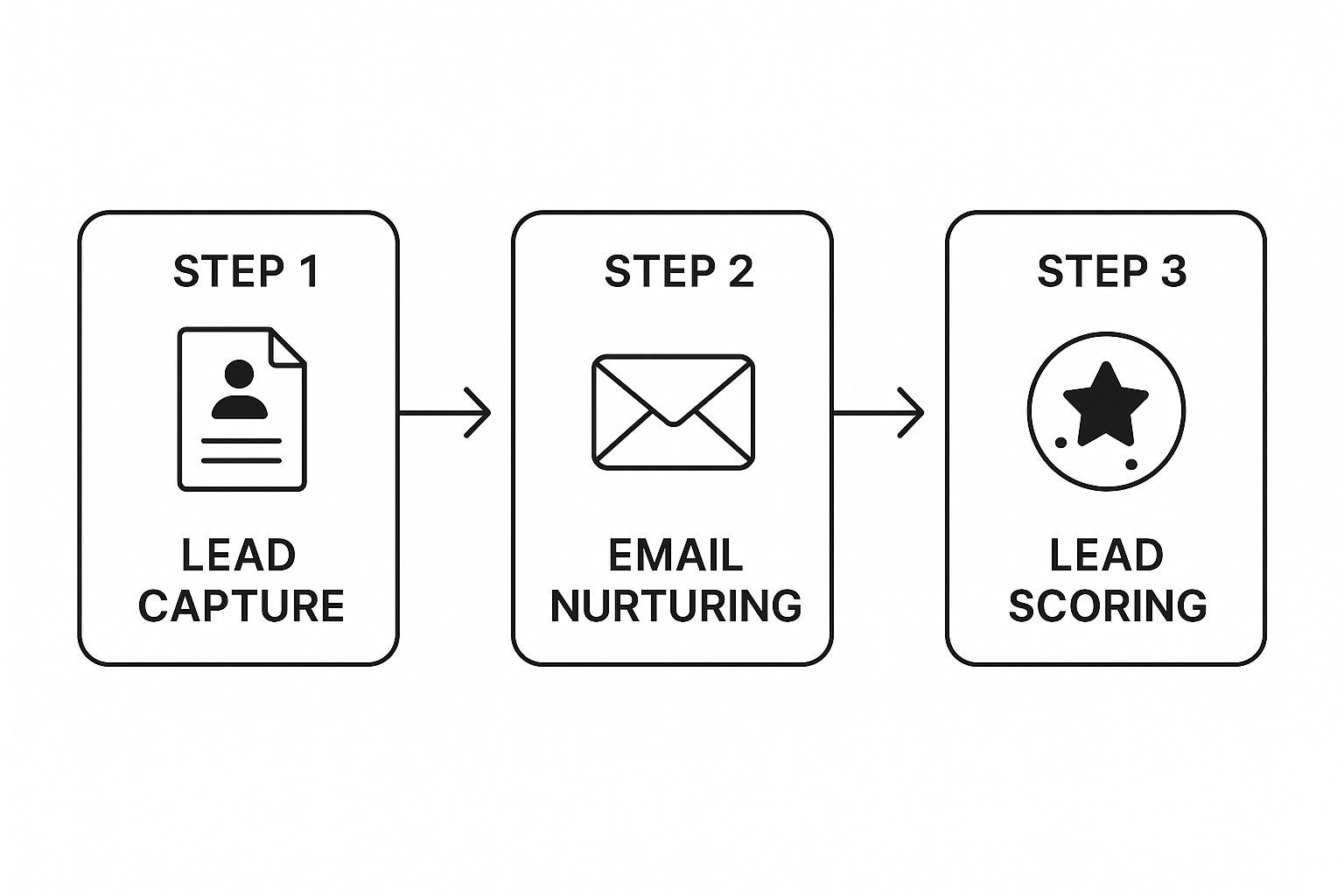
Automated lead generation is all about using software to do the heavy lifting—capturing, nurturing, and qualifying potential customers so you don't have to. The idea is to simply connect the tools you already use, like your website forms, CRM, and email platform, into a smooth, connected workflow. This system then guides a prospect from their very first interaction all the way to becoming a sales-ready lead.


It's a fundamental shift in thinking, moving you from constantly chasing down leads to building a system that brings them to you.


Why Manual Lead Generation Is Holding You Back


Does the endless cycle of manual follow-ups and missed opportunities feel familiar? If so, you're not alone. So many business owners get bogged down trying to remember who to email, when to check in, and which leads are actually worth the effort. This approach isn’t just inefficient; it costs you real money and creates major leaks in your sales funnel.


Lead generation is always a top priority for marketers, but the numbers show just how tough it can be. The average cost to acquire a single lead hovers around $198.44. To make matters worse, a staggering 44% of sales reps admit they're too swamped to follow up with leads effectively. This is exactly why automated nurturing systems are so critical.


The True Cost of Inefficiency


When you're handling leads by hand, you're losing more than just time—you're losing revenue. Every single lead that falls through the cracks is a lost sale. This is where automation stops being a "nice-to-have" and becomes a genuine strategic advantage.


Think about the classic pain points that come with a manual process:


  • Inconsistent Follow-Up: Leads get a random email here and there, which slowly kills their interest and trust.

  • Lost Opportunities: High-value prospects get buried in your inbox and are completely forgotten.

  • No Scalability: Your growth is capped by how many hours you can physically put into chasing down leads.

  • Lack of Data: Without a system, you're just guessing. It's almost impossible to know what’s working, so you can't make smart decisions to improve.


By automating these tedious tasks and building a clear workflow, you guarantee every lead gets the right message at the perfect time. This isn't about removing the human touch. It’s about amplifying it by freeing up your team to focus on the meaningful conversations that actually close deals. You can find more strategies on this in our guide on how to automate tasks and win back your time.

First, Blueprint Your Lead Generation Workflow


I’ve seen it a hundred times: a business gets excited about automation, dives headfirst into a tool like Zapier or Make.com, and ends up with a mess. Jumping in without a clear plan is like trying to build a house without a blueprint. You’ll get something built, but I guarantee it won’t be the solid, reliable structure you need.


Before you even think about connecting apps, you have to map out your current lead generation process. This is, without a doubt, the most skipped step, and it’s also the most critical one. If you automate a broken or clunky process, you’re just getting bad results faster. The whole point is to make the technology serve your strategy, not the other way around.


Visualize the Customer's Journey


Grab a whiteboard or open up a free tool like Miro. Your first job is to trace the exact path a lead takes to find you. Forget about systems for a minute and focus entirely on the human experience. Where are people actually coming from?


Your main lead sources probably include things like:


  • Website Forms: Think "Contact Us" or "Request a Quote" pages.

  • Lead Magnets: That PDF guide you offer, a checklist, or a webinar signup.

  • Social Media Ads: The campaigns you're running that point to a landing page.

  • Direct Outreach: Cold emails or messages on LinkedIn.


Get granular and list every single entry point. This simple exercise almost always uncovers surprising gaps and opportunities. It’s not uncommon to discover that 80% of your best leads come from one specific source you’ve been neglecting, while another is just a time-wasting dead end.


Define Your Ideal Lead and Follow-Up Sequence


Once you know where leads are coming from, you need to get crystal clear on what a "qualified" lead actually is for your business. This is way more than just a name and an email. It’s a specific set of criteria that tells you a prospect is a fantastic fit. For a B2B software company, maybe it's someone in the logistics industry with a company size over 50 employees.


With that definition in hand, start sketching out the perfect follow-up sequence. What’s the very first thing that should happen the moment someone fills out your form?


Here’s a real-world example I love: A local roofing contractor set up an automation for their website form. The instant a lead comes in, it triggers an SMS that says, "Hi [Name], thanks for your roofing quote request! John will call you from this number within 15 minutes to discuss your project." This one tiny automation does so much—it sets expectations, builds trust, and skyrockets the chances of actually connecting with the lead.

Your map should detail every single touchpoint. Think about the initial confirmation email, the step that adds them to your CRM, the notification that pings the right salesperson, and even the follow-up email that goes out three days later if they haven’t replied.


This visual blueprint is your non-negotiable guide. It’s what you’ll use to build a lead generation machine that actually works.


Choosing Your Automation Toolkit


Alright, you've mapped out your workflow. Now for the fun part: picking the tools to bring it to life. The software market is noisy, but you can cut through it by thinking about your tech stack in a couple of distinct categories.


This isn't about finding one "perfect" tool. It's about building a stack that's powerful, cost-effective, and—most importantly—right for your business. Your choice will generally fall into one of two camps: specialized integration platforms or comprehensive all-in-one suites.


Integration Platforms vs. All-In-One Suites


Think of integration platforms like Zapier or Make.com as the universal translators for your software. They’re the glue. These tools are built to connect the apps you already know and love, letting them share data and trigger actions in each other. You can easily connect your website form to your CRM, then to your email list, creating a smooth, automated handoff.


On the other side, you have all-in-one platforms. Think of giants like HubSpot or ActiveCampaign. These platforms bundle marketing, sales, and service tools into a single ecosystem. Everything from lead capture and email campaigns to CRM management happens under one roof, which means the built-in integrations are incredibly deep and reliable.


Your existing tech stack is the biggest factor here. If you've already got a set of tools you rely on, an integration platform is your best bet. If you're just starting out or looking to simplify a messy collection of software, an all-in-one suite could be a game-changer.

Key Features Your Automation Tools Must Have


No matter which route you take, a few core features are absolutely essential for any serious lead generation automation. As you evaluate your options, make sure they nail these fundamentals:


  • Triggers: These are the starting pistol for your workflow. A trigger is the specific event that kicks everything off, like a "New Form Submission" from your website or a "New Contact Added" in your CRM. Your tool has to catch these without fail.

  • Actions: These are the jobs your automation actually does. Once a trigger fires, an action could be "Send Welcome Email," "Create a Deal in the CRM," or "Add Contact to a Nurture Sequence." The more actions a tool supports, the more you can build.

  • Conditional Logic (If/Then): This is where your automation goes from simple to smart. Conditional logic lets your workflow make decisions. For example, if a lead is from the tech industry, route them to a specific salesperson. Or if a lead's company size is over 100 employees, send a priority notification to your team on Slack.


Marketing automation isn't just a nice-to-have; it's a proven way to grow. In fact, a whopping 80% of users see an increase in their leads after implementing it. When asked what features are most important for converting those leads, marketers point to lead management (44%), lead scoring (40%), and email marketing (45%). You can see more data on how these stats impact business growth.


To help you visualize the trade-offs, here’s a quick comparison of the different tool types.


Automation Tool Comparison: Zapier vs. Make.com vs. All-in-One Platforms


Deciding between a flexible connector and a unified system depends entirely on your team's technical comfort, budget, and how complex your lead generation process is. This table breaks down the key differences.


Feature

Zapier

Make.com

All-in-One Platforms (e.g., HubSpot)

Best For

Simplicity and a massive library of app integrations.

Visual workflow building and complex, multi-step scenarios.

Businesses wanting a single source of truth for marketing, sales, and service.

Ease of Use

Very user-friendly, great for non-technical users.

Steeper learning curve but incredibly powerful once mastered.

Generally easy to use, with a unified interface and dedicated support.

Flexibility

High. Connects almost any app you can think of.

Very high. Offers advanced logic, routing, and error handling.

Lower. Deep integration within its own suite, but can be limited with outside tools.

Pricing Model

Based on the number of tasks (automations) you run per month.

Based on the number of operations (individual steps) you use per month.

Subscription-based, often tiered by the number of contacts and features.

When to Choose

You love your current tools and just need them to communicate.

You need to build complex, custom workflows with conditional logic.

You're consolidating tools or starting from scratch and want one system to do it all.


Ultimately, there's no single right answer. The goal is to find the right balance for your team. You don't need every bell and whistle, just a solid foundation of triggers, actions, and smart logic to make your lead generation process work for you.


For a more detailed breakdown of specific software, take a look at our guide to the top workflow automation solutions for business success.


Getting Your Hands Dirty: Building Your First Automated Lead Workflow


Alright, you've got your blueprint and you've picked your tools. Now for the fun part: making it all work together. Theory is one thing, but seeing your first workflow spring to life is where the magic really happens.


Let's walk through a classic, must-have automation: instantly following up with someone who downloads a guide or checklist from your website.


This single workflow can completely change how you handle new leads. Forget manually checking form submissions, copying and pasting info into a spreadsheet, and setting reminders to send an email. Once this is set up, it all happens in the blink of an eye.


Kicking Things Off: The Trigger and First Actions


Every automation starts with a trigger—the specific event that gets the ball rolling. For our example, the trigger is a "New Form Submission" from a tool like Gravity Forms or Typeform. Think of it as the starting gun.


Once that form is submitted, the first thing we need to do is get that person's information organized. I always set up two actions to run at the same time:


  • Log the Lead in Your CRM: The contact’s details (name, email, etc.) get zapped straight into your CRM, whether it's HubSpot or Pipedrive. This creates a new record or updates an existing one. No more leads falling through the cracks.

  • Add to an Email List: At the same exact moment, they're added to the right list in your email marketing platform, like Mailchimp or ConvertKit. This is vital for nurturing them down the road.


This is the fundamental flow: capture the lead, get them into your systems, and start the conversation.


Delivering the Goods and Getting Smart About It


With the lead's info safely stored, it's time to give them what they came for. The very next step is an automated action that sends a personalized "Welcome Email." This email lands in their inbox moments after they hit "submit."


Inside, you'll thank them and—most importantly—give them the link to download the resource. This immediate delivery is huge for building trust right from the start.


But why stop there? We can add some intelligence to this workflow using conditional logic, sometimes called "paths" or "filters." This lets your automation make decisions on its own. For example, you could set up an if/then rule:


IF the lead's "Industry" field is "Technology," THEN ping the #tech-leads channel in Slack.

Suddenly, your top tech salesperson gets a real-time notification about a hot lead. That’s how you get the right leads to the right people, instantly. The number of apps you can connect is staggering, meaning you can tie together just about any tool you're already using.


The Gentle Nudge: Scheduling a Follow-Up


The final piece of this puzzle is a well-timed delay. Let's be honest, most people who download an e-book aren't ready to buy that same day. You need to give them some space.


By adding a "Delay" action, you can build this breathing room right into the workflow. Here’s a simple way to do it:


  1. Set a Delay: Tell the workflow to pause for a bit, maybe 3 days.

  2. Send a Follow-Up: After the wait, another automated email goes out. This isn't a hard pitch. It's a simple, helpful check-in: "Hey, just wanted to see if you had a chance to look at the guide. Any questions I can answer?"


With this simple but incredibly effective workflow, you've built a system that gives every single lead a prompt, personal, and relevant experience—all without you lifting a finger. This is what effective lead generation automation is all about.


Using AI to Supercharge Your Automation


Once you've got the hang of building basic workflows, the real fun begins: weaving in artificial intelligence. This isn't about some far-off, futuristic concept. It’s about using practical AI tools to give your existing automations a serious upgrade, making them smarter and far more effective. You're moving beyond just automating tasks and starting to automate actual decisions.


Think of AI as the brain that powers your whole automation engine. It can analyze data, figure out context, and make calls that used to require a person to step in. That intelligence is what really lets you scale up your lead generation without killing the personal touch.


The shift to AI in lead generation is already happening, and fast. Consider that 69% of high-performing sales teams are already using AI. Smart tools like AI-driven lead scoring can bump up sales ROI by 10% to 20%, and 62% of consumers say they’d rather talk to an AI chatbot than wait for a human.


Real-Time Lead Qualification with AI Chatbots


One of the most immediate and powerful ways to use AI is right on your website. An AI-powered chatbot can engage with visitors around the clock, doing way more than just spitting out canned answers. It can qualify leads on the spot.


Picture this: a visitor lands on your pricing page. The chatbot pops up and starts a conversation with a few targeted questions. "What's the biggest headache in your current process?" or "How many people are on your team?"


Based on those answers, the bot can instantly:


  • Figure out if they're a solid fit for your product.

  • Send high-value prospects straight to a sales rep’s calendar to book a demo.

  • Drop promising leads who aren't quite ready into a tailored email nurture sequence.


Just like that, your website goes from being a static brochure to an intelligent, active part of your sales team.


By bringing AI into the mix, you’re not just automating your sales process; you’re making it smarter and more responsive. This lets your team focus their energy where it really counts: closing deals. For a deeper dive, check out our guide on how to https://www.flowgenius.ai/post/automate-sales-process-for-real-growth-a-guide.

Predictive Lead Scoring and Personalized Outreach


Beyond chatbots, AI is a powerhouse for analyzing lead behavior to predict who’s most likely to buy. Forget manually assigning points based on simple rules. Predictive lead scoring uses algorithms to identify the key traits and actions of your best customers and then hunts for those same patterns in your new leads.


This means your CRM can automatically surface the hottest leads, making sure your sales team is always working on the opportunities with the best shot at closing. And it doesn't stop there. AI writing assistants can draft incredibly personalized email sequences at scale, pulling in details about a lead's industry, recent company news, or specific pain points.


In the end, this is all about Solving Lead Generation Challenges with AI by making your entire system more efficient and a whole lot smarter.


Got Questions About Lead Automation? Let's Clear Things Up.


Thinking about automating your lead gen is exciting, but it's natural for a bunch of questions to pop up. Moving from theory to practice is where the real work begins. Let's tackle some of the most common questions and concerns I hear from businesses just starting out.


My goal here is to give you the confidence to build your system by addressing the practical hurdles you're likely to face.


How Much Does Lead Automation Actually Cost?


This is always the first question, and the honest answer is, "it depends." Your costs can range from literally nothing to thousands of dollars a month, all based on the tools you pick and how complex your needs are.


Here’s a realistic look at the numbers:


  • For the Scrappy Startup: You can get started for less than $50 a month. Seriously. By using the free or entry-level plans from tools like Zapier or Make.com, you can easily connect a simple website form to your email list or a basic CRM. This is perfect when you're just dipping your toes in and dealing with a lower volume of leads.

  • For the Growing Business: Once you start seeing real traction, your needs get a bit more complex. You might upgrade to a more powerful plan on your automation platform or invest in an all-in-one tool like ActiveCampaign. At this stage, a budget of $150 to $500 per month is pretty standard for handling more leads and building smarter workflows.

  • For the Established Enterprise: Large-scale operations need a different level of power. This is where platforms like HubSpot or Marketo come in, with costs often ranging from $800 to well over $3,000 per month. For that price, you get incredibly deep analytics, sophisticated lead scoring, and hands-on support.


My best advice? Start small. Don't get locked into a pricey annual plan for features you might never use. Get a simple, effective workflow running, prove it generates a positive return, and then reinvest those profits into scaling up.

What Are the Biggest Mistakes People Make?


Over the years, I've seen a few classic blunders that can trip people up right out of the gate. If you can sidestep these, you'll be way ahead of the curve.


The absolute number one mistake is automating a bad process. If your manual lead follow-up is already a disorganized mess, all automation will do is help you create that mess faster and on a bigger scale. Clean up your process first.


Another huge pitfall is picking the wrong tool for the job. It's so easy to get dazzled by a platform that promises a million features when you really only need a handful. This just leads to overpaying for a system that's too confusing to use effectively.


And finally, people often forget the human touch. Automation should make your interactions feel more personal and timely, not like they're coming from a robot. If your automated emails are generic, cold, and impersonal, you can bet your engagement rates will plummet.


Ready to build a powerful lead generation system without the guesswork? Flow Genius specializes in designing and implementing custom automation blueprints that save you time and drive growth. We handle the technical setup so you can focus on closing deals. Schedule a free consultation to start automating your success.


bottom of page