top of page

Insights

Short. Precise. Effective.

Lean process improvement is really just a straightforward idea: systematically get rid of waste so you can give your customers more of what they actually want. It's all about making your operations quicker, smarter, and more effective by cutting out anything that doesn't add real value from the customer's perspective.


Think of it like tuning a high-performance engine. You're not just making it run; you're making it run perfectly.


The Core Idea Behind Lean Thinking


At its heart, lean thinking is a constant, relentless search for a better way. It’s not some one-off project you can check off a list. Instead, it’s a fundamental shift in company culture where everyone, from the top floor to the shop floor, is empowered to spot and eliminate inefficiency.


The ultimate goal is to create a seamless, uninterrupted flow of work that delivers exactly what the customer needs, right when they need it, with zero unnecessary steps or frustrating delays. This entire philosophy grew out of the legendary Toyota Production System and has since been successfully applied in just about every industry imaginable, from software development to healthcare.


The real power of this approach is its sharp focus. By zeroing in on removing "waste," businesses can unlock some truly impressive results. And when we talk about waste, we're not just talking about what goes in the trash bin. In lean, waste is anything that eats up resources but adds zero value.


"Lean is a way of thinking, not a list of things to do." – Shigeo Shingo, a leading expert on the Toyota Production System

Companies that truly embrace lean principles often see huge gains. Data from the Lean Enterprise Institute shows that manufacturers adopting lean can boost productivity by 25% to 50% and cut costs by 20-30%.


These numbers aren't magic; they come from applying a simple but powerful idea. To get started, you first need to understand your current state, which is where mapping out your workflows with our process improvement plan template guide can be a game-changer.


The Eight Wastes of Lean (DOWNTIME)


To really get a handle on what to look for, the lean methodology identifies eight specific types of waste, easily remembered by the acronym DOWNTIME. Spotting these in your own processes is the first major step toward eliminating them.


Waste Type (Acronym)

Description

Example

Defects

Products or services that are incorrect or require rework. This is a direct hit to quality and resources.

A software bug that needs a patch after release, or a manufactured part that doesn't meet specifications.

Overproduction

Making more of something, or making it sooner, than is needed by the next process or the customer.

A bakery making 200 loaves of sourdough when daily demand is only 100, leading to stale, wasted bread.

Waiting

Idle time created when people, information, or materials are not ready.

A hospital patient waiting for lab results, or a developer waiting for a code review before they can proceed.

Non-Utilized Talent

Failing to use the full knowledge, skills, and creativity of your team.

An experienced engineer stuck doing basic data entry instead of solving complex problems.

Transportation

Unnecessary movement of products and materials from one location to another.

Moving raw materials from a warehouse to the factory floor, then to another station, then back to storage.

Inventory

Excess products and materials that are not being processed. Excess inventory hides other problems.

A warehouse full of last year's smartphone model that is now difficult to sell at full price.

Motion

Any movement by people or equipment that is not necessary to perform an operation.

A factory worker having to walk across the room repeatedly to get tools that could be stored at their station.

Extra-Processing

Doing more work or adding more steps than are necessary from the customer's perspective.

Applying three coats of paint when the customer's specifications only require one for a perfect finish.


Understanding and internalizing these eight wastes gives you a new lens through which to view your operations. Suddenly, you start seeing opportunities for improvement everywhere.


The Five Principles That Drive Lean Success


Lean isn't just about a set of tools or fancy techniques; it's a fundamental shift in mindset. This mindset is built on five core principles that work in harmony, guiding every decision and action. They're not a checklist to be ticked off, but rather a compass that consistently points your organization toward delivering maximum value to the customer.


Think of these principles as a powerful, self-reinforcing cycle. Each one builds on the last, creating a loop of continuous improvement that can genuinely reshape how you do business.


The image below gives a great visual of this hierarchy, showing how everything in Lean starts with one thing: identifying true value.
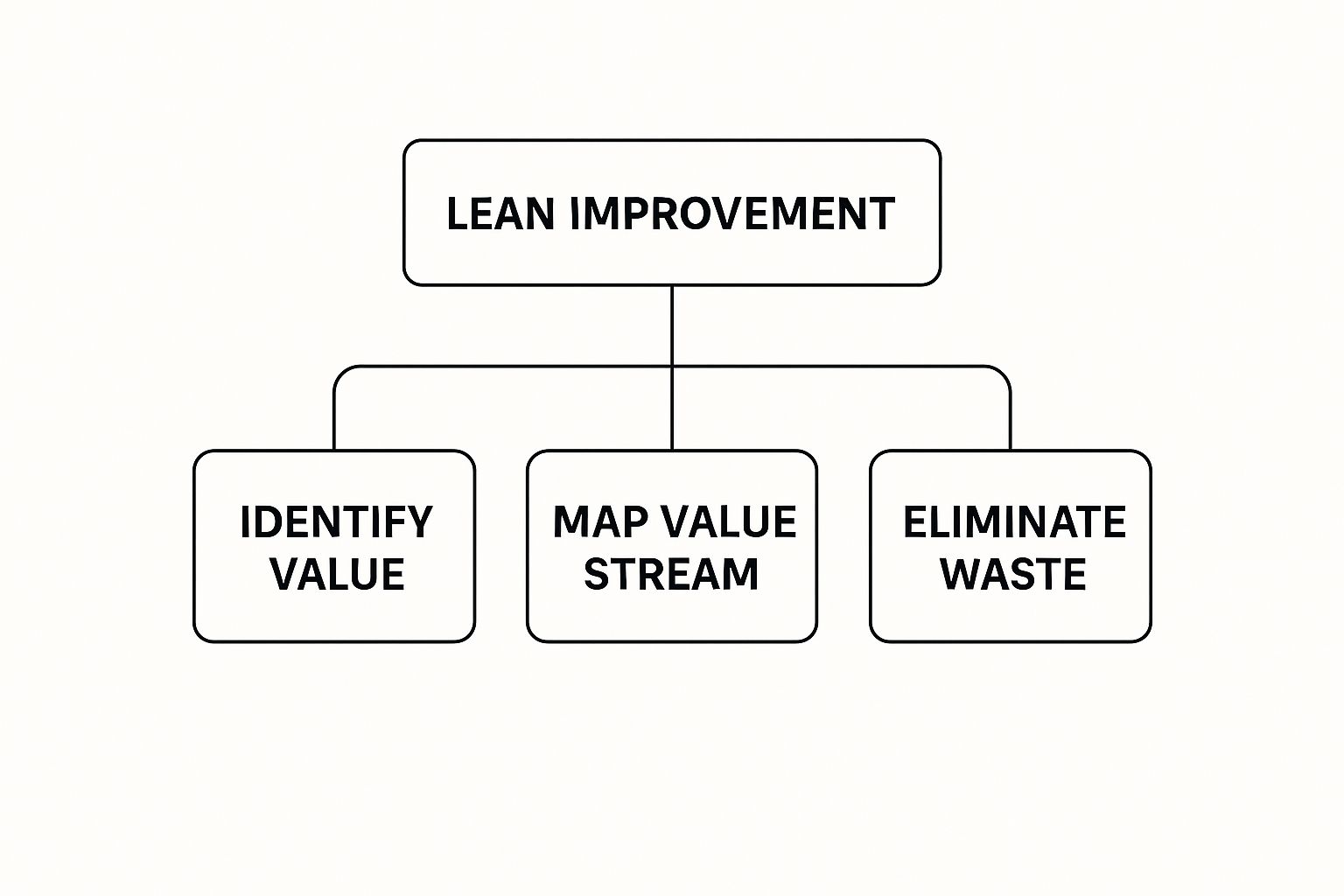


As you can see, the entire journey begins with understanding the customer's perspective, which then naturally leads to mapping out the process and hunting down waste.


1. Define Value From the Customer's Viewpoint


The first and most critical principle is deceptively simple: value is defined by the customer, and absolutely nothing else. It’s easy to get caught up in what we think is important or what’s easiest for us to produce. But if the customer isn't willing to pay for it, it isn't value. Period.


A software team might spend months building a technically brilliant new feature. If users don't need it or find it confusing, it’s just sophisticated waste. Real value might be a simple bug fix that stops their system from crashing or a redesigned interface that saves them five minutes every day.


This principle forces you to step outside your own four walls and see your work through the eyes of the people who actually use it.


2. Map the Entire Value Stream


Once you know what your customer truly values, the next job is to map the value stream. This is the entire sequence of actions—from initial concept to final delivery—required to bring that value to the customer. We're talking about everything: design, sourcing, production, and shipping.


The goal here is to get a brutally honest, high-level view of every single step. By laying out the entire process, both the good and the bad, you can instantly see where the eight wastes (DOWNTIME) are lurking. This map isn't just a diagram; it's your treasure map for finding improvement opportunities.


3. Create an Uninterrupted Flow


With your value stream mapped out, the third principle is to create flow. This is all about making work move smoothly from one step to the next without any of the delays, bottlenecks, or interruptions you just identified. When you start eliminating waste, flow is the natural result.


Picture a fulfillment center where an order sits in a bin for hours, just waiting for someone at the next station. That’s a classic example of broken flow. In a lean process, that order would move seamlessly from picking to packing to shipping, drastically cutting down the time it takes to get to the customer.


4. Establish a Pull System


The fourth principle, establishing pull, completely flips the script on traditional production. Instead of "pushing" products out into the world based on forecasts and best guesses, a pull system means you only create what the customer has asked for. Work is triggered by real demand, not by a prediction.


"Mistakes are inevitable, but the defects that arise from them are not." – Shigeo Shingo

Toyota famously mastered this approach. By doing so, they minimized overproduction and slashed their inventory—two of the biggest and costliest forms of waste. It ensures you’re only using your time, money, and materials to create something that already has a home.


5. Pursue Absolute Perfection


Finally, the fifth principle is a relentless pursuit of perfection. This isn't about reaching some mythical, flawless state. It's about embedding continuous improvement—known as kaizen—into the very DNA of your company culture.


This last step makes Lean a never-ending journey, not a one-and-done project. By constantly cycling back through the first four principles, your organization will always be finding new ways to define value, spot waste, and improve flow. It creates an environment where everyone, every single day, is empowered to make things just a little bit better.


Mastering the Tools in the Lean Toolbox
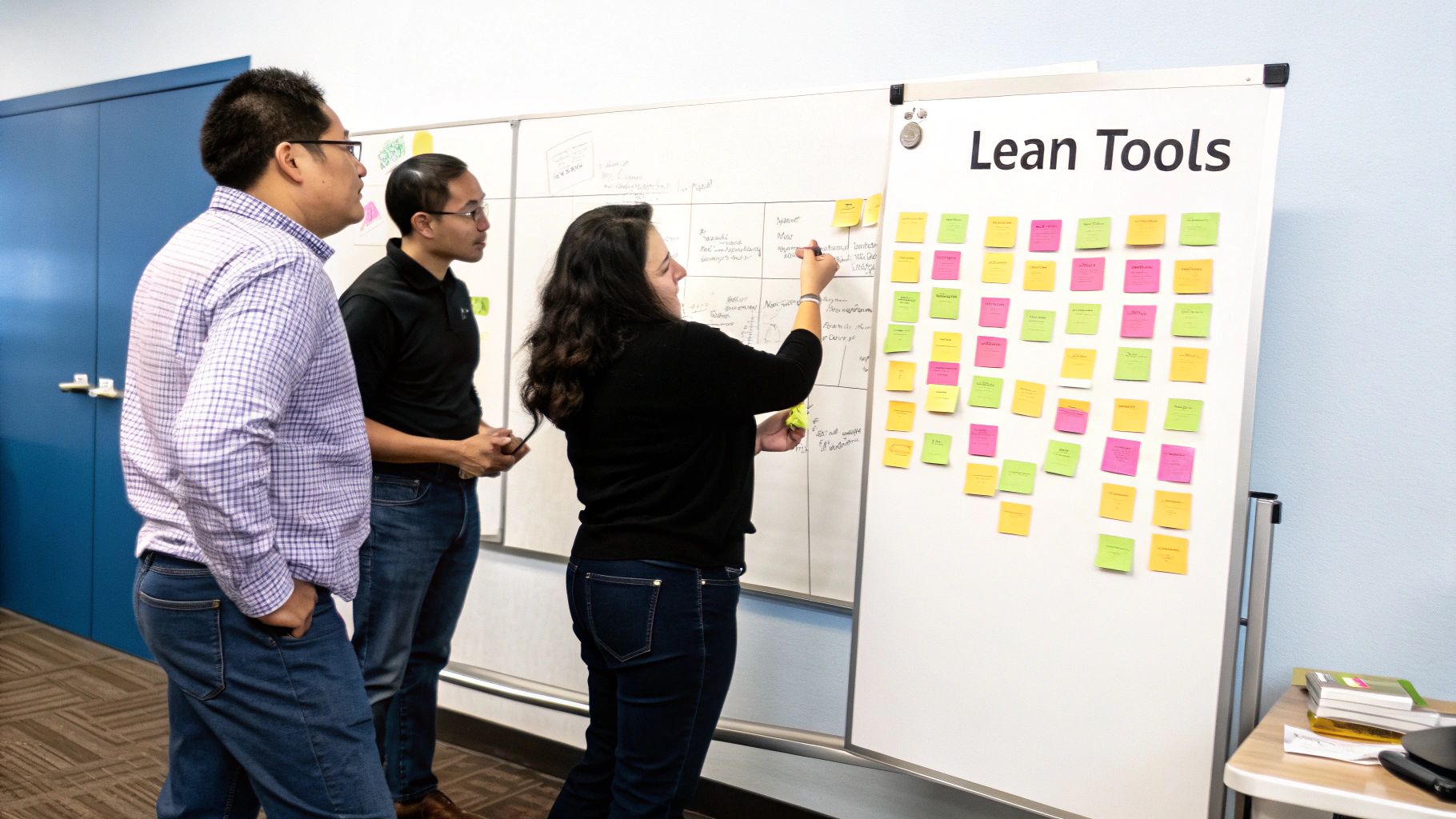


Understanding the principles of Lean is the first step, but putting them into practice is where the real work begins. This is where the Lean toolbox comes in. It’s not about fancy software or expensive machinery; it’s a collection of practical, often visual, methods that make waste impossible to ignore and give teams the power to solve problems on the spot.


These tools are what connect the high-level philosophy of Lean to the day-to-day grind. Each one has a specific job, whether it's mapping out a workflow, tidying up a physical space, or stopping errors before they even have a chance to happen.


Visualizing Workflow With Kanban


One of the most widely used Lean tools is the Kanban board. Born at Toyota, Kanban (which is Japanese for "visual signal") is a brilliantly simple way for teams to see their entire workflow in one place. At its core, it's just a board with columns that represent the different stages of a process—think "To Do," "In Progress," and "Done."


Imagine a marketing team swamped with content requests. By putting each blog post or video idea on a card and moving it across a Kanban board, bottlenecks become obvious. If the "In Review" column is overflowing while "Writing" is empty, everyone knows exactly where the logjam is. This simple act of making work visible keeps tasks from falling through the cracks and gets everyone on the same page.


For a deeper dive into how tools like Kanban fit into the bigger picture, this guide to process improvement methodology offers a fantastic overview.


Creating Order With the 5S System


The 5S method is another cornerstone tool, focused on creating a clean, organized, and efficient workspace. It's a systematic, five-step approach to decluttering a physical or digital environment, which directly cuts down on the waste of unnecessary motion and waiting.


The five steps are:


  • Sort (Seiri): Get rid of everything you don't need in the work area.

  • Set in Order (Seiton): Give everything that remains a specific, logical home.

  • Shine (Seiso): Clean the workspace and make tidiness a daily routine.

  • Standardize (Seiketsu): Create clear rules and procedures to keep the first three S's in place.

  • Sustain (Shitsuke): Build the habits that make 5S a natural part of your company culture.


Think about a hospital emergency room. Applying 5S means critical supplies like defibrillators and bandages are always in the same clearly labeled spot. No one wastes precious seconds frantically searching during a crisis, which can directly improve patient outcomes.


The goal of Lean is not to be Lean, but to be able to deliver more value to your customer. By applying these tools, you're building a system that achieves just that.

Advanced Tools for Deeper Insights


Beyond the foundational tools, Lean offers more advanced methods for getting to the root of problems. Value Stream Mapping (VSM) is a powerful technique for diagramming every single step in your process, from customer request to final delivery. By mapping it all out, you can pinpoint exactly where the delays and waste are hiding.


Another brilliant concept is Poka-Yoke, which literally means "mistake-proofing." It’s about designing your processes so that it’s physically impossible to make a mistake. The USB cable that only fits one way is a perfect, everyday example of Poka-Yoke in action.


The Lean toolbox is also evolving with technology. For example, modern accounting automation tools are a great example of how software can be used to eliminate manual data entry—a classic form of process waste.


By mastering these tools, you're not just tweaking a process here and there. You're systematically building a stronger, more efficient, and more resilient operation from the ground up.


What You Really Get From Going Lean


Jumping into lean process improvement isn't just about cleaning up a messy workflow. It's about starting a chain reaction that strengthens the entire business, from the ground up.


Think about it: when you make a small operational change, like shortening a lead time or improving product quality, you're not just tweaking a process. You're directly impacting the company's financial health. Smoother, faster operations almost always lead to a healthier bottom line.


Connecting Process to Profit


This is where the magic happens. Those small operational wins become the engine for real financial gains.


Let's say you figure out how to deliver your service 20% faster. That means you get paid sooner, which immediately improves your cash flow. Or maybe you eliminate a common defect in your product. Suddenly, you're not wasting money on rework, returns, or warranty claims. That's pure profit going straight back into the business.


"Lean creates a direct line of sight between small, daily improvements and significant, long-term financial health. It turns operational excellence into a reliable source of business growth."

These efficiencies give you a serious edge. You start delivering better products to your customers, faster than your competition. That’s how you grab market share and earn loyalty that lasts.


It's Not Just About the Numbers


The financial perks are great, but the cultural shift that lean brings is often the real prize. When you give your team the power to spot and solve problems themselves, their engagement goes through the roof.


They're no longer just cogs in a machine. They become invested owners of their work, actively shaping the company's success. That problem-solving mindset gets woven into the fabric of your organization.


This creates a culture where everyone is always looking for a better way—a safer, smarter, more efficient way—to get things done. You’re not just fixing today's problems; you're building a team that's ready for tomorrow's challenges.


The best part is how these benefits feed into each other, creating a powerful loop of positive change:


  • Improved Quality: You stop patching over mistakes and start fixing the root causes of errors. This means happier customers and fewer costly blunders.

  • Increased Productivity: By cutting out the fluff, your team can achieve more without burning out. You get more done with the resources you already have.

  • Enhanced Employee Morale: People who have a say in how their work gets done are happier and more satisfied. This feeling of ownership is a huge morale booster and helps reduce turnover.

  • Greater Profitability: When you combine higher productivity with less waste, the financial results speak for themselves. Streamlined operations are one of the most reliable ways to find proven strategies to reduce operating costs.


Ultimately, lean is about building a stronger, more competitive, and more resilient business from the inside out.


Navigating the Challenges of Lean Implementation


Adopting a lean approach is a powerful move, but let's be honest—the path isn't always a straight line. While the benefits are huge, the journey often involves navigating some very real, very human challenges. Knowing what these roadblocks are ahead of time is the first step to clearing them.


The shift to a lean mindset requires more than just learning new tools. It demands a fundamental change in your company's culture, and this is often where the real friction happens. Teams can be resistant to changing long-standing habits, and leadership might not fully grasp what it takes to actually support the transformation.


Overcoming Resistance to Change


One of the most common hurdles you'll face is pushback from employees. People naturally get comfortable with their routines, and a call to change can feel like a personal critique of how they've been doing their job. Skepticism can take root fast if the "why" behind the change isn't communicated clearly and often.


The best way to turn skeptics into champions is to get them involved. Don't just hand down a finished plan from on high; invite teams into the process of spotting waste and brainstorming better ways to work. When people have a hand in designing the new system, they feel a sense of ownership and are far more likely to get on board.


Another great strategy is to start with small, visible wins. Instead of trying to overhaul the entire company from day one, find one frustrating bottleneck and fix it. Celebrating that small success builds momentum and shows everyone—in a tangible way—that this lean stuff really does make their jobs better.


Securing True Leadership Buy-In


Let's be clear: you can't have a successful lean implementation without genuine, active support from the top. It’s not enough for executives to simply give the initiative a thumbs-up. They have to be its most visible advocates. That means providing the right resources, knocking down organizational barriers, and walking the walk themselves.


A common pitfall is when leadership treats lean like a one-off project with a start and end date. True success comes from a long-term commitment to continuous improvement. Leaders have to consistently reinforce the message that this is simply how we operate now, not just a temporary flavor of the month.


The human element is the most critical component of any lean transformation. When you focus on empowering people and building a supportive culture, the tools and processes will follow.

Research backs this up time and time again. In fact, studies suggest that 60-70% of lean success hinges on culture and employee engagement, while only 30-40% is about the tools themselves. Common mistakes, like launching too many projects at once or not giving teams the resources they need, almost always stem from a disconnect between the tools and the people meant to use them. You can dive deeper into this by learning about common implementation pitfalls.


Your First Steps on the Lean Journey


It’s easy to get excited about what lean can do for your business. The real challenge? Turning that initial spark of inspiration into real-world action. The trick is to resist the urge to overhaul your entire operation overnight. The lean journey starts with a single, manageable step.


Don’t get bogged down by the big picture. Instead, zero in on one specific area where you can make a tangible difference. This strategy helps you build momentum and show everyone the value of lean thinking, fast. A great place to start is with a recurring, frustrating problem—that one issue the team is always complaining about. A quick win there can turn even the biggest skeptics into believers.


Simple Starting Points


To get the ball rolling, try one of these practical first steps. They don't require a big budget or tons of resources, but they offer a huge return in terms of learning.


  • Conduct a "Waste Walk": This is as simple as it sounds. Grab a notepad, pick a process, and physically walk it from beginning to end. Watch every single action, delay, and handoff. You will be absolutely stunned by the inefficiencies you uncover just by observing with a fresh perspective.

  • Map One Workflow: Get your team together in front of a whiteboard. Have everyone map out a single process from start to finish using sticky notes for each step. This simple, collaborative exercise makes bottlenecks and redundant tasks jump out at you in a way that’s impossible to ignore.


The goal isn’t perfection right out of the gate. It’s about sparking a culture of continuous improvement by proving that small, focused changes can deliver surprisingly big results.

By taking these first steps, you'll start building the confidence and practical know-how you need to create a leaner, more effective organization.


Common Questions We Hear About Lean


Even with a good grasp of the basics, a few questions always seem to pop up when people first start digging into lean process improvement. Let's clear the air on some of the most common ones.


Getting these details straight can make a huge difference in understanding how lean actually feels and functions in the real world.


What's the Difference Between Lean and Six Sigma?


It's a classic question because you often hear them mentioned in the same breath. The easiest way to think about it is this: Lean is all about speed, while Six Sigma is all about quality.


Lean’s main obsession is removing waste to make processes flow faster and more efficiently. It constantly asks, "How can we deliver value to the customer sooner?"


Six Sigma, on the other hand, is a deep dive into data and statistics. Its goal is to hunt down defects and variations in a process until the output is incredibly consistent and predictable. It’s always asking, "How can we make this process nearly perfect, every single time?"


That's why you see so many organizations using "Lean Six Sigma." It's a hybrid approach that combines the best of both worlds. You get processes that are not only fast and waste-free (thanks to Lean) but also exceptionally reliable and high-quality (thanks to Six Sigma).

Can Lean Really Work Outside of a Factory?


Absolutely. It’s a common misconception that Lean is only for manufacturing. While its story began on the Toyota factory floor, its principles are about improving any process with a customer and a workflow.


You just have to learn to see "waste" in a different context.


  • In healthcare, it’s used to slash patient wait times, get lab results back faster, and organize operating rooms to prevent delays and mistakes.

  • In software development, Agile and Scrum are direct descendants of Lean thinking. They focus on shipping valuable code in small, quick cycles and cutting out pointless meetings or documentation.

  • In government agencies, Lean helps untangle bureaucratic red tape, simplify paperwork, and deliver public services much more efficiently.


The "product" might be a clean bill of health or a software feature instead of a car, but the core idea of maximizing value by eliminating waste is universal.


What's the Single Most Important Thing for a Successful Lean Rollout?


While tools like Kanban boards and 5S are great, they're not the most important piece of the puzzle. The one thing that will make or break any Lean initiative is unshakeable commitment from leadership and a genuine cultural shift.


Lean isn't a "project" you finish. It’s a whole new way of thinking that has to permeate every corner of the organization.


Leaders can't just sign off on the plan and walk away. They have to live and breathe it—providing the resources, celebrating small wins, and empowering every last employee to speak up about problems and test out solutions. Without that deep support from the top and active participation from everyone else, any improvements you make will fizzle out fast.


At Flow Genius, we specialize in implementing the core principles of lean by automating the wasteful, repetitive tasks that slow your business down. We build intelligent workflows that create flow and give your team back the time to focus on delivering true value. Discover how our smart automation services can make your operations leaner and more efficient.


In today's competitive business environment, manual processes are a significant drain on productivity and growth. From tedious data entry in a CRM to complex approval chains for logistics, these repetitive tasks consume valuable hours and invite costly human error. The solution isn’t simply working harder; it’s about implementing smarter, more efficient systems. This is where workflow automation steps in, transforming how businesses operate from the ground up by streamlining tasks in platforms like Zapier, Make.com, or GoHighLevel.


By strategically automating rule-based tasks, companies can reclaim countless hours, enhance accuracy, and empower their teams to focus on high-impact initiatives that drive real value. This is especially true in specialized fields; for a detailed exploration of how automation drives progress in technical teams, consider reviewing the 8 Critical Workflow Automation Benefits for DevOps. For any business, from a roofing contractor managing job schedules to a real estate broker automating client outreach, the core advantages remain universal.


In this comprehensive guide, we'll explore the seven most significant benefits of workflow automation. We will move beyond theory and provide actionable insights and practical examples to show you how to unlock unprecedented efficiency, improve customer satisfaction, and strategically scale your operations for the future. You will learn how to reduce operational costs, improve compliance, and make better data-driven decisions.


1. Increased Efficiency and Productivity


One of the most immediate and impactful benefits of workflow automation is the dramatic boost in operational efficiency and team productivity. At its core, automation targets and eliminates the manual, repetitive tasks that drain valuable employee time and organizational resources. By delegating rule-based, predictable processes to software, you free your human talent to concentrate on strategic initiatives, creative problem-solving, and other high-value work that truly drives business growth.


This principle, rooted in methodologies like the Toyota Production System and Lean manufacturing, is about optimizing resource allocation. Instead of employees spending hours on data entry, invoice processing, or generating standard reports, automated workflows execute these tasks instantly and without error. This not only accelerates the completion of individual tasks but also compresses entire project timelines, allowing your organization to accomplish more with the same resources.


Real-World Impact of Automation


The transformative effect of automation is clear across industries. Consider Bank of America, which automated aspects of its loan processing system, shrinking the approval timeline from days to a matter of hours. Similarly, Amazon's fulfillment centers leverage sophisticated automation to process millions of orders daily with unparalleled speed and accuracy. In the B2B space, companies using Salesforce's automated lead nurturing sequences have reported conversion rate increases of up to 30%, as the system ensures timely, consistent follow-up without manual intervention.


The following infographic highlights two key metrics that quantify this efficiency gain.


These figures illustrate that automation enables teams to complete work significantly faster while ensuring processes can run continuously, maximizing output and operational uptime.


How to Get Started


To harness these productivity gains, you should approach automation strategically.


  • Identify Prime Candidates: Begin by targeting high-volume, rule-based processes like customer onboarding, purchase order approvals, or data synchronization between apps.

  • Map Existing Workflows: Before automating, thoroughly document the current process. This helps identify bottlenecks and ensures the automated version is optimized.

  • Define Success Metrics: Establish clear KPIs, such as "reduce invoice processing time by 75%" or "decrease new hire paperwork errors to zero," to measure the impact of your efforts.

  • Implement Gradually: Start with a pilot program in a single department to refine the process and demonstrate value before scaling the solution across the organization.


2. Reduced Human Error and Improved Accuracy


Beyond speed, one of the most critical benefits of workflow automation is the significant reduction in human error, leading to higher accuracy and quality across all operations. Manual processes, no matter how carefully managed, are inherently susceptible to mistakes, from simple typos in data entry to misinterpretations of complex business rules. These errors can be costly, leading to financial losses, compliance issues, and damage to customer trust. Workflow automation mitigates this risk by standardizing processes and executing them with machine precision.


This principle is a cornerstone of modern quality management, drawing from philosophies like W. Edwards Deming’s focus on process control and Philip Crosby's "zero defects" ideal. Automated systems follow predefined logic without deviation, ensuring that every task is performed consistently and correctly every time. By removing manual touchpoints, especially in data-heavy tasks, you create a more reliable operational framework. For a deeper dive into this, you can learn more about automating data entry to boost efficiency on flowgenius.ai.


Real-World Impact of Automation


The impact of error reduction is profound in high-stakes industries. For instance, Johnson & Johnson successfully reduced medication dispensing errors by an astounding 85% by implementing automated pharmacy systems. In the financial sector, Deutsche Bank's automated trade settlement processes cut its error rate from 20% down to less than 1%, saving millions in reconciliation costs. Similarly, the Mayo Clinic eliminated 40% of its medical record errors by automating patient data entry, drastically improving patient safety and care quality.


These examples show that automation doesn't just make processes faster; it makes them fundamentally more reliable and secure, protecting both the business and its customers from the consequences of human fallibility.


How to Get Started


To leverage automation for improved accuracy, a deliberate and methodical approach is essential.


  • Implement Validation Rules: Build error-checking and data validation directly into your automated workflows to catch inconsistencies before they cause problems.

  • Test Thoroughly: Before full deployment, run the automated process in a controlled sandbox environment with various test cases to identify and resolve potential failure points.

  • Maintain Exception Handling: Design a clear protocol for handling exceptions or tasks that the automated system cannot process, ensuring a human can intervene when necessary.

  • Conduct Regular Audits: Periodically review the logs and outputs of your automated processes to confirm they are functioning as intended and meeting accuracy benchmarks.


3. Significant Cost Reduction


Beyond improving efficiency, one of the most compelling benefits of workflow automation is its direct and substantial impact on an organization's bottom line. Automation achieves significant cost reduction by targeting key areas of operational expenditure. It drastically lowers labor costs associated with manual, repetitive tasks, minimizes the frequency of costly human errors, and ensures optimal resource allocation by eliminating process waste and redundancies. This strategic shift moves operational spending from manual upkeep to value-driven growth.


The financial ROI of automation is often realized swiftly, with many organizations reporting positive returns within 6 to 18 months. As automated systems scale to handle higher volumes, the cost per transaction or process steadily decreases, creating an economic model that becomes more efficient over time. This principle is a cornerstone of modern business process reengineering, as highlighted in research by firms like the McKinsey Global Institute.


Real-World Impact of Automation


The financial advantages of automation are well-documented across diverse sectors. American Express, for instance, automated its expense report processing system, resulting in annual savings of over $3 million by reducing manual review and error correction. In logistics, UPS implemented its ORION (On-Road Integrated Optimization and Navigation) system, an advanced workflow automation that optimizes delivery routes, saving the company an estimated $300 to $400 million each year in fuel and labor costs. Similarly, Walmart leveraged supply chain automation to cut its logistics costs by a remarkable 25%, enhancing its competitive pricing strategy.


These examples show how automation directly translates into tangible savings, whether in finance, logistics, or retail, by making core operations leaner and more cost-effective. For a deeper dive into financial optimization, you can explore some of the top cost reduction strategies for high-value sectors.


How to Get Started


To leverage automation for cost savings, a focused approach is essential.


  • Calculate Total Cost of Ownership (TCO): Before implementing, evaluate the full cost of an automation solution, including software licenses, implementation, and maintenance, against the projected savings from reduced labor and error rates.

  • Focus on High-Volume Processes: Prioritize automating tasks that occur frequently, such as invoice processing or data entry. The savings from these high-volume activities compound quickly, delivering the most significant ROI.

  • Consider Cloud-Based Solutions: Opt for SaaS or cloud-based automation platforms like Zapier, Make, or n8n to minimize upfront infrastructure investment and benefit from scalable, pay-as-you-go pricing models.

  • Track and Measure Savings: Establish clear metrics to monitor the financial impact. Regularly compare pre- and post-automation costs related to labor hours, error correction, and resource usage to validate your investment.


4. Enhanced Compliance and Audit Readiness


One of the most critical, yet often overlooked, benefits of workflow automation is its capacity to enforce regulatory compliance and simplify audit processes. Automation ensures that business processes consistently adhere to predefined company policies, industry standards like ISO certifications, and legal requirements such as GDPR or the Sarbanes-Oxley Act. By embedding compliance rules directly into the workflow, you remove the risk of human error and guarantee that every step is executed according to protocol.


This systematic approach creates an immutable, digital audit trail for every transaction and decision. Every action, approval, and data modification is automatically logged with a timestamp and user credentials, providing complete transparency and accountability. Instead of manually sifting through emails and spreadsheets during an audit, organizations can instantly generate comprehensive reports that prove adherence to regulations, dramatically reducing the time and stress associated with compliance reviews.


Real-World Impact of Automation


The power of automation in regulated environments is evident across many sectors. For instance, financial institutions like JPMorgan Chase have automated complex regulatory reporting processes, cutting down preparation time from weeks to just a few days while improving accuracy. In the pharmaceutical industry, Pfizer leverages automated workflows in its clinical trial management to ensure strict FDA compliance is maintained across more than 100 simultaneous studies. Similarly, professional services firm Ernst & Young uses automated tax compliance workflows to serve thousands of clients with precision and efficiency, ensuring rules are applied consistently.


These examples show that automation is not just about efficiency; it's a foundational tool for risk management. It transforms compliance from a reactive, manual effort into a proactive, embedded, and continuously monitored function within the organization's core operations.


How to Get Started


To leverage automation for better compliance and audit readiness, a collaborative and meticulous approach is essential.


  • Involve Compliance Teams: Work directly with your compliance and legal experts from the very beginning to design workflows that accurately reflect regulatory requirements.

  • Build in Regular Updates: Regulations change. Design your automated systems to be easily updated with new compliance rules to ensure they never become obsolete.

  • Implement Role-Based Access Controls: Use automation to enforce strict permissions, ensuring only authorized personnel can approve, view, or modify sensitive information within a process.

  • Maintain Detailed Logs: Configure your automation tools to capture and store detailed, unalterable logs of all workflow activities, which serve as your primary evidence during an audit.


5. Improved Customer Experience and Satisfaction


Beyond internal efficiencies, one of the most powerful benefits of workflow automation is its direct and positive impact on the customer experience. Automation ensures consistent, speedy, and reliable service delivery, which is the foundation of customer satisfaction and loyalty. By automating key customer-facing processes, you eliminate the potential for human error and delays, creating a seamless and predictable journey for your clients.


This principle extends far beyond simple chatbots. It involves orchestrating the entire customer lifecycle, from initial inquiry to post-purchase support. When a customer places an order, requests support, or seeks information, automated workflows can instantly trigger the correct sequence of actions. This means faster order confirmations, immediate ticket assignments, and proactive status updates, all delivered 24/7 without manual oversight. This level of responsiveness makes customers feel valued and builds trust in your brand.


Real-World Impact of Automation


The a leaders in customer experience have long leveraged automation to set new standards. For instance, Domino's Pizza's automated ordering system now processes over 85% of its orders without human intervention, ensuring accuracy and speed. Netflix’s sophisticated recommendation engine, a form of workflow automation, is responsible for driving 80% of the content its users watch, creating a highly personalized and engaging experience. Similarly, Zappos famously automated its return process, making it so effortless that it reportedly increased customer satisfaction by 35%.


These examples show that automation isn’t about removing the human touch; it's about making every interaction as smooth and effective as possible, saving human intervention for complex, high-value conversations.


How to Get Started


To elevate your customer experience with automation, focus on key interaction points.


  • Map Customer Journey Touchpoints: Identify all the points where a customer interacts with your company, such as submitting a form, making a purchase, or requesting support. These are prime candidates for automation.

  • Maintain Escalation Paths: Ensure that every automated workflow has a clear path for a customer to reach a human agent if their issue is complex or they become frustrated.

  • Gather Customer Feedback: Actively solicit feedback on your automated processes. Use surveys or follow-up messages to understand what’s working and where improvements are needed.

  • Personalize Automated Interactions: Use customer data from your CRM to personalize automated communications. Addressing a customer by name or referencing their purchase history makes the experience feel more tailored and less robotic.


6. Better Resource Allocation and Scalability


One of the most strategic benefits of workflow automation is its ability to enable superior resource allocation and seamless operational scalability. Automation empowers businesses to intelligently distribute tasks and workloads based on predefined rules, such as employee capacity, skill sets, or task priority. This ensures that the right work always goes to the right person at the right time, maximizing the value of your human capital and technology infrastructure.


This intelligent allocation moves beyond simple task completion. It allows an organization to dynamically adapt to changing demands without a linear increase in costs or personnel. When business activity surges, automated systems can scale to handle the higher volume instantly. Conversely, during slower periods, resources are not wasted on idle processes. This elasticity is crucial for sustainable growth, allowing you to seize opportunities without being constrained by your current operational footprint.


Real-World Impact of Automation


The power of automation in resource management and scaling is evident across major industries. Uber’s entire business model relies on automated resource allocation, using sophisticated algorithms to match the nearest available driver with a rider, optimizing efficiency for millions of users simultaneously. Similarly, Microsoft leverages automated deployment pipelines for its software updates, allowing it to scale new features to a global user base without a proportional increase in its engineering staff.


FedEx provides another powerful example. Its automated package sorting systems are designed to handle massive volume fluctuations, especially during peak holiday seasons. This automation ensures that resources are allocated effectively to manage the surge, maintaining delivery timelines and service quality without needing to hire an unmanageable number of temporary staff.


How to Get Started


To leverage automation for better resource management and scalability, a focused approach is key.


  • Analyze Utilization Patterns: Start by auditing how your resources, both human and technological, are currently used. Identify areas where misallocation or underutilization occurs.

  • Design for Scalability: When building automated workflows, design them with future growth in mind. Use cloud-based tools and flexible architectures that can handle increased volume without a complete overhaul.

  • Implement Gradual Rollouts: Introduce automated allocation in a single team or for a specific process first. This allows you to monitor its impact, gather feedback, and refine the system before a wider implementation.

  • Monitor Key Metrics: Continuously track metrics like task completion times, workload distribution, and system performance during peak times to ensure your automation strategy remains effective as you scale.


7. Real-time Monitoring and Analytics


One of the most powerful yet often overlooked benefits of workflow automation is the unprecedented visibility it provides into your business processes. By digitizing and automating workflows, you create a system that logs every action, timestamp, and outcome, generating a rich source of data. This allows for real-time monitoring, comprehensive reporting, and advanced analytics, transforming how you understand and manage operational performance.


This data-driven approach, central to methodologies like Six Sigma and modern DevOps, shifts decision-making from gut feelings and assumptions to objective, quantifiable metrics. Instead of wondering where a process is slowing down, you can pinpoint the exact stage causing a bottleneck. This enables continuous process improvement, predictive analysis, and strategic decisions based on what is actually happening within your organization, not just what you think is happening.


Real-World Impact of Automation


The strategic advantage of real-time analytics is evident across global industries. General Electric, for instance, leverages automated equipment monitoring to predict maintenance needs, which has reportedly reduced critical downtime by up to 30%. In the retail sector, Starbucks utilizes automated sales analytics to optimize inventory and staffing in real time across its vast network of over 30,000 locations. Similarly, Tesla's highly automated production lines use constant monitoring to identify and address quality control issues instantly, minimizing defects and waste.


These examples show how automation turns operational processes into valuable data streams. This visibility allows businesses to be proactive rather than reactive, addressing potential issues before they escalate and capitalizing on opportunities as they emerge.


How to Get Started


To leverage the analytical benefits of workflow automation, focus on creating a clear monitoring framework.


  • Define Key Performance Indicators (KPIs): Before you automate, determine the essential metrics you need to track. This could include process cycle time, error rates, resource utilization, or customer satisfaction scores.

  • Create Role-Specific Dashboards: Build customized dashboards that present the most relevant data to different stakeholders. An executive needs a high-level overview, while a department manager requires granular operational details. For inspiration, you can learn more about powerful business intelligence dashboard examples on flowgenius.ai.

  • Set Up Automated Alerts: Configure your system to send automatic notifications when critical metrics deviate from established thresholds. This enables rapid response to urgent issues, like a sudden spike in customer support tickets.

  • Schedule Regular Reviews: Use the data gathered to hold periodic process review meetings. Analyze trends, celebrate improvements, and collaboratively identify the next opportunity for optimization.


Benefits Comparison of 7 Key Workflow Automation Advantages


Aspect

Increased Efficiency and Productivity

Reduced Human Error and Improved Accuracy

Significant Cost Reduction

Enhanced Compliance and Audit Readiness

Improved Customer Experience and Satisfaction

Better Resource Allocation and Scalability

Real-time Monitoring and Analytics

Implementation Complexity 🔄

Moderate; requires workflow mapping and setup

Moderate; needs precise configuration and testing

High; upfront investment and ongoing costs

High; complex compliance rules and updates

Moderate; integration across customer touchpoints

Moderate to high; resource setup and change mgmt

High; requires analytics tools and expertise

Resource Requirements ⚡

Automation tools, IT support, monitoring

Validation tools, error-checking mechanisms

Investment capital, maintenance, licensing

Compliance experts, updating automation regularly

CRM integration, multi-channel tools

Resource optimization algorithms, training

Dashboards, analytics software, skilled analysts

Expected Outcomes 📊

50-80% faster tasks, 24/7 operation

70-90% error reduction, consistent quality

30-70% operational cost reduction, fast ROI

60-80% fewer compliance violations

25-40% improved customer satisfaction

Better utilization, volume handling, strategic staff

Data-driven decisions, early issue detection

Ideal Use Cases 💡

High-volume routine workflows

Processes with high error risk and data entry

Cost-sensitive, labor-intensive operations

Regulated industries needing audit trails

Customer service, order processing, support automation

Dynamic workloads, fluctuating volumes, scaling needs

Performance monitoring, bottleneck identification

Key Advantages ⭐

Faster completion, reduced delays, freed human effort

Improved accuracy, quality consistency

Predictable costs, economies of scale

Lower regulatory risk, simplified audits

Faster responses, consistent service, higher loyalty

Efficient resource use, scalability, less overtime

Continuous optimization, forecasting, real-time alerts


Ready to Transform Your Operations?


The journey through the core benefits of workflow automation has illuminated a clear and compelling path forward for any modern business. We've moved beyond abstract concepts and delved into the tangible, day-to-day victories that automation delivers. From slashing operational costs by eliminating redundant tasks to drastically increasing productivity by freeing your team to focus on high-value strategic work, the evidence is undeniable. Automation is not merely a tool for efficiency; it is a foundational pillar for building a more resilient, scalable, and intelligent organization.


We've explored how structured, automated workflows virtually eliminate the costly impact of human error, ensuring data integrity and consistency across all your operations. This newfound accuracy directly translates into enhanced compliance and audit readiness, transforming a traditionally stressful process into a streamlined, transparent one. By automating everything from CRM updates in GoHighLevel to complex multi-step processes with tools like Make.com and Zapier, businesses can build a reliable operational backbone that supports sustainable growth.


From Theory to Tangible Results


The true power of these benefits emerges when they work in concert. Consider the cascading effect:


  • Improved Accuracy: Leads to better data for analytics.

  • Real-time Analytics: Empowers smarter resource allocation.

  • Optimized Resource Allocation: Frees up capital and personnel for innovation.

  • Innovation: Drives a superior customer experience.


This interconnected cycle is the engine of competitive advantage. For infrastructure project managers, it means synchronized logistics and flawless communication. For technology companies, it’s about creating a seamless, integrated software ecosystem. For roofing contractors and real estate brokers, it’s about automating outreach and lead management to close more deals, faster. The benefits of workflow automation are not isolated gains; they are a holistic upgrade to your entire business model.


Your Next Step: Strategic Implementation


Understanding these advantages is the first critical step. The next, and most important, is translating that knowledge into action. The journey begins with a strategic audit of your current processes. Identify the bottlenecks, the repetitive manual tasks, and the areas most prone to error. Start small with a single, high-impact workflow, such as client onboarding or invoice processing, to build momentum and demonstrate value.


Ultimately, mastering workflow automation means shifting your company's mindset from reactive problem-solving to proactive system-building. It's about designing a business that runs itself, where your team is empowered to create, strategize, and connect with customers, not just manage tedious administrative tasks. By embracing this transformation, you are not just optimizing for today; you are building a future-proof foundation for whatever comes next.


Navigating the complexities of selecting the right tools and designing effective workflows can be challenging. Flow Genius specializes in creating bespoke automation solutions that translate these powerful benefits into measurable results for your specific industry. Let our experts build a custom blueprint for your success, so you can focus on growing your business.


[Discover how Flow Genius can engineer your ideal workflow today.](https://www.flowgenius.ai)


Learning how to automate your data entry isn't a massive, complex project. It really comes down to four key moves: spotting your most repetitive tasks, picking the right tools for the job, building out your first simple workflow, and having a plan to keep it running smoothly. Getting this right means you can stop the manual grind, slash errors, and get your team's valuable time back for work that actually moves the needle.


The Hidden Costs of Manual Data Entry


Before we get into the "how-to," let's talk about the "why." It's easy to dismiss manual data entry as just another tedious task, but it’s actually an operational anchor weighing your business down. It quietly eats away at your profits, drains team morale, and seriously limits how fast you can grow.


The most obvious cost is wasted time and talent. Think about it: every single hour a team member spends copying information from an email into a CRM or from a web form into a spreadsheet is an hour they aren't spending with customers or solving bigger problems. This isn't just inefficient—it's a massive drain on your most important asset: your people.


Beyond Time: The Ripple Effect of Errors


We all know that manual work is a magnet for mistakes. A single typo in an invoice, a wrong address for a shipment, or a misplaced decimal point can set off a chain reaction of problems. These aren't just small hiccups; they often lead to real damage.


  • Financial Losses: Think incorrect billing, accidental overpayments, or missed sales opportunities. These little mistakes can directly hit your bottom line.

  • Damaged Customer Relationships: Shipping an order to the wrong place or sending a confusing invoice is a fast way to erode trust and lose customers.

  • Poor Decision-Making: If your data is messy and unreliable, any business decision you base on it is built on a shaky foundation. This undermines everything from how you manage inventory to how you forecast sales.


The True Business Case for Automation


Making the switch to automated data entry is more than just a time-saver. It's a strategic decision to build a smarter, more resilient, and data-driven company. The numbers don't lie: around 60% of businesses have already automated parts of their workflow, with data entry being a top target for obvious reasons.


Implementing tools like Robotic Process Automation (RPA) can deliver a massive return on investment, often between 30% and 200% within the first year. For a deeper dive into the latest numbers, check out the automation statistics on thunderbit.com.


To put it in perspective, here’s a quick comparison of the two approaches.


Manual vs. Automated Data Entry: A Quick Comparison


This table breaks down the fundamental differences and shows why making the switch is so impactful.


Aspect

Manual Data Entry

Automated Data Entry

Speed

Slow, limited by human typing speed.

Instantaneous, processes thousands of entries in minutes.

Accuracy

Prone to typos, transpositions, and fatigue-related errors.

Nearly 100% accurate; follows predefined rules without fail.

Cost

High ongoing labor costs for repetitive work.

Initial setup cost, then low ongoing operational costs.

Scalability

Difficult to scale; requires hiring more people.

Easily scalable; can handle huge increases in volume.

Employee Morale

Tedious, unfulfilling work leads to burnout and low morale.

Frees up employees for engaging, strategic, and creative work.

Data Consistency

Inconsistent formatting and standards across different people.

Enforces consistent formatting and data standards every time.


Ultimately, automation is about creating a reliable foundation for your entire operation.


The real cost of manual data entry isn't just the hours spent typing. It’s the lost opportunities, the customer trust you sacrifice, and the strategic momentum you lose with every preventable error.

When you embrace automation, you’re making accuracy and consistency a priority. By taking human error out of the equation, you guarantee your data is clean and trustworthy. This creates a solid base for everything else you do and is a core principle behind the **9 best practices for data management in 2025**. Now, let’s look at how you can swap these hidden costs for real gains in productivity and growth.


Finding Your Biggest Data Entry Bottlenecks


Before you can even think about automating data entry, you first have to figure out where the real problems are hiding. Jumping straight into automation tools without a clear target is like trying to fix a leak without knowing where the water is coming from. You’ll just end up making a bigger mess.


What you need is a precise map of your current processes to pinpoint the tasks that drain the most time and cause the most friction.


This initial audit is, without a doubt, the most important part of the entire process. It’s where you uncover the specific, high-impact opportunities that will deliver the biggest return on your effort. For a small e-commerce business, the major bottleneck might be manually updating inventory spreadsheets after every Shopify sale. For a service firm, it could be the hours spent copying client details from a website contact form into their CRM.


Start with a Simple Process Map


You don't need fancy software for this. Seriously. Just grab a whiteboard or open a blank document and start mapping out a workflow from beginning to end.


Let’s imagine you’re onboarding a new client. Where does their information come from first? An email? A form? What happens next? Visually tracing the journey of that data—from the moment it enters your business to its final destination—is incredibly revealing.


You'll quickly see where information gets stuck, where it needs someone to manually nudge it along, and where the risk of a typo is highest. This simple map becomes your treasure hunt guide for finding the best automation opportunities.


Identify the Automation Hotspots


Once you have your map laid out, start looking for the tell-tale signs of a bottleneck. These are the spots where automation can make a real difference right away. To truly fix these choke points, you'll want to get comfortable with automating repetitive tasks.


Here are the key things I always look for:


  • High-Volume, Repetitive Tasks: Is someone copying and pasting the same kind of information dozens or even hundreds of times a day? This is the lowest-hanging fruit, and your first win.

  • Tasks Needing Data Consistency: Think about any process where standardized formatting is crucial, like entering SKUs or addresses. Manual entry is a breeding ground for tiny inconsistencies that can break entire systems down the line.

  • Multi-System Data Transfer: If your workflow involves moving data between two or more apps that don't naturally talk to each other—like from an email to a project management tool—it's a perfect spot to build an automated bridge.

  • Time-Sensitive Processes: Tasks that need to happen fast to trigger the next step, like sending an instant welcome email to a new subscriber, benefit immensely from the speed of automation.


By zeroing in on these hotspots, you can prioritize which data entry jobs to tackle first, ensuring you get immediate and noticeable results.


Get Feedback from Your Team


Don't do this in a vacuum. The people doing the grunt work every single day are your best source of information. They know exactly where the frustrations and slowdowns are.


A quick conversation or a simple survey can uncover pain points you would have completely missed on your own.


Ask them direct questions:


  • What’s the most mind-numbingly boring part of your day?

  • Which task eats up the most time for the least reward?

  • If you could wave a magic wand and make one manual task disappear forever, what would it be?


This feedback is gold. It not only helps you identify the right processes to automate but also gets your team excited about the changes. When they see automation as a tool to get rid of their most hated tasks, they become your biggest advocates.


Pinpointing your data entry bottlenecks isn't just a technical exercise; it's about understanding the human cost of inefficiency. By targeting the most repetitive and error-prone tasks, you not only improve your data but also free your team for more meaningful work.

Ultimately, this discovery phase ensures you're not just automating for the sake of it. You’re making smart, strategic decisions that lead to real improvements in productivity, accuracy, and team morale. A focused approach here is the foundation of any successful automation strategy.


Choosing Your Automation Toolkit


Once you’ve pinpointed where your data entry is getting bogged down, it's time to pick the right tools to fix it. The world of automation is crowded, and frankly, it can be a bit much. The secret isn't finding the "best" tool, but the one that fits your task, your team's tech skills, and your budget.


Think of it like this: you wouldn’t use a sports car to haul furniture, right? The same logic applies here. Let's break down the main options so you can find the perfect fit for your specific needs.


No-Code Platforms: The Visual Approach


For most teams dipping their toes into automation, no-code platforms are the way to go. These tools are built for everyone, not just developers. They use simple, visual, drag-and-drop interfaces to link your apps together and build out workflows.


Let's say you want every email attachment from a specific client to automatically land in a dedicated Google Drive folder. With a tool like Zapier or Make, you don’t touch a single line of code. You just tell it that a new Gmail message is the "trigger" and saving a file to Google Drive is the "action," then point to where the data should go. It’s that intuitive.


These platforms are perfect for:


  • Connecting the web apps you already use (like your CRM, email marketing tool, and project manager).

  • Straightforward workflows that follow a clear "if this happens, then do that" logic.

  • Teams without a developer on standby who need to build and tweak things themselves.


The real magic of no-code is how accessible it is. It gives anyone in your company the power to solve their own data entry headaches without getting in line for IT's help.

Low-Code Solutions: For a Bit More Power


As your needs get more specific, you might hit a wall with what a purely no-code tool can do. That’s where low-code solutions come in. Tools like Airtable Automations or Microsoft Power Automate still have those friendly visual builders, but they also let you add small scripts or more advanced logic.


This middle ground gives you a lot more flexibility. Maybe you need to reformat a date, run a quick calculation, or add a tricky conditional rule before the data moves on. A low-code platform lets you add that little bit of custom logic to get the job done right.


This approach is best when you need to:


  • Add complex logic, like "if an invoice is over $1,000 and the client is based in California, then alert the sales director."

  • Clean up or change data before it lands in its destination.

  • Create automations that live inside a specific ecosystem, like Microsoft 365 or Google Workspace.


Custom Scripts: For Ultimate Control


For those truly unique, high-volume, or just plain weird tasks, nothing beats a custom script. This means writing code from scratch, usually in a language like Python, to build an automation solution that is perfectly tailored to your process. It’s the most technical route, but it gives you absolute control.


You’d go this route if you’re trying to connect with an old-school system that doesn't have a modern API, or if you need to process massive amounts of data with maximum speed. It requires a developer, but the result is a tool that does exactly what you need, no compromises. This is the path for mission-critical operations where an off-the-shelf solution just won’t do.


The financial upside of this level of automation is huge. The global marketing automation market, for instance, is expected to jump from $5.65 billion in 2024 to $14.55 billion by 2031, largely because of the efficiencies gained from automating data-heavy work. You can find more insights on automation growth and its impact.


Choosing between these options really just depends on what you're trying to accomplish.


Automation Tool Comparison: Which Is Right for You?


Feeling unsure about which path to take? This table breaks down the three main categories to help you match a solution to your specific situation—from your team's skills to the complexity of the task at hand.


Tool Type

Best For

Technical Skill Required

Example Tools

No-Code

Connecting popular web apps and creating simple, linear workflows. Ideal for non-technical teams.

None. A visual, drag-and-drop interface makes it accessible to anyone.

Zapier, Make, IFTTT

Low-Code

Workflows needing custom logic, data formatting, or conditional steps within a specific platform.

Basic. Familiarity with formulas or light scripting is helpful but not always required.

Airtable Automations, Microsoft Power Automate, Retool

Custom Script

Highly specialized, high-volume, or mission-critical tasks requiring maximum control and performance.

Advanced. Requires a developer proficient in a language like Python, JavaScript, or similar.

Python scripts, Google Apps Script, custom API integrations


Ultimately, the best tool is the one that gets the job done efficiently without creating a new headache for your team to manage. Start with the simplest solution that meets your needs and scale up from there.


Building Your First Automated Workflow


Alright, you've picked your tools. Now for the fun part: turning that process map into a real, working automation that actually saves you time. This is where the magic happens, and it's less complicated than you might think.


Let's walk through a classic example using a no-code platform like Zapier.


Imagine a new lead fills out a form on your website. The old way? Someone on your team has to manually copy-paste that info into your CRM (let's say HubSpot), then jump over to Mailchimp to add them to an email list. It's tedious, error-prone, and a perfect candidate for automation.


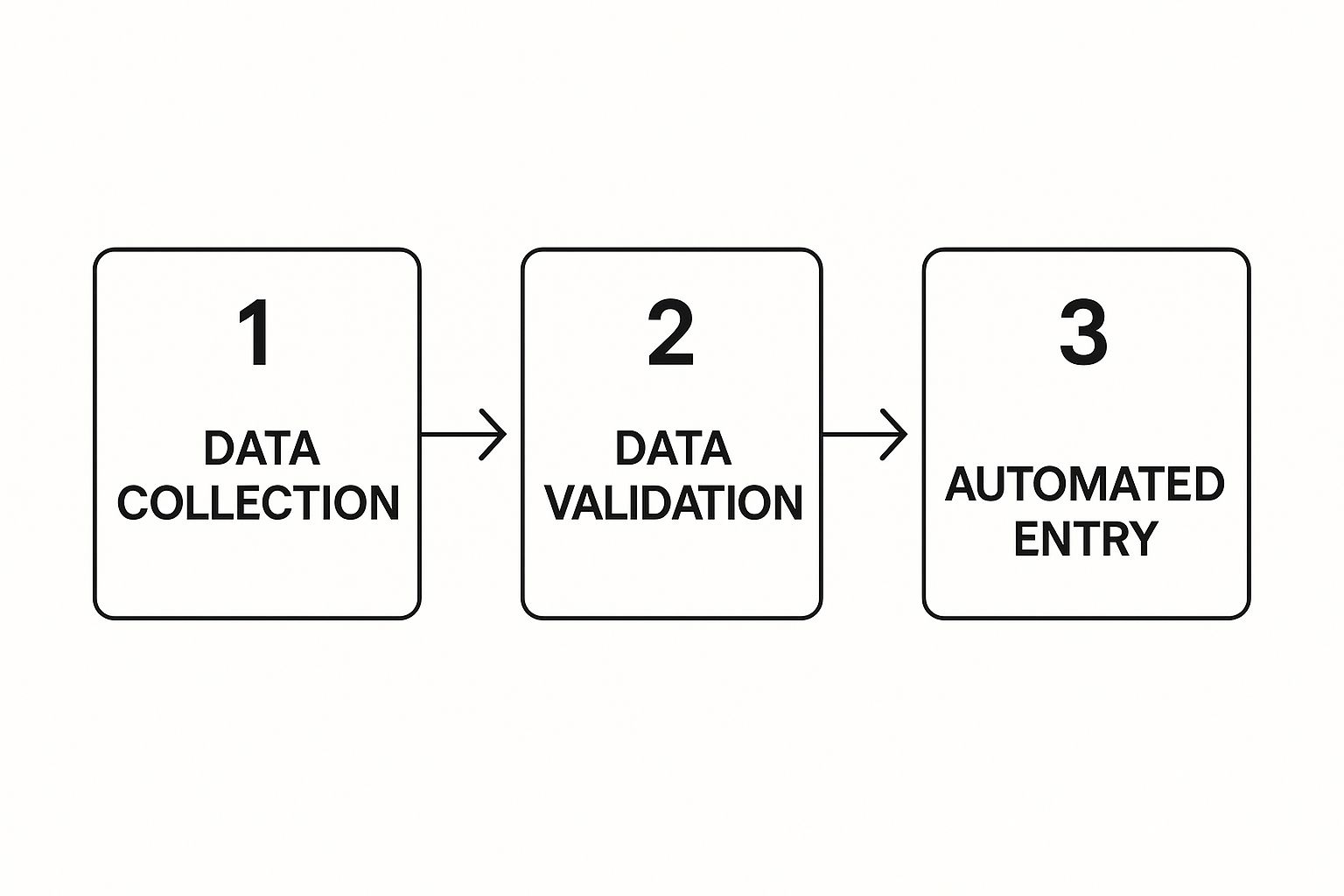
This is the basic flow we're aiming for: get the data, make sure it's good, and then plug it into the right systems automatically.


This simple collect-validate-enter sequence is the foundation for almost any data entry automation you'll ever build.


Nailing the Trigger Event


Every single automation starts with a trigger. Think of it as the starting pistol for the race. It’s the one specific event that tells your workflow, "Okay, go!"


In our lead capture example, the trigger is dead simple: a new form submission. When someone hits "submit" on your website form—whether it's on Typeform, Gravity Forms, or your landing page builder—that's our signal.


When you set this up in a tool like Zapier, you'll connect your form software and pinpoint the exact form that should kick things off. This first step is critical. Get the trigger wrong, and your workflow will either never run or run when you don't want it to.


The trigger is the digital tripwire for your entire workflow. If you define it well, your automation will be reliable and predictable. If it's vague, you're in for a world of frustration.

Stringing Together the Actions


Once the trigger fires, your automation needs its to-do list. These next steps are called actions. An action is simply a task the workflow performs. You can chain as many as you need to build out the full process.


For our lead gen scenario, we'll need two main actions:


  1. Create a Contact in HubSpot: The first action grabs the data from the form (name, email, company) and uses it to create a brand-new contact record in your HubSpot CRM.

  2. Add Subscriber to Mailchimp: The second action takes that same email and adds the person to a specific list in your Mailchimp account, like your "New Website Leads" audience.


Suddenly, you have a smooth handoff of information from your website right into your sales and marketing tools. No human intervention needed. This is a core concept when you learn how to automate business processes for max efficiency—it's all about making separate systems talk to each other.


Mapping Your Data Fields (The Important Bit)


Connecting the apps is easy. Now comes the part that requires a little focus: data mapping. This is where you play matchmaker, telling the automation exactly which piece of info from the form goes into which field in HubSpot.


You literally map the "Email" field from your form submission to the "Email" field in HubSpot. Then you do the same for first name, last name, phone number, and any other custom fields you're collecting.


This is where no-code platforms are brilliant. They give you a visual interface where you can see all the data points from your trigger and just click to plug them into the right spots in your action app.


Think of it like you're filling out the HubSpot form for the user. You have their info in one hand (the form submission) and the blank fields in the other (HubSpot). Your job is just to put the right info in the right box. Don't rush this part—mismatched fields are the #1 reason for messy data and failed automations.


Always Test Your Workflow


I can't say this enough: never, ever set a new workflow live without testing it. Automating a broken process just means you make mistakes at lightning speed.


Most platforms have a built-in test function. Use it. It will pull in a recent form submission and let you run it through your workflow step-by-step.


Here’s your testing checklist:


  • Did the trigger work? Did it grab the right data from the form?

  • Did the action run? Go check HubSpot. Is the new contact actually there?

  • Is the data clean? Open that new contact. Is the first name in the First Name field? Is the email spelled correctly? No weird characters?

  • Did every step work? Now log into Mailchimp. Was the subscriber added to the correct list?


If anything breaks, you'll usually get an error message. It's often something simple, like a permissions issue or trying to stuff text into a number-only field. Read the error, tweak your mapping, and test again. Once it runs flawlessly from start to finish, then you can turn it on.


Maintaining and Scaling Your Automations


Getting your first automated workflow up and running is a great feeling. But the real work begins after you launch. Automation isn't a fire-and-forget missile; it’s a living part of your business that needs regular attention to keep performing as your company evolves. If you neglect it, that amazing time-saver can quietly become a source of bad data and operational headaches.


I like to think of my automations as a new, super-efficient employee. Just like any team member, they need clear instructions and periodic check-ins to stay on track. Without that oversight, you're risking a "silent failure"—where a workflow breaks and starts pumping faulty information through your systems for weeks before anyone even notices.


The Power of Simple Documentation


Sooner or later, an automation will break. It's inevitable. An app you've connected will update its API, a field name will change, or a permission will be revoked. When that happens, the last thing you want is a mad scramble trying to figure out who built the workflow and how it's supposed to work.


This is where documentation becomes your best friend. And no, you don't need to write a technical manual. A simple log for each workflow is all it takes to turn a potential crisis into a quick fix.


Just jot down the basics:


  • What it does: A quick, one-sentence summary. For example, "Moves new leads from our website's Typeform into HubSpot."

  • Apps connected: A simple list of the tools involved (e.g., Typeform, HubSpot, Gmail).

  • Owner: Who’s the go-to person for this workflow? It's also smart to list a backup.


This tiny bit of prep work is the difference between targeted problem-solving and a company-wide fire drill.


Proactive Monitoring for Long-Term Health


Waiting for something to go wrong is a recipe for disaster. A much better approach is to keep a proactive eye on your automations' health, and thankfully, most platforms make this pretty easy.


The first, non-negotiable step is to set up instant error notifications. Have your system send you an email or a Slack message the second a workflow fails. This means you find out about a problem right away, not when a customer complains or a quarterly report comes back with skewed numbers.


An automation that fails silently is far more dangerous than one that doesn't run at all. With proactive monitoring, you're always the first to know when something's off, protecting the integrity of your data.

Beyond alerts, I recommend scheduling a monthly health check. Block off just 30 minutes to scan your automation logs. Look for recurring error patterns, check run histories for anything that looks odd, and confirm everything is performing as you expect. It's a small time investment that prevents minor glitches from snowballing into system-wide failures. This discipline is key to unlocking the unmissable benefits of business automation in 2025.


Smart Strategies for Scaling Your Efforts


Once your core automations are running smoothly, it's time to think bigger. Scaling isn't just about building more workflows from scratch; it's about making your entire operation smarter. The best place to start is often with what you already have. Can you add another step to an existing workflow to make it even more powerful?


This forward-thinking mindset is crucial, especially as technology like artificial intelligence continues to advance. The World Economic Forum estimates that automation could displace over 7.5 million data entry jobs by 2027 as AI tools become more sophisticated.


As you grow, create a simple system for finding new opportunities. Encourage your team to flag tasks they find tedious and repetitive. This creates a feedback loop for continuous improvement, ensuring your automation efforts grow right alongside your business needs and deliver more value over time.


Got Questions About Data Entry Automation? We've Got Answers.


As you start exploring automation, you're bound to have questions. It's totally normal. Moving from manual processes to automated workflows is a big shift, and it’s smart to get a clear picture of what’s involved. We’ve heard it all, so let’s tackle some of the most common questions that pop up.


Think of this as a quick-start guide to sidestepping common hurdles and making sure your automation projects are secure and successful from day one.


What Are the Biggest Mistakes People Make When Starting Out?


One of the most common traps is trying to automate a broken process. If your current manual workflow is a tangled mess of confusing steps and workarounds, slapping automation on top of it will just create a faster, more efficient mess. Before you even think about building a workflow, take the time to map out your existing process. Simplify it. Clean it up. Then, and only then, should you automate it.


Another huge misstep is skimping on testing. I get it—you've built the workflow, and you're excited to see it run. But just flipping the switch and walking away is a recipe for disaster. A single, tiny mapping error can silently corrupt thousands of records before anyone even notices. You absolutely have to run tests with different kinds of data to make sure every field is landing exactly where it should.


The point of automation isn't just to do things faster; it's to do them better. Automating a flawed process only magnifies its problems, creating chaos at a speed no human could ever match.

Can You Really Automate Data Entry From PDFs and Scans?


Yes, absolutely. This is one of the most powerful use cases for automation, and it’s made possible by a technology called Optical Character Recognition (OCR). Think of OCR software as a translator that can read text from images, like a scanned invoice or a PDF attachment, and turn it into structured data your other apps can understand.


It's the critical link between your paper world and your digital workflows. For example, you can set up an automation where an invoice arrives as a PDF in your inbox. An OCR tool scans it, pulls out the invoice number, due date, and total amount, and then zaps that information straight into your accounting software to create a new bill. This completely removes the manual typing, which not only saves a ton of time but also slashes those pesky data entry errors, which can be as high as 4% when done by hand.


How Can I Make Sure My Automated Data Stays Secure?


This is a big one, and rightly so. When you're moving sensitive customer or financial data around, security has to be front and center. A solid automation strategy is built on a foundation of good security practices.


First, lock down your API keys and other credentials. These are the digital keys to your kingdom. Treat them like passwords—store them in a secure manager and never, ever leave them exposed in your code or public files. Most good automation platforms have built-in tools for managing these "secrets."


You also need to live by the principle of least privilege. It’s simple:


  • Limit access: Grant users and apps only the minimum permissions they need to do their job. If a workflow just needs to read data from your CRM, it should never have the power to delete records.

  • Audit your connections: Make it a habit to regularly review which apps are connected to your systems. If a tool or user no longer needs access, revoke it immediately.


Building these habits ensures your automated workflows are not only efficient but also buttoned-up and secure.


Ready to stop wasting time on manual tasks and build a more efficient business? The experts at Flow Genius design and implement custom automation solutions that give you your time back. Find out how we can build your perfect workflow.


bottom of page